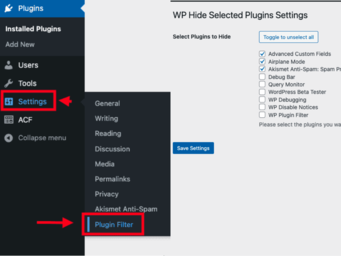
WP Plugin Filter lets you easily hide unnecessary plugins from the WordPress admin dashboard, streamlining plugin management.
★ 5.0/5 (1)20+ active installations
- Version
- 1.3.1
- WordPress
- 6.3+
- PHP
- 7.0+
- Updated
- 20 Jun 2026
View plugin details ↗Boost engagement with AJAX-driven star ratings, reviews, vote buttons for content.
★ 5.0/5 (2)20+ active installations
- Version
- 1.8.0
- WordPress
- 6.9+
- PHP
- 8.2+
- Updated
- 9 Nov 2026
View plugin details ↗Adds geographic location and weather support to WordPress.
★ 4.6/5 (8)300+ active installations
- Version
- 6.4.0
- WordPress
- 6.2+
- PHP
- 7.4+
- Updated
- 9 Nov 2026
View plugin details ↗Lens has it all: unlimited folders, drag-and-drop, role-based permissions, smart search, and more. Get organized now!
★ 5.0/5 (6)80+ active installations
- Version
- 1.0.4
- WordPress
- 5.8+
- PHP
- 7.4+
- Updated
- 8 Feb 2026
View plugin details ↗Restrict your WordPress site to registered/logged-in users only. Perfect for private communities, staging sites, and intranet portals.
★ 5.0/5 (3)20+ active installations
- Version
- 2.0.0
- WordPress
- 5.6+
- PHP
- 7.4+
- Updated
- 1 Mar 2026
View plugin details ↗Update an existing WordPress site with AI beside a live preview. Select a page element, describe the change, and review the result.
★ 5.0/5 (7)80+ active installations
- Version
- 5.9.0
- WordPress
- 6.0+
- PHP
- 7.4+
- Updated
- 10 Nov 2026
View plugin details ↗Advanced WordPress search with WooCommerce product search, category/tag & custom post type filtering, live suggestions, and a Gutenberg block.
★ 5.0/5 (1)0+ active installations
- Version
- 1.0.8
- WordPress
- 5.0+
- PHP
- 7.0+
- Updated
- 4 Aug 2026
View plugin details ↗The best events plugin with event registration, free and paid ticket sales, event registration forms, PayPal payments, automatic emails, and more!
★ 4.4/5 (136)500+ active installations
- Version
- 5.0.59.decaf
- WordPress
- 4.5+
- PHP
- 7.4+
- Updated
- 11 Sep 2026
View plugin details ↗Patronage system. A free Patreon-like tool to monetize your creations and reward your backers with restricted content. Works great with WooCommerce.
★ 5.0/5 (1)0+ active installations
- Version
- 1.1.3
- WordPress
- 6.7+
- PHP
- 7.0+
- Updated
- 15 Oct 2026
View plugin details ↗Show live ShipStation rates at WooCommerce checkout with insurance and signature support. Buyers pay what shipping actually costs. Free.
★ 3.6/5 (11)800+ active installations
- Version
- 1.4.22
- WordPress
- 5.6+
- PHP
- 7.4+
- Updated
- 22 Nov 2026
View plugin details ↗Password protect your WordPress site, pages and posts with a custom lock screen you design visually. No code needed, and it works with any theme.
10+ active installations
- Version
- 1.0.0
- WordPress
- 6.2+
- PHP
- 7.4+
- Updated
- 2 Nov 2026
View plugin details ↗Dozens of settings aiming at creating a friendlier administration environment for both Administrators and Editors.
★ 5.0/5 (9)500+ active installations
- Version
- 3.8.4
- WordPress
- 5.0+
- PHP
- 7.0+
- Updated
- 15 Oct 2026
View plugin details ↗