

Performance & Security
By JMR.codes
A site manager's toolkit. Settings to modify WordPress and improve performance and security.
★ 5.0/5 (2)50+ active installations
- Version
- 1.2.2
- WordPress
- 6.2+
- PHP
- 7.4+
- Updated
- 22 Oct 2026
WORDPRESS RESOURCES
Explore public plugin information from the official WordPress.org directory. Compare what a plugin does, its requirements and update history before adding it to your website.
Explore WordPress hosting →4,775 matching plugins reported by WordPress.org · Page 49 of 50
Source: WordPress.org
Data refreshed 21 Nov 2026 10:34 UTC
By JMR.codes
A site manager's toolkit. Settings to modify WordPress and improve performance and security.

By yamaker
Manage background music playback on your website.

By Rathly
Efficiently manage HTTP 410 (Gone) responses with manual entries, regex patterns, and CSV import functionality.
Manage WordPress from Claude or ChatGPT with a free MCP server: posts, WooCommerce, SEO and Elementor. AI chatbot and content writer included.
By Denis Botić
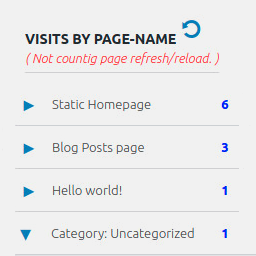
Display number of visits for each page in admin dashboard and browser developer-tool/console. Doesn't count page refresh as a new visit...

By PluginRx
Clear all cache sources in one click from the WordPress admin bar, including WP cache, transients, sessions, browser cache.

By WP Engine
Make sure your plugins and themes are compatible with newer PHP versions.

By BaseCloud
🛡️ Enterprise-grade WordPress security made simple. Implement military-standard HTTP security headers with zero technical knowledge required.
Connect contact forms and WooCommerce to WhatsApp & Telegram by live click to chat. Send form data to WhatsApp Business for customer engagement

Restrict content based on login status, user roles, device type & more. Monetize your content with a paywall or members-only content.

By Best WP Developer
Build a multilingual CV and resume platform with 25 templates, email verification, custom-role access, front-end editing, job board, and payments.

By Benjamin Intal
Unlimited free image compression and WebP conversion, done instantly as you upload them. No quotas, no external servers, no limits.
CHOOSE WHAT YOUR WEBSITE NEEDS
Start with the task you need to solve. Compare features, WordPress and PHP requirements, update history and the author’s documentation. Test changes on a private copy and avoid adding several plugins for the same job.
This independent directory displays plugin information on WebFulHost and links to the official source. Packages are not mirrored or installed here. A plugin can include paid extensions or services with separate terms from its author.

