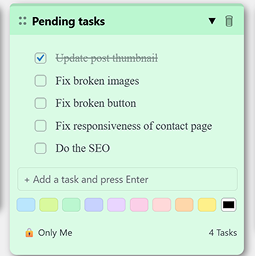
Create draggable admin notes with checklists inside your WordPress dashboard. Easily organize important tasks or reminders.
0+ active installations
- Version
- 1.0.0
- WordPress
- 5.5+
- PHP
- 7.4+
- Updated
- 17 Mar 2026
View plugin details ↗Removes a Tainacan item's documents, attachments and files from disk on permanent deletion, so deleted items stop leaving orphaned uploads behind.
10+ active installations
- Version
- 1.1.0
- WordPress
- 5.5+
- PHP
- 8.2+
- Updated
- 24 Aug 2026
View plugin details ↗Enable instant message notifications for site editors on your WordPress site to stay updated with your team and improve communication & collaboration.
★ 5.0/5 (1)0+ active installations
- Version
- 1.3.5
- WordPress
- 6.6+
- PHP
- 7.2+
- Updated
- 22 Sep 2026
View plugin details ↗Show Review Stars via ProvenExpert.com in WordPress
★ 3.8/5 (5)700+ active installations
- Version
- 2.0.06
- WordPress
- 6.0.0+
- PHP
- 8.0+
- Updated
- 18 Jul 2024
View plugin details ↗The data of kintone can be reflected on WordPress.
★ 5.0/5 (4)60+ active installations
- Version
- 1.16.4
- WordPress
- 4.9+
- PHP
- 7.4+
- Updated
- 23 Oct 2026
View plugin details ↗Create invoices, quotes and keep track of your earnings and expenses with this billing suite—tailored for freelancers and small agencies.
10+ active installations
- Version
- 2.7.1
- WordPress
- 6.6+
- PHP
- 8.2+
- Updated
- 18 Nov 2026
View plugin details ↗A secure, lightweight dashboard widget to write down quick notes and tasks directly inside the WordPress admin panel.
0+ active installations
- Version
- 1.2.4
- WordPress
- 6.0+
- Updated
- 19 Jul 2026
View plugin details ↗Complete affiliate program for WooCommerce: referral links, coupons, per-product commissions and payouts. No fees, no limit on affiliates.
20+ active installations
- Version
- 1.0.5
- WordPress
- 6.0+
- PHP
- 7.4+
- Updated
- 10 Sep 2026
View plugin details ↗Floating WhatsApp chat button for teams. Each agent has their own number, photo and working hours, and shows as online or offline automatically.
10+ active installations
- Version
- 1.0.4
- WordPress
- 6.0+
- PHP
- 7.4+
- Updated
- 9 Nov 2026
View plugin details ↗Project management, Kanban boards & task manager for WordPress. Drag-and-drop tasks, todo lists, timers, comments — all inside wp-admin.
0+ active installations
- Version
- 1.0.7
- WordPress
- 6.0+
- PHP
- 7.4+
- Updated
- 27 May 2026
View plugin details ↗Adds brazil's input fields to checkout & more. Plugin p/ lojas brasileiras com CPF, CNPJ e outros campos ao checkout, auto-preenchimento de endereços.
10+ active installations
- Version
- 0.10.8
- WordPress
- 6.5+
- PHP
- 8.0+
- Updated
- 25 Sep 2026
View plugin details ↗Enables in-place expansion of excerpts in the admin dashboard 'Comments' section of the 'Activity' widget to view full comments.
★ 5.0/5 (2)30+ active installations
- Version
- 3.0.1
- WordPress
- 4.6+
- Updated
- 16 Apr 2025
View plugin details ↗