Hide posts or WooCommerce products from the homepage, archives, search, RSS, REST API, sitemaps and SEO tools — per-post control in any editor.
★ 4.7/5 (22)20,000+ active installations
- Version
- 2.1.3
- WordPress
- 5.0+
- PHP
- 7.3+
- Updated
- 3 Nov 2026
View plugin details ↗Display to Post Author Information Box on bottom of the contents.
★ 4.5/5 (8)10,000+ active installations
- Version
- 1.28.2
- WordPress
- 5.3+
- PHP
- 7.4+
- Updated
- 24 Aug 2026
View plugin details ↗List the most recent posts with post titles, thumbnails, excerpts, authors, categories, dates and more!
★ 4.8/5 (215)100,000+ active installations
- Version
- 7.2.0
- WordPress
- 4.6+
- PHP
- 5.6+
- Updated
- 10 Oct 2026
View plugin details ↗Archive old WooCommerce orders, export data, and perform database cleanup to speed up WooCommerce store performance. Safe WooCommerce order archiving.
★ 5.0/5 (4)100+ active installations
- Version
- 1.13.5
- WordPress
- 6.2+
- PHP
- 7.4+
- Updated
- 4 Nov 2026
View plugin details ↗Supercharge your custom post type archives by letting visitors filter posts by their terms/categories. This plugin handles the whole thing for you!
★ 4.9/5 (68)2,000+ active installations
- Version
- 2.6.1
- WordPress
- 4.3.0+
- Updated
- 19 Nov 2026
View plugin details ↗AIOSEO is the WordPress SEO plugin. Boost SEO rankings with AI SEO tools, schema, meta descriptions, XML sitemaps & rank tracking.
★ 4.7/5 (5,242)2,000,000+ active installations
- Version
- 5.0.5.1
- WordPress
- 5.7+
- PHP
- 7.4+
- Updated
- 13 Nov 2026
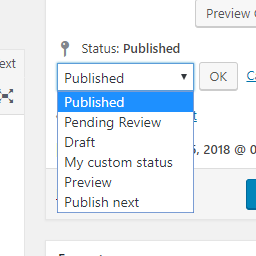
View plugin details ↗Add new statuses to all post types (posts, pages, products, ...).
★ 4.5/5 (11)1,000+ active installations
- Version
- 1.1.1
- WordPress
- 5.0+
- PHP
- 7.2+
- Updated
- 1 Sep 2026
View plugin details ↗Try FREE Theme Builder for Elementor with 50+ FREE widgets. Create a custom header, footer, singular, and archive layout in no time.
★ 5.0/5 (14)20,000+ active installations
- Version
- 1.2.16
- WordPress
- 5.0+
- PHP
- 7.0+
- Updated
- 13 Oct 2026
View plugin details ↗Reverse the post order for a specific category to be date ascending. This is a lightweight plugin that adds the option to reorder the posts from a spe …
★ 5.0/5 (7)1,000+ active installations
- Version
- 1.05
- WordPress
- 4.4+
- PHP
- 5.2.4+
- Updated
- 24 Jun 2026
View plugin details ↗Automatically redirect 404 errors to the right page using a 7-engine matching pipeline and spell-checking algorithm. Zero configuration required.
★ 4.9/5 (45)10,000+ active installations
- Version
- 4.4.2
- WordPress
- 5.0+
- PHP
- 7.4+
- Updated
- 19 Nov 2026
View plugin details ↗Connect ChatGPT, Claude, or another AI agent to your site. Plus backup, malware scan, firewall, stats, CDN, and SEO tools in one plugin.
★ 3.7/5 (2,413)3,000,000+ active installations
- Version
- 16.4
- WordPress
- 7.0+
- PHP
- 7.4+
- Updated
- 3 Nov 2026
View plugin details ↗Turn dropdowns into color, image, and button swatches for WooCommerce Variable Products. No coding needed.
★ 4.8/5 (926)300,000+ active installations
- Version
- 2.6.2
- WordPress
- 6.8+
- PHP
- 7.4+
- Updated
- 28 Oct 2026
View plugin details ↗