Hide posts or WooCommerce products from the homepage, archives, search, RSS, REST API, sitemaps and SEO tools — per-post control in any editor.
★ 4.7/5 (22)20,000+ active installations
- Version
- 2.1.3
- WordPress
- 5.0+
- PHP
- 7.3+
- Updated
- 3 Nov 2026
View plugin details ↗Publish and link together a series of posts using a new "series" taxonomy. Automatically display links to other posts in a series above your content.
★ 4.7/5 (9)600+ active installations
- Version
- 2.1.0
- WordPress
- 6.6+
- PHP
- 7.4+
- Updated
- 6 Oct 2026
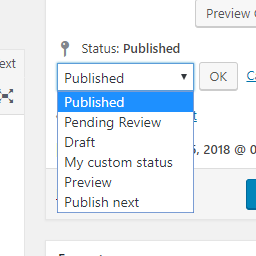
View plugin details ↗Add new statuses to all post types (posts, pages, products, ...).
★ 4.5/5 (11)1,000+ active installations
- Version
- 1.1.1
- WordPress
- 5.0+
- PHP
- 7.2+
- Updated
- 1 Sep 2026
View plugin details ↗Easiest way to make sure your page or post is ready to go live
★ 5.0/5 (11)1,000+ active installations
- Version
- 1.1.4
- WordPress
- 4.7+
- PHP
- 5.6+
- Updated
- 19 Jan 2026
View plugin details ↗Allows user to sync Posts, Pages and Custom Post Type with multiple websites.
★ 3.9/5 (29)3,000+ active installations
- Version
- 1.9.4
- WordPress
- 4.5+
- Updated
- 4 Nov 2026
View plugin details ↗Intuitively reorder Posts, Pages, Custom Post Types, Taxonomies, and Sites with a simple drag-and-drop interface.
★ 4.4/5 (139)400,000+ active installations
- Version
- 3.2.0
- WordPress
- 3.5.0+
- Updated
- 16 Sep 2025
View plugin details ↗The only free pro-grade Elementor filtering system for posts, taxonomies, custom fields, ACF, WooCommerce, WPML & more. Ditch paid limits!
★ 5.0/5 (19)4,000+ active installations
- Version
- 1.9.2
- WordPress
- 6.2+
- PHP
- 7.4+
- Updated
- 25 Oct 2026
View plugin details ↗Easily duplicate or clone any post or page, including all metadata and taxonomies, with just one click.
★ 5.0/5 (1)1,000+ active installations
- Version
- 1.3.7
- WordPress
- 6.1+
- PHP
- 7.4+
- Updated
- 20 Nov 2026
View plugin details ↗Make a copy of posts and pages with just one click.
★ 4.7/5 (13)50,000+ active installations
- Version
- 9.3
- WordPress
- 4.5+
- PHP
- 5.6+
- Updated
- 6 Mar 2026
View plugin details ↗Export and import WordPress posts, pages, users, widgets, menus, themes & settings - real media files, no broken links or missing thumbnails.
★ 4.5/5 (8)1,000+ active installations
- Version
- 1.19.0
- WordPress
- 6.7+
- PHP
- 7.4+
- Updated
- 19 Nov 2026
View plugin details ↗Add unlimited RSS feeds, import their items automatically, and show them anywhere on your site with a block or shortcode.
★ 4.5/5 (566)40,000+ active installations
- Version
- 5.8.0
- WordPress
- 6.2.2+
- PHP
- 7.4.0+
- Updated
- 18 Nov 2026
View plugin details ↗Enable visitors to submit posts and images from the front-end of your site. Many features including anti-spam security, content restriction, and more.
★ 4.8/5 (914)10,000+ active installations
- Version
- 20261029
- WordPress
- 4.7+
- PHP
- 5.6.20+
- Updated
- 29 Oct 2026
View plugin details ↗