A powerful Elementor table builder plugin. Create responsive data tables with search, sort, filter, pagination, CSV import, and more.
★ 5.0/5 (1)100+ active installations
- Version
- 1.0.5
- WordPress
- 6.5+
- PHP
- 7.4+
- Updated
- 12 Oct 2026
View plugin details ↗Solid Performance is a no-code solution for increasing the page performance of your WordPress website.
★ 4.3/5 (3)4,000+ active installations
- Version
- 2.0.2
- WordPress
- 6.4+
- PHP
- 7.4+
- Updated
- 15 Oct 2026
View plugin details ↗Code Embed provides a very easy and efficient way to embed code (JavaScript, CSS and HTML) in your posts and pages.
★ 4.4/5 (45)10,000+ active installations
- Version
- 2.6.4
- WordPress
- 4.9+
- PHP
- 7.4+
- Updated
- 21 Aug 2026
View plugin details ↗AI-assisted WordPress diagnostics, performance checks, security insights, logs, cron monitoring, database health, and more.
★ 5.0/5 (6)200+ active installations
- Version
- 3.0.1
- WordPress
- 6.0+
- PHP
- 7.4+
- Updated
- 9 Oct 2026
View plugin details ↗Find and fix what slows your WordPress site. Real-time performance monitoring, plugin profiling, and external request tracking.
★ 5.0/5 (2)100+ active installations
- Version
- 1.5.1
- WordPress
- 5.5+
- PHP
- 7.4+
- Updated
- 8 Nov 2026
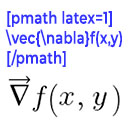
View plugin details ↗Render mathematical equations in WordPress as PNG images using pmath native syntax or LaTeX input with server-side rendering.
★ 4.2/5 (5)300+ active installations
- Version
- 3.0.5
- WordPress
- 5.0+
- PHP
- 7.2+
- Updated
- 9 May 2026
View plugin details ↗A lightweight WordPress plugin for YouTube, YouTube Shorts, Vimeo, HTML5 video and audio, playlists, and brand-matched colors.
★ 4.7/5 (6)2,000+ active installations
- Version
- 3.5.1
- WordPress
- 6.0+
- PHP
- 7.4+
- Updated
- 5 Nov 2026
View plugin details ↗BuddyForms is a versatile plugin that allows the creation of post forms, registration forms, profile forms, content forms, and supports file uploads.
★ 4.8/5 (180)800+ active installations
- Version
- 2.10.10
- WordPress
- 5.9+
- PHP
- 7.4+
- Updated
- 20 Nov 2026
View plugin details ↗Display Facebook events on your WordPress site with beautiful, auto-updating event feeds using the Live Feed Builder. No API key required.
★ 4.5/5 (15)800+ active installations
- Version
- 2.0.0
- WordPress
- 6.0+
- PHP
- 7.4+
- Updated
- 17 Aug 2026
View plugin details ↗More than 20 special blocks for Gutenberg to build complex pages and animations with highest possible web vitals score.
★ 4.8/5 (106)70,000+ active installations
- Version
- 13.2.4
- WordPress
- 6.9+
- PHP
- 7.3+
- Updated
- 18 Nov 2026
View plugin details ↗Hide Gutenberg blocks by device, custom breakpoints, and login status. Syncs with WordPress Hide block controls; Pro adds advanced rules.
★ 5.0/5 (3)900+ active installations
- Version
- 1.2.8
- WordPress
- 5.0+
- PHP
- 7.4+
- Updated
- 19 Jun 2026
View plugin details ↗
By Ash Brentnall | ABCode
Automatic cache warmer and preloader: rebuilds your page cache after every purge, in parallel, and shows exactly which URLs were cached.
★ 5.0/5 (2)100+ active installations
- Version
- 1.1.1
- WordPress
- 5.6+
- PHP
- 7.4+
- Updated
- 18 Aug 2026
View plugin details ↗