Restrict content access on your WordPress site based on user roles or login status. Protect posts, pages, or even your entire site with ease.
★ 5.0/5 (1)50+ active installations
- Version
- 1.0.3
- WordPress
- 5.5+
- PHP
- 7.4+
- Updated
- 16 Oct 2026
WORDPRESS RESOURCES
Explore public plugin information from the official WordPress.org directory. Compare what a plugin does, its requirements and update history before adding it to your website.
Explore WordPress hosting →2,983 matching plugins reported by WordPress.org · Page 50 of 50
Source: WordPress.org
Data refreshed 23 Nov 2026 15:20 UTC
Restrict content access on your WordPress site based on user roles or login status. Protect posts, pages, or even your entire site with ease.
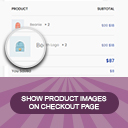
Display Product Images on Checkout Page.

By PluginRx
Restrict pages by role, user or login status, and show every blocked visitor a customizable template that explains why and what to do next.
ShopCred - The Best Gutenberg Blocks Collection for WooCommerce with WooCommerce Builder

By Md. Oliullah Al Ahad
Fast, local WebP and AVIF image optimizer for WordPress with native GD/Imagick processing, non-destructive backup, and Elementor support.

AI help desk: knowledge base, support ticket system, and an AI chatbot and auto-responder that answer from your own docs. Unlimited agents.
Best WordPress interactive image map plugin to create responsive SVG maps, floor plans, soundboards, shoppable lookbooks with hotspots & audio guides

By Malware Intercept
🔐 All-in-one WordPress security: malware scanner (files+DB), force re-login, force logout, control logins, email-alerts. Cloud-based, light & fast.
Free accessibility toolbar: text size, contrast, dyslexia & low-vision profiles. No cookies, no external service, no subscription.

By tukuyo2027
Organize WordPress posts into shelves and nested structures, with optional tables of contents and previous/next navigation.
Manage AdSense, banner, and affiliate ads with reliable ad tracking. A fast, lightweight, no-bloat ad manager built by experts.

By SacredWP
Embed PDFs in a fast, SEO-friendly inline viewer with fullscreen, per-role download control, and optional text highlighting. No external services.
CHOOSE WHAT YOUR WEBSITE NEEDS
Start with the task you need to solve. Compare features, WordPress and PHP requirements, update history and the author’s documentation. Test changes on a private copy and avoid adding several plugins for the same job.
This independent directory displays plugin information on WebFulHost and links to the official source. Packages are not mirrored or installed here. A plugin can include paid extensions or services with separate terms from its author.