

Disabler
By saas
Instead of installing a million plugins to disable features you don't want, why not use just ONE plugin?
★ 5.0/5 (6)900+ active installations
- Version
- 4.0.4
- WordPress
- 7.0+
- PHP
- 8.2+
- Updated
- 10 Jul 2026
WORDPRESS RESOURCES
Explore public plugin information from the official WordPress.org directory. Compare what a plugin does, its requirements and update history before adding it to your website.
Explore WordPress hosting →10,000 matching plugins reported by WordPress.org · Page 50 of 50
Source: WordPress.org
Data refreshed 21 Nov 2026 12:27 UTC
By saas
Instead of installing a million plugins to disable features you don't want, why not use just ONE plugin?
WP Post Author is the ultimate solution for an Author Box, Multiple Authors, Guest Authors, and Local Avatars. Easily manage Author Bios, Co-authors, …

By Braintum
Create, organize, and display FAQs with AI-powered answers, one-click FAQ groups, WooCommerce, and a floating chat assistant.
GLS Shipping plugin for WooCommerce
90+ Elementor widgets & addons, 600+ templates, Mega Menu, WooCommerce, Display Conditions. The only Elementor addon AI agents can fully build with.

By YITHEMES
Let your customers buy products before they are released and generate cash flow in advance to cover costs.
Replace the default WordPress robots.txt workflow with a smarter, structured version you can preview before publishing, with Free, Pro, and Premium ed …

Install Post SMTP (WordPress SMTP Plugin) to fix WordPress email delivery. Connect Gmail SMTP, Microsoft 365, Brevo, SendGrid, Zoho, Amazon SES, etc.

By PressMaximum
Currency Switcher for WooCommerce is a WordPress plugin that allows to switch product prices and get their rates converted in the real time!

By Aslam Doctor
Boost WooCommerce sales with the Rearrange Products for WooCommerce plugin. Easily reorder products with a simple drag-and-drop tool!

By PickPlugins
Email verification for user registration to protect spam.
By G Matta
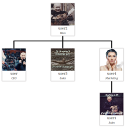
Drag-and-drop organization chart for WordPress. Display your team hierarchy with a shortcode.
CHOOSE WHAT YOUR WEBSITE NEEDS
Start with the task you need to solve. Compare features, WordPress and PHP requirements, update history and the author’s documentation. Test changes on a private copy and avoid adding several plugins for the same job.
This independent directory displays plugin information on WebFulHost and links to the official source. Packages are not mirrored or installed here. A plugin can include paid extensions or services with separate terms from its author.



