Secure Custom Fields boosts content management with custom fields and options. It deactivates Advanced Custom Fields to prevent duplicate code errors.
★ 4.8/5 (69)100,000+ active installations
- Version
- 6.9.10
- WordPress
- 6.2+
- PHP
- 7.4+
- Updated
- 20 Nov 2026
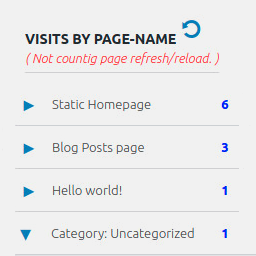
View plugin details ↗Display number of visits for each page in admin dashboard and browser developer-tool/console. Doesn't count page refresh as a new visit...
★ 4.0/5 (7)5,000+ active installations
- Version
- 2.0.5
- WordPress
- 6.5+
- PHP
- 5.6.40+
- Updated
- 14 Sep 2026
View plugin details ↗WooCommerce PDF invoice generator with automatic invoice email attachment. Create packing slips, shipping labels, credit notes, multilingual.
★ 4.6/5 (47)6,000+ active installations
- Version
- 4.0.0
- WordPress
- 6.6+
- PHP
- 7.4+
- Updated
- 18 Nov 2026
View plugin details ↗Apply image or text watermarks to new uploads and existing Media Library images.
★ 4.2/5 (303)40,000+ active installations
- Version
- 2.1.0
- WordPress
- 6.3+
- PHP
- 7.3+
- Updated
- 18 Nov 2026
View plugin details ↗Project and task management inside WordPress with Kanban boards, task lists, team collaboration and a frontend dashboard. No SaaS needed.
★ 4.7/5 (7)600+ active installations
- Version
- 7.0.1
- WordPress
- 5.6+
- PHP
- 7.4+
- Updated
- 7 Nov 2026
View plugin details ↗Quick and Easy way to search all URLS, Content and replace them with new links and content in WordPress website.
★ 4.7/5 (26)20,000+ active installations
- Version
- 1.5.3
- WordPress
- 5.0.0+
- PHP
- 5.6+
- Updated
- 10 Oct 2026
View plugin details ↗Create photo and video galleries with albums, sliders and a lightbox. Includes free Media Library folders to organize your files.
★ 4.8/5 (118)40,000+ active installations
- Version
- 3.5.0
- WordPress
- 6.8+
- PHP
- 7.4+
- Updated
- 16 Nov 2026
View plugin details ↗Reliable WordPress email through the provider of your choice, with a real email log, one click resend, failure alerts and offline mode. All free.
★ 5.0/5 (27)1,000+ active installations
- Version
- 0.3.5
- WordPress
- 6.0+
- PHP
- 7.4+
- Updated
- 10 Nov 2026
View plugin details ↗Create a classified listings directory, from auto listings to yard sales with AWP Classifieds plugin.
★ 4.6/5 (301)3,000+ active installations
- Version
- 4.4.10
- WordPress
- 6.2+
- PHP
- 5.6+
- Updated
- 20 Oct 2026
View plugin details ↗Lightweight Free WordPress SEO: meta tags, schema, Open Graph, redirects, robots, LLMS, MD, sitemap. No bloat, no tracking. Visible to search and AI.
★ 5.0/5 (7)700+ active installations
- Version
- 3.2.5
- WordPress
- 6.1+
- PHP
- 7.4+
- Updated
- 17 Nov 2026
View plugin details ↗WP Accessibility fixes common accessibility issues in your WordPress site.
★ 4.8/5 (68)60,000+ active installations
- Version
- 2.4.5
- WordPress
- 6.4+
- PHP
- 7.4+
- Updated
- 25 Oct 2026
View plugin details ↗WooCommerce refund and returns process made simple. Let your customers request a refund and return products directly from the My Account page.
★ 4.0/5 (4)2,000+ active installations
- Version
- 2.1.5
- WordPress
- 6.4+
- PHP
- 7.4+
- Updated
- 21 Nov 2026
View plugin details ↗