

Create Announcement Bars, Notification Bars & Popup Campaigns with countdown timers, A/B testing, smart targeting & analytics.
★ 4.2/5 (38)9,000+ active installations
- Version
- 2.0.7
- WordPress
- 5.3+
- Updated
- 17 Nov 2026
WORDPRESS RESOURCES
Explore public plugin information from the official WordPress.org directory. Compare what a plugin does, its requirements and update history before adding it to your website.
Explore WordPress hosting →878 matching plugins reported by WordPress.org · Page 6 of 50
Source: WordPress.org
Data refreshed 20 Nov 2026 06:09 UTC
Create Announcement Bars, Notification Bars & Popup Campaigns with countdown timers, A/B testing, smart targeting & analytics.
Deliver Contact Form 7 submissions to Telegram instantly via a bot.

By Lester Chan
Adds an AJAX poll system to your WordPress blog. You can also easily add a poll into your WordPress's blog post/page.

Celebrate the holidays with falling snow, Christmas lights, holiday music, flying Santa sleigh, countdown timers, confetti bursts, and banners.

By Simple Share
A simple plugin that enables you to add share buttons to all of your posts and/or pages.

By YYDevelopment
This plugin will allow you to add subscribe notification checkbox to comments on your site.

By Dog Byte Marketing
Quickly add FAQ sections compatible with structured data to your site using simple shortcodes, improving your SEO.

By Daniel Martín Ochoa
A lightweight global WordPress counter with twelve visual styles, display sizes, flexible counting behavior, number formatting, shortcode overrides an …
By Ron Fredericks
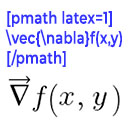
Render mathematical equations in WordPress as PNG images using pmath native syntax or LaTeX input with server-side rendering.

Get cited by ChatGPT, Perplexity, Gemini and AI Overviews. Schema, FAQs, llms.txt, AI traffic tracking, and ACP and UCP for WooCommerce stores.

By Sabuj Kundu
A plugin to create interactive feature tour/User Walkthroughs/Guided Tours for product, service or any feature demonstration

By SPBooking.com
The official Booking.com search box is a user-friendly, customisable plugin to add the Booking.com search box to your own website in two easy steps.
CHOOSE WHAT YOUR WEBSITE NEEDS
Start with the task you need to solve. Compare features, WordPress and PHP requirements, update history and the author’s documentation. Test changes on a private copy and avoid adding several plugins for the same job.
This independent directory displays plugin information on WebFulHost and links to the official source. Packages are not mirrored or installed here. A plugin can include paid extensions or services with separate terms from its author.
