
Product Category Dropdowns
By Pektsekye
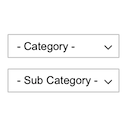
Displays product categories as dependent drop-down selects.
★ 4.7/5 (12)800+ active installations
- Version
- 1.0.0
- WordPress
- 4.7+
- Updated
- 16 Nov 2026
WORDPRESS RESOURCES
Explore public plugin information from the official WordPress.org directory. Compare what a plugin does, its requirements and update history before adding it to your website.
Explore WordPress hosting →10,000 matching plugins reported by WordPress.org · Page 6 of 50
Source: WordPress.org
Data refreshed 29 Nov 2026 01:13 UTC
By Pektsekye
Displays product categories as dependent drop-down selects.

By themefusecom
A page builder that is fast & easy, Brizy is a next-gen website builder that anyone can use. No designer or developer skills required.
Print the entire page or part of any web page with just a single click.

By Sajjad Hossain Sagor
Add Custom Image To Your Category / Custom Taxonomy Field With Advanced Category and Custom Taxonomy Image Plugin.
Display WooCommerce product categories in responsive sliders and grids to boost navigation, engagement, and product discovery.

By jeffrey-wp
Adds the ability to use categories in the media library.

By Pavel Espinal
Modern WordPress plugin for filtering categories from home page with performance optimization and security enhancements.

By wpgenie2
OnSale Page is an extension for Woocommerce which enables you to have real on sale page with paging, sorting and filtering.
Real-time SEO guidance, schema, and AI built in. Help search engines and AI systems understand your content. All AI tools included, no hidden fees.
Automatically redirect 404 errors to the right page using a 7-engine matching pipeline and spell-checking algorithm. Zero configuration required.
Gutenberg block editor with AI. 70+ Gutenberg blocks, patterns, WooCommerce blocks, post grid, gallery, menu with Gutenberg block library.

By George Stephanis
This widget will let you display a list of the most recent posts in a single category in your sidebar.
CHOOSE WHAT YOUR WEBSITE NEEDS
Start with the task you need to solve. Compare features, WordPress and PHP requirements, update history and the author’s documentation. Test changes on a private copy and avoid adding several plugins for the same job.
This independent directory displays plugin information on WebFulHost and links to the official source. Packages are not mirrored or installed here. A plugin can include paid extensions or services with separate terms from its author.




