

Feature-packed membership plugin for creating subscription plans, adding recurring payments & content restriction on your membership site.
★ 4.7/5 (271)10,000+ active installations
- Version
- 3.1.6
- WordPress
- 3.1+
- PHP
- 7.4+
- Updated
- 25 Nov 2026
WORDPRESS RESOURCES
Explore public plugin information from the official WordPress.org directory. Compare what a plugin does, its requirements and update history before adding it to your website.
Explore WordPress hosting →5,172 matching plugins reported by WordPress.org · Page 6 of 50
Source: WordPress.org
Data refreshed 26 Nov 2026 15:45 UTC
Feature-packed membership plugin for creating subscription plans, adding recurring payments & content restriction on your membership site.
By Felix W.
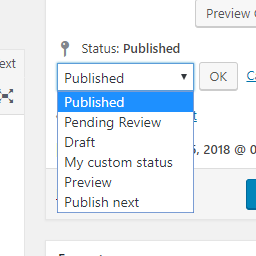
Add new statuses to all post types (posts, pages, products, ...).

By Automattic
A very fast caching engine for WordPress that produces static html files.

By Joe Dolson
Accessible WordPress event calendar plugin. Manage single or recurring events, event venues, and display your calendar anywhere on your site.

By Matt Cromwell
Quickly reorder posts, pages, and custom post types using an intuitive drag-and-drop interface. Reordering supports auto-sorting and nested pages.
MCP server for WordPress. Connect Claude, ChatGPT, Cursor or any MCP client to manage content, themes and settings, with approvals.

By hijiri
Intuitively reorder Posts, Pages, Custom Post Types, Taxonomies, and Sites with a simple drag-and-drop interface.

By David Anderson / Team Updraft
Protect your WordPress site with All-In-One Security (AIOS): easy-to-use login security, a powerful firewall, and much more.

The drag and drop AI form builder for contact forms, multi-step forms, payment forms, quizzes, polls, surveys, calculators, and web apps.

By Mehraz Morshed
Control the visibility of post and page titles on your WordPress site — globally or per item — while navigation menus always keep their labels.

By Beaver Builder
The Professional's Choice for Drag & Drop WordPress Page Building. Fast, Reliable, and Trusted since 2014.

By Fernando Tellado
FREE WordPress Security: firewall, two factor authentication (2FA), security headers, login, malware and password protection, scanner, activity log
CHOOSE WHAT YOUR WEBSITE NEEDS
Start with the task you need to solve. Compare features, WordPress and PHP requirements, update history and the author’s documentation. Test changes on a private copy and avoid adding several plugins for the same job.
This independent directory displays plugin information on WebFulHost and links to the official source. Packages are not mirrored or installed here. A plugin can include paid extensions or services with separate terms from its author.
