

CBX Poll
By Sabuj Kundu
CBX Poll - Complete Poll and Vote plugin for WordPress
★ 4.7/5 (3)40+ active installations
- Version
- 2.0.5
- WordPress
- 6.9+
- Updated
- 29 Aug 2026
WORDPRESS RESOURCES
Explore public plugin information from the official WordPress.org directory. Compare what a plugin does, its requirements and update history before adding it to your website.
Explore WordPress hosting →412 matching plugins reported by WordPress.org · Page 6 of 35
Source: WordPress.org
Data refreshed 26 Nov 2026 05:06 UTC
By Sabuj Kundu
CBX Poll - Complete Poll and Vote plugin for WordPress

By aviplugins.com
This is an easy to setup polling/ voting plugin for users. Create Polls from admin panel and display in widgets.

By Elvin Haci
Turn your SQL queries into beautiful dynamic charts with a visual SQL builder, live autocomplete and no-code date/input filters.

By Patrick Garman
Collect and manage user feedback using your existing WordPress website. Prioritize the product features important to you and your customers.
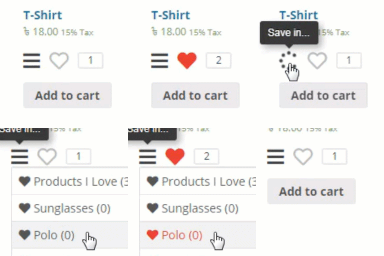
By PickPlugins
Add wishlist feature to your WooCommerce product or any post types.

By Melograno Venture Studio
Create responsive, sortable tables & charts from Forminator forms submissions with wpDataTables.

By Pradnyankur Nikam
Easily add Google Analytics code to your WordPress website. Also insert analytics or tracking codes of other website and services.

By Mahbubur Rahman
Post Meta is a WordPress custom post field, post type and taxonomy management Plugin. Shortcode with GUI, Import & export and many more.
Changelog, release notes, product roadmap and feature request board for WordPress. Beautiful visual timelines, no coding needed.

By AuditySEO
Attach images to WordPress comments with drag-and-drop, preview before posting, admin moderation, and lightbox viewer.

Create stunning FAQ & accordion blocks. SEO-optimized, fully accessible, zero performance impact. No coding needed.
By wp-buy
This plugin lets you list posts by category, author, tags, and more, using a shortcode on posts, pages, or widgets with plenty of customization option …
CHOOSE WHAT YOUR WEBSITE NEEDS
Start with the task you need to solve. Compare features, WordPress and PHP requirements, update history and the author’s documentation. Test changes on a private copy and avoid adding several plugins for the same job.
This independent directory displays plugin information on WebFulHost and links to the official source. Packages are not mirrored or installed here. A plugin can include paid extensions or services with separate terms from its author.
