Logo Slider and Showcase plugin is fully Responsive and Mobile Friendly to display your partner logo in slider and grid views.
★ 3.9/5 (17)7,000+ active installations
- Version
- 2.0.0
- WordPress
- 5.6+
- PHP
- 7.4+
- Updated
- 2 Nov 2026
View plugin details ↗Create A Captivating Visual Experience & Impress Your Audience
★ 5.0/5 (1)900+ active installations
- Version
- 1.2.11
- WordPress
- 6.0+
- PHP
- 7.4+
- Updated
- 15 Nov 2026
View plugin details ↗Display WooCommerce products in a responsive slider or carousel with customizable layouts to boost engagement and improve product browsing.
★ 4.1/5 (38)4,000+ active installations
- Version
- 2.4
- WordPress
- 5.0+
- Updated
- 13 Aug 2026
View plugin details ↗Simple responsive logo slider for your WordPress site
★ 4.4/5 (10)1,000+ active installations
- Version
- 3.7
- WordPress
- 4.7+
- PHP
- 5.6.2+
- Updated
- 18 Sep 2026
View plugin details ↗Show WooCommerce products in carousels, sliders and grids with hover image swap, quick view and fade effects. Works with Gutenberg and Elementor.
★ 4.3/5 (33)6,000+ active installations
- Version
- 1.15.1
- WordPress
- 4.0+
- Updated
- 15 Nov 2026
View plugin details ↗Build responsive, accessible sliders or carousel in the Block Editor fast templates, no code needed.
★ 5.0/5 (1)900+ active installations
- Version
- 1.3.0
- WordPress
- 6.6+
- PHP
- 7.4+
- Updated
- 9 Sep 2026
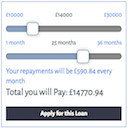
View plugin details ↗A simple repayment calculator. Uses sliders to set the amount and term and displays a range of outputs
★ 4.6/5 (13)1,000+ active installations
- Version
- 3.1.8
- WordPress
- 6.0+
- Updated
- 16 Jul 2026
View plugin details ↗A beautiful, easy to use post slider widget for Elementor to display your recent posts.
1,000+ active installations
- Version
- 2.2.1
- WordPress
- 6.0+
- PHP
- 7.4+
- Updated
- 4 Jul 2026
View plugin details ↗Build beautiful responsive carousels inside Divi Builder. Create image sliders, logo showcases, testimonial carousels, blog sliders, and more with an …
★ 4.0/5 (21)6,000+ active installations
- Version
- 2.0.1
- WordPress
- 5.0+
- PHP
- 7.4+
- Updated
- 17 Nov 2026
View plugin details ↗A fast, lightweight responsive thumbnail slider for WordPress — modern animation engine, lightbox, captions, and full theme/builder compatibility.
★ 4.4/5 (23)1,000+ active installations
- Version
- 1.1.53
- WordPress
- 3.5+
- Updated
- 2 Sep 2026
View plugin details ↗Display Airbnb guest reviews in a fast WordPress slider or grid with a summary badge. Multi-listing support; stored locally on your server.
★ 5.0/5 (56)1,000+ active installations
- Version
- 5.3
- WordPress
- 4.0.1+
- Updated
- 6 Nov 2026
View plugin details ↗Fast full width slider for hero banners and header images. Gutenberg block, captions, swipe and autoplay. No jQuery, built for page speed.
★ 3.5/5 (2)2,000+ active installations
- Version
- 1.2.0
- WordPress
- 6.0+
- PHP
- 7.1+
- Updated
- 13 Nov 2026
View plugin details ↗