RY City Select for WooCommerce
By Richer Yang
Show a dropdown select as the cities input on WooCommerce. Auto set the postcode for selected city.
★ 4.9/5 (9)2,000+ active installations
- Version
- 2.3.1
- WordPress
- 6.8+
- PHP
- 8.2+
- Updated
- 20 Nov 2026
WORDPRESS RESOURCES
Explore public plugin information from the official WordPress.org directory. Compare what a plugin does, its requirements and update history before adding it to your website.
Explore WordPress hosting →8,667 matching plugins reported by WordPress.org · Page 6 of 50
Source: WordPress.org
Data refreshed 20 Nov 2026 12:41 UTC
By Richer Yang
Show a dropdown select as the cities input on WooCommerce. Auto set the postcode for selected city.
WordPress backup plugin to create full website backups and restore them easily. Built in migration to easily migrate your website, smart pre-update ba …

By Marios Alexandrou
Modifies RSS feeds so that they include pages and not just posts.

By Ben Balter
Document management and version control for WordPress. Collaborate on files, track every revision, and auto-generate change summaries with AI.

By Link Nacional
Calculate shipping on product and cart pages, with free shipping rules, progress bar and address autofill for WooCommerce.
Create unlimited notifications, announcements, or notices for your visitors
Create sticky / fixed / popup bubble and flyout sidebars and add your widgets to it.

By WebFactory
Advanced shipping rate for WooCommerce. Calculate rate shipping using country, weight, or price. Supports WooCommerce shipping zones.

By Art Project Group
Adds to WooCommerce an automatic city name generated from the postcode.
Build fast, accessible accordions and FAQ sections in the WordPress block editor.

By WP Grim
Disables Gutenberg editor totally everywhere and enables Classic Editor and Classic Widgets.
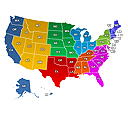
Create engaging Interactive United States Maps in WordPress for free. It's easy to install, simple, and highly customizable.
CHOOSE WHAT YOUR WEBSITE NEEDS
Start with the task you need to solve. Compare features, WordPress and PHP requirements, update history and the author’s documentation. Test changes on a private copy and avoid adding several plugins for the same job.
This independent directory displays plugin information on WebFulHost and links to the official source. Packages are not mirrored or installed here. A plugin can include paid extensions or services with separate terms from its author.