
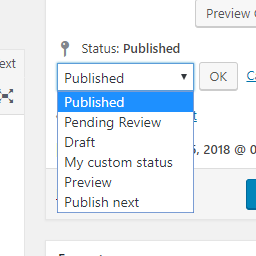
Extended Post Status
By Felix W.
Add new statuses to all post types (posts, pages, products, ...).
★ 4.5/5 (11)1,000+ active installations
- Version
- 1.1.1
- WordPress
- 5.0+
- PHP
- 7.2+
- Updated
- 1 Sep 2026
WORDPRESS RESOURCES
Explore public plugin information from the official WordPress.org directory. Compare what a plugin does, its requirements and update history before adding it to your website.
Explore WordPress hosting →10,000 matching plugins reported by WordPress.org · Page 7 of 50
Source: WordPress.org
Data refreshed 27 Nov 2026 05:29 UTC
By Felix W.
Add new statuses to all post types (posts, pages, products, ...).

By PickPlugins
Display Related Post under post by taxonomy and terms.

By Timi Makinde
Keep your WordPress content evergreen with Auto Update Post Date – a FREE simple WP plugin designed to effortlessly update your posts and boost SEO

By WPExplorer
Create unlimited custom post types and custom taxonomies.

By Marco Milesi
Easily redirect your WordPress posts to any external URL with a simple metabox. Lightweight, efficient, and perfect for SEO!

By Sully
Export (an XML file) a single post or page using WordPress' eXtended RSS (WXR). There's no need to export your entire database anymore!

By Tobias Bäthge
Embed beautiful, accessible, and interactive tables into your WordPress website’s posts and pages, without having to write code!

By learnhowwp
This plugin add a post carousel module to the Divi theme.

By David Anderson / Team Updraft
Protect your WordPress site with All-In-One Security (AIOS): easy-to-use login security, a powerful firewall, and much more.

By CodeVibrant
Versatile plugin specially designed to create beautiful posts layouts. Fully compatible with Gutenberg and Elementor. Comes with advanced features suc …

By devowl.io GmbH
Custom post order for posts, pages, WooCommerce products and custom post types using drag and drop. Simple and intuitive sorting of your content!

By Trusty Plugins
AJAX filter & WooCommerce product filter. Filter posts, CPTs & products by category, taxonomy, attribute & price. Build with drag & drop or AI (MCP).
CHOOSE WHAT YOUR WEBSITE NEEDS
Start with the task you need to solve. Compare features, WordPress and PHP requirements, update history and the author’s documentation. Test changes on a private copy and avoid adding several plugins for the same job.
This independent directory displays plugin information on WebFulHost and links to the official source. Packages are not mirrored or installed here. A plugin can include paid extensions or services with separate terms from its author.