Automatically reorders the HTML head of your WordPress pages for optimal browser rendering performance using the Capo.js methodology.
30+ active installations
- Version
- 0.1.4
- WordPress
- 6.0+
- PHP
- 7.4+
- Updated
- 24 Aug 2026
View plugin details ↗Selectively disable WordPress features to improve performance, security, and cleanliness. Toggle each feature individually from a single settings page …
40+ active installations
- Version
- 1.1.2
- WordPress
- 5.8+
- PHP
- 7.4+
- Updated
- 24 Aug 2026
View plugin details ↗Adds extra wordpress options, which are not shown in stock WordPress Dashboard [ ✅ 𝐒𝐄𝐂𝐔𝐑𝐄 𝐏𝐋𝐔𝐆𝐈𝐍𝐒 𝙗𝙮 𝙋𝙪𝙫𝙤𝙭 ]
★ 5.0/5 (1)10+ active installations
- Version
- 1.27.2
- WordPress
- 6.0+
- Updated
- 22 Oct 2026
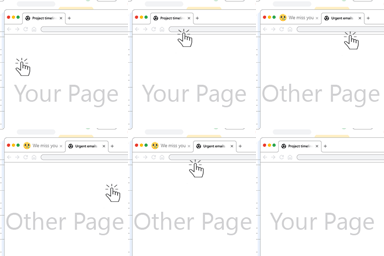
View plugin details ↗Changes the browser tab title and favicon when users leave the page, and restores them on return. Lightweight, fast, and attention-boosting.
10+ active installations
- Version
- 1.0.0
- WordPress
- 6.0+
- PHP
- 7.4+
- Updated
- 9 Dec 2025
View plugin details ↗Enhance Multisite for Network Admins with different topics
★ 4.5/5 (49)80+ active installations
- Version
- 1.7.1
- WordPress
- 4.6+
- PHP
- 7.2+
- Updated
- 18 Jul 2024
View plugin details ↗Create great looking Maintenance Mode Page or Coming Soon Page that sets up in minutes.
★ 4.2/5 (24)4,000+ active installations
- Version
- 4.4
- WordPress
- 3.1+
- PHP
- 7.0+
- Updated
- 18 Mar 2024
View plugin details ↗The fastest & simplest maintenance page for WordPress site. Super-easy to use!
70+ active installations
- Version
- 1.5
- WordPress
- 6.0+
- PHP
- 7.4+
- Updated
- 13 May 2025
View plugin details ↗Custom fields, custom post types, taxonomies, SEO & speed toolkit in one plugin — build structure and optimize your site with zero code.
★ 5.0/5 (1)0+ active installations
- Version
- 1.3.4
- WordPress
- 6.0+
- PHP
- 8.1+
- Updated
- 23 Oct 2026
View plugin details ↗Send real-time WooCommerce order notifications to Discord, Telegram, Slack, and SMS channels.
30+ active installations
- Version
- 2.1.2
- WordPress
- 5.0+
- PHP
- 7.4+
- Updated
- 18 May 2026
View plugin details ↗Back up any size site to S3, R2, B2, Wasabi, Google Drive, Dropbox, OneDrive, SFTP, WebDAV or Managed Cloud. Free full restore and automated DR.
★ 5.0/5 (2)10+ active installations
- Version
- 3.2.902
- WordPress
- 6.0+
- PHP
- 8.1+
- Updated
- 25 Nov 2026
View plugin details ↗A simple, yet powerful WordPress analytics plugin that gives you privacy-friendly stats to grow your website. A Google Analytics alternative.
★ 4.8/5 (169)100,000+ active installations
- Version
- 2.16.4
- WordPress
- 5.9+
- PHP
- 8.2+
- Updated
- 23 Nov 2026
View plugin details ↗Simplify and streamline WordPress by removing unnecessary data and functionalities.
10+ active installations
- Version
- 1.0.0
- WordPress
- 5.0+
- PHP
- 7.4+
- Updated
- 10 Jan 2026
View plugin details ↗