

Take full control of your WordPress admin bar: hide items, reorder menus, and design a cleaner toolbar for every user.
★ 4.4/5 (24)3,000+ active installations
- Version
- 1.1.12
- WordPress
- 5.0+
- PHP
- 7.0+
- Updated
- 15 Oct 2026
WORDPRESS RESOURCES
Explore public plugin information from the official WordPress.org directory. Compare what a plugin does, its requirements and update history before adding it to your website.
Explore WordPress hosting →8,186 matching plugins reported by WordPress.org · Page 7 of 50
Source: WordPress.org
Data refreshed 26 Nov 2026 08:58 UTC
Take full control of your WordPress admin bar: hide items, reorder menus, and design a cleaner toolbar for every user.

By WPFactory
Limit number of items your WooCommerce customers can buy (lifetime or in selected date range).
Modern Bulk Editor for Users and Profiles, create and edit hundreds of users in a spreadsheet inside wp-admin. Quick edits.

By Mahfuzur Rahman
Hide or show WordPress menu items by user role and login status, item by item, without creating duplicate menus.

Let users upload a custom user avatar and profile picture from their device or webcam, stored on your own server instead of Gravatar.
By WP Darko
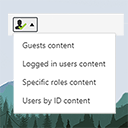
The simplest way of controlling who sees what in your posts/pages. Restrict content to logged in users only (or guests, or by roles) with simple short …
Formerly "Instagram Feed". Display clean, customizable, and responsive Instagram feeds from multiple accounts. Supports Instagram oEmbeds.

By HelgaTheViking
Hide custom menu items based on user roles.

By LiteSpeed Technologies
All-in-one unbeatable acceleration & PageSpeed improvement: caching, image/CSS/JS optimization...

Cookie notice banner for GDPR, CCPA, EU cookie law, data protection and privacy regulations and other cookie law and consent notice requirements on yo …
Elementor templates, Header footer builder, Elementor Post Grid, Woocommerce Grid builder, Slider, Forms, Gallery, Nav menu addons, Elementor widgets.

By Yasar Khalifa
A simple plugin to hide the WordPress admin bar based on user roles. Clean, fast, and easy to use.
CHOOSE WHAT YOUR WEBSITE NEEDS
Start with the task you need to solve. Compare features, WordPress and PHP requirements, update history and the author’s documentation. Test changes on a private copy and avoid adding several plugins for the same job.
This independent directory displays plugin information on WebFulHost and links to the official source. Packages are not mirrored or installed here. A plugin can include paid extensions or services with separate terms from its author.


