

Social media automation, social media scheduling and auto publish for WordPress posts to Facebook, X/Twitter, Threads, LinkedIn, Telegram and more.
★ 4.3/5 (11)200+ active installations
- Version
- 1.4.6
- WordPress
- 6.2+
- PHP
- 7.4+
- Updated
- 5 Nov 2026
WORDPRESS RESOURCES
Explore public plugin information from the official WordPress.org directory. Compare what a plugin does, its requirements and update history before adding it to your website.
Explore WordPress hosting →5,885 matching plugins reported by WordPress.org · Page 7 of 50
Source: WordPress.org
Data refreshed 20 Nov 2026 01:12 UTC
Social media automation, social media scheduling and auto publish for WordPress posts to Facebook, X/Twitter, Threads, LinkedIn, Telegram and more.

By Ben Sibley
A simple, yet powerful WordPress analytics plugin that gives you privacy-friendly stats to grow your website. A Google Analytics alternative.

By Lester Chan
Adds a more advanced paging navigation interface.

By Spacetime
Manage Google AdSense ads, banners, ad rotation, sticky widgets, AMP ads, ads.txt, tracking, header and footer code, PHP code, global custom fields

By Aurovrata Venet
This plugin enables the mapping of your CF7 forms to custom posts, including featured images, files, meta-fields and taxonomies

By Elementor
Monitor every change on your WordPress site — who did what, when, and where it came from — for a complete audit trail and stronger security.

By wpdevart
Duplicate Page or Post is an great tool that allow to duplicate pages and posts. Now you can do it in one click.
Auto-publish posts, pages & CPTs, plus manage Google Business Profile posts. All from your WordPress dashboard!

By hondamarlboro
This plugin enables visitors to remind them old posts on the same day year(s) ago on the widget.

By Sayan Datta
RevivePress, the all-in-one tool for republishing & cloning old posts and pages which push old posts to your front page, the top of archive pages, …
Elementor addon: 120+ widgets & templates — Elementor Gallery, Mega Menu, Slider, Form, Post Grid, Accordion, Header Footer Builder & WooCommerce.
By Felix W.
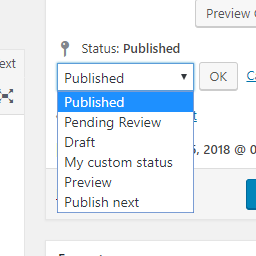
Add new statuses to all post types (posts, pages, products, ...).
CHOOSE WHAT YOUR WEBSITE NEEDS
Start with the task you need to solve. Compare features, WordPress and PHP requirements, update history and the author’s documentation. Test changes on a private copy and avoid adding several plugins for the same job.
This independent directory displays plugin information on WebFulHost and links to the official source. Packages are not mirrored or installed here. A plugin can include paid extensions or services with separate terms from its author.

