Display WooCommerce products by customer's user role.
★ 3.6/5 (22)6,000+ active installations
- Version
- 1.8.6
- WordPress
- 4.4+
- Updated
- 5 Nov 2026
WORDPRESS RESOURCES
Explore public plugin information from the official WordPress.org directory. Compare what a plugin does, its requirements and update history before adding it to your website.
Explore WordPress hosting →3,675 matching plugins reported by WordPress.org · Page 7 of 50
Source: WordPress.org
Data refreshed 20 Nov 2026 17:56 UTC
Display WooCommerce products by customer's user role.

WooCommerce Google Sheet Connector automatically syncs orders, products, customers, coupons, and variations to Google Sheets.

By printify
Printify is a print on demand drop shipping platform for WordPress users.

By packlink
Elevate your store with Packlink PRO —the ultimate free shipping solution offering discounted rates from 350+ carriers instantly.

Migrate and sync products, orders, customers and inventory between WooCommerce and Shopify. Works in either direction, one-time or ongoing.
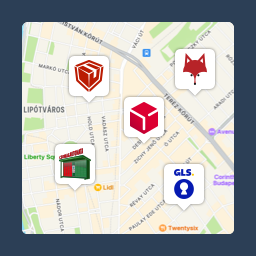
Pickup point map and shipping labels for WooCommerce, for home delivery too. MPL, Foxpost, GLS, DPD, Express One, Packeta and more.
Build 2D and 3D product configurators for WooCommerce. Customers design their product with a live preview, then buy it or request a quote.

Import and Export WooCommerce orders, products, customers & coupons to Google Sheets in real time, with CSV/Excel import export and one-click setup.
Firewall, Malware Scanner, Two Factor Auth, and Comprehensive Security Features, powered by our 24-hour team. Make security a priority with Wordfence.

By Link Nacional
Brazilian checkout fields: CPF/CNPJ, address number, neighborhood and phone, with automatic CEP address pre-filling and much more for WooCommerce.

Integrate WooCommerce with HubSpot’s free CRM, abandoned cart tracking, email marketing, marketing automation, analytics & more.
Events calendar plugin for event registration, event tickets, bookings, RSVP, recurring and virtual events with WooCommerce and Zoom (AI-powered).
CHOOSE WHAT YOUR WEBSITE NEEDS
Start with the task you need to solve. Compare features, WordPress and PHP requirements, update history and the author’s documentation. Test changes on a private copy and avoid adding several plugins for the same job.
This independent directory displays plugin information on WebFulHost and links to the official source. Packages are not mirrored or installed here. A plugin can include paid extensions or services with separate terms from its author.