

Breadcrumb NavXT
By John Havlik
Adds breadcrumb navigation showing the visitor's path to their current location.
★ 4.6/5 (132)700,000+ active installations
- Version
- 7.5.2
- WordPress
- 5.8+
- PHP
- 7.0+
- Updated
- 29 Aug 2026
WORDPRESS RESOURCES
Explore public plugin information from the official WordPress.org directory. Compare what a plugin does, its requirements and update history before adding it to your website.
Explore WordPress hosting →10,000 matching plugins reported by WordPress.org · Page 8 of 50
Source: WordPress.org
Data refreshed 22 Nov 2026 06:55 UTC
By John Havlik
Adds breadcrumb navigation showing the visitor's path to their current location.

By watchful
A web developers toolbox for remotely managing and monitoring tens, hundreds, or thousands of WordPress websites at once.

One-click uploads from Unsplash, Openverse, Pixabay, Pexels, and Giphy directly to your WordPress media library.

By Cloudinary
Boost the performance of your WordPress site by optimizing your images and videos with the Cloudinary WordPress Plugin. WordPress developers, content …
Connects Google Analytics with your WordPress site. Displays stats to help you understand your users and site content on a whole new level!

By Melapress
Get better WordPress login security; add two-factor authentication (2FA) for all your users with this easy-to-use plugin.

By Digital Challenge
This plugin helps you create an XML feed for Skroutz and BestPrice marketplaces.

By webheadcoder
Purges cache on WPEngine, W3TC, WP Super Cache, WP Fastest Cache when widgets, menus, settings update. Forces browsers to reload CSS and JS files.

By POSIMYTH
The original Elementor sticky header & sticky menu plugin. Transparent, fixed & scroll effects (blur, shrink, hide) on Elementor Free or Pro.

By Hook & Filter
Favorites for any post type. Easily add favoriting/liking, wishlists, or any other similar functionality using the developer-friendly API.
By Denis Botić
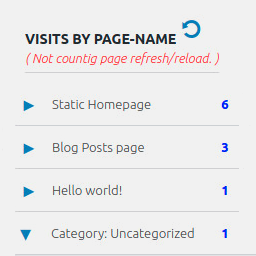
Display number of visits for each page in admin dashboard and browser developer-tool/console. Doesn't count page refresh as a new visit...

By Matthias Nordwig
Invisible spam protection for every form, login and checkout. No puzzles, no checkboxes, no lost visitors — a CAPTCHA your users never see.
CHOOSE WHAT YOUR WEBSITE NEEDS
Start with the task you need to solve. Compare features, WordPress and PHP requirements, update history and the author’s documentation. Test changes on a private copy and avoid adding several plugins for the same job.
This independent directory displays plugin information on WebFulHost and links to the official source. Packages are not mirrored or installed here. A plugin can include paid extensions or services with separate terms from its author.
