
Social Divi
By Jelle Roorda
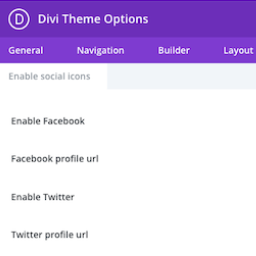
This plugin adds the ability to add more social icons to your website when using the Divi theme.
★ 5.0/5 (4)1,000+ active installations
- Version
- 1.8.1
- WordPress
- 5.1+
- PHP
- 5.4+
- Updated
- 7 May 2026
WORDPRESS RESOURCES
Explore public plugin information from the official WordPress.org directory. Compare what a plugin does, its requirements and update history before adding it to your website.
Explore WordPress hosting →650 matching plugins reported by WordPress.org · Page 8 of 50
Source: WordPress.org
Data refreshed 26 Nov 2026 18:34 UTC
By Jelle Roorda
This plugin adds the ability to add more social icons to your website when using the Divi theme.
Social media scheduler & auto post for WordPress. Schedule posts on a visual calendar, auto share to Facebook, X, LinkedIn, Bluesky, Threads & more.
Create responsive portfolios in Gutenberg with grid, masonry, filters, lightbox, slider, and customizable project layouts.
Embed Instagram, TikTok, Pinterest, and Twitter feeds easily using Gutenberg blocks.
Automatically share your WordPress posts on multiple social networks like Facebook, X (Twitter), LinkedIn, Instagram and more.

By maxfoundry
Our Share Button addon to MaxButtons and MaxButtons Pro plugins gets you up and sharing within minutes. It's easy to setup and offers flexibility …

By Michael Ott
Control how your content looks when shared on Facebook, X, LinkedIn, Pinterest and Slack.

By PickPlugins
Post Grid is a powerful WordPress plugin for creating customizable post grid layouts with advanced query options, allowing users to display posts dyna …
Points and Rewards for WooCommerce offer a reward for points to your customers for their activities & increase customer loyalty.

By YayCommerce
Customize WooCommerce email templates with an advanced drag-and-drop email builder. Works great with 80+ WooCommerce Email Customizer Addons.
Instagram, TikTok, YouTube & Facebook feeds, Google & Trustpilot reviews, and WooCommerce product feeds for Meta & TikTok ads in one plugin.

By overclokk
Ask the cookie consent by category and block third party scripts, videos and maps until the consent. With a consent log and Google Consent Mode v2.
CHOOSE WHAT YOUR WEBSITE NEEDS
Start with the task you need to solve. Compare features, WordPress and PHP requirements, update history and the author’s documentation. Test changes on a private copy and avoid adding several plugins for the same job.
This independent directory displays plugin information on WebFulHost and links to the official source. Packages are not mirrored or installed here. A plugin can include paid extensions or services with separate terms from its author.





