Import and export WordPress users and WooCommerce customers using CSV. Migrate to your new site without any data loss.
★ 4.8/5 (443)50,000+ active installations
- Version
- 2.7.8
- WordPress
- 3.0.1+
- PHP
- 7.4+
- Updated
- 16 Nov 2026
View plugin details ↗Elementor addon: 120+ widgets & templates — Elementor Gallery, Mega Menu, Slider, Form, Post Grid, Accordion, Header Footer Builder & WooCommerce.
★ 4.9/5 (4,133)1,000,000+ active installations
- Version
- 6.8.9
- WordPress
- 5.3+
- PHP
- 7.0+
- Updated
- 15 Nov 2026
View plugin details ↗Everything you need for a faster website – smart optimization, advanced caching, adaptive images, WebP creation, script improvements, optional CDN del …
★ 4.5/5 (155)9,000+ active installations
- Version
- 7.30.95
- WordPress
- 6.5+
- PHP
- 8.0+
- Updated
- 18 Nov 2026
View plugin details ↗Send Contact Form 7 submissions to any API, Webhook or CRM — quick setup, flexible payloads, endpoints and authentication.
★ 5.0/5 (28)8,000+ active installations
- Version
- 3.0.8
- WordPress
- 6.0+
- PHP
- 7.4+
- Updated
- 19 Nov 2026
View plugin details ↗Display panoramas, virtual tours or object movies created with Pano2VR and Object2VR.
★ 4.2/5 (5)4,000+ active installations
- Version
- 2.5.4
- WordPress
- 5.0+
- PHP
- 7.2+
- Updated
- 15 Oct 2026
View plugin details ↗Send Contact Form 7 submissions to a remote API with GET or POST.
★ 4.3/5 (6)1,000+ active installations
- Version
- 1.5.4
- WordPress
- 6.7+
- PHP
- 7.4+
- Updated
- 13 Oct 2026
View plugin details ↗使用阿里云对象存储 OSS 作为附件存储空间。(This is a plugin that uses Aliyun Object Storage Service for attachments remote saving.)
★ 4.8/5 (5)3,000+ active installations
- Version
- 1.5.4
- WordPress
- 4.6+
- PHP
- 7.1+
- Updated
- 17 Sep 2026
View plugin details ↗Gutenberg block editor with AI. 70+ Gutenberg blocks, patterns, WooCommerce blocks, post grid, gallery, menu with Gutenberg block library.
★ 4.9/5 (216)100,000+ active installations
- Version
- 6.5.4
- WordPress
- 5.8+
- PHP
- 7.4+
- Updated
- 17 Nov 2026
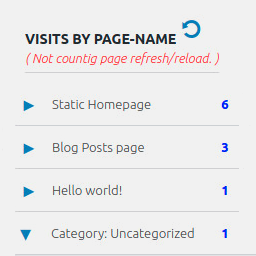
View plugin details ↗Display number of visits for each page in admin dashboard and browser developer-tool/console. Doesn't count page refresh as a new visit...
★ 4.0/5 (7)5,000+ active installations
- Version
- 2.0.5
- WordPress
- 6.5+
- PHP
- 5.6.40+
- Updated
- 14 Sep 2026
View plugin details ↗Extend WordPress REST API to support remote site management, plugin updates, and integration with the Fluent Suite.
50+ active installations
- Version
- 6.5.1
- WordPress
- 5.6+
- Updated
- 6 Mar 2026
View plugin details ↗Create custom interactive maps with free Leaflet-based styles, no Google Maps API key, frontend marker submissions, search and filters.
★ 5.0/5 (70)10,000+ active installations
- Version
- 1.4.58
- WordPress
- 5.5+
- PHP
- 7.0+
- Updated
- 12 Nov 2026
View plugin details ↗Manage WordPress files and folders from your dashboard with a built-in code editor: upload, edit, delete, move, rename, and archive, no FTP needed.
★ 4.3/5 (202)10,000+ active installations
- Version
- 7.0
- WordPress
- 5.0+
- PHP
- 8.0+
- Updated
- 29 Oct 2026
View plugin details ↗