Show WooCommerce products in carousels, sliders and grids with hover image swap, quick view and fade effects. Works with Gutenberg and Elementor.
★ 4.3/5 (33)6,000+ active installations
- Version
- 1.15.1
- WordPress
- 4.0+
- Updated
- 15 Nov 2026
WORDPRESS RESOURCES
Explore public plugin information from the official WordPress.org directory. Compare what a plugin does, its requirements and update history before adding it to your website.
Explore WordPress hosting →2,063 matching plugins reported by WordPress.org · Page 8 of 50
Source: WordPress.org
Data refreshed 21 Nov 2026 19:11 UTC
Show WooCommerce products in carousels, sliders and grids with hover image swap, quick view and fade effects. Works with Gutenberg and Elementor.
More than 20 special blocks for Gutenberg to build complex pages and animations with highest possible web vitals score.
Blocks that show your shop's products as a slider, a card that changes its image, or a product gallery.
Translate your site visually, directly from the front-end. Go multilingual in minutes using automatic AI translation. Works with any theme or plugin.
A modular, high-performance carousel block for WordPress, powered by the Interactivity API and Embla Carousel.

Collect, manage, and display customer reviews with testimonial sliders, carousels, grids, lists, and review forms. Build with AI or ready patterns.
By Graham
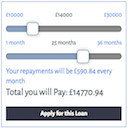
A simple repayment calculator. Uses sliders to set the amount and term and displays a range of outputs
FancyPost provides advanced post blocks, grids, layouts, carousels, and sliders for Block Editor & Elementor. Includes featured posts and sliders.
A single block to display custom fields in the Block Editor. It supports ACF, MetaBox, WooCommerce, meta, rest field, shortcode and more.
Video player block for Gutenberg – embed and play YouTube, Vimeo, and self-hosted HTML5 videos in a responsive, customizable player.

Build WordPress blog, magazine, news, archive and single-post layouts with Elementor post grid, carousel, slider and list widgets.

By Dennis Buchwald
Infinity logo carousel and text marquee for client, partner or sponsor logos.
CHOOSE WHAT YOUR WEBSITE NEEDS
Start with the task you need to solve. Compare features, WordPress and PHP requirements, update history and the author’s documentation. Test changes on a private copy and avoid adding several plugins for the same job.
This independent directory displays plugin information on WebFulHost and links to the official source. Packages are not mirrored or installed here. A plugin can include paid extensions or services with separate terms from its author.