Navigate between posts and pages without returning to the post list. Works with Classic Editor, Gutenberg, and all Custom Post Types.
★ 5.0/5 (2)100+ active installations
- Version
- 1.5.0
- WordPress
- 5.0+
- PHP
- 7.4+
- Updated
- 14 Sep 2026
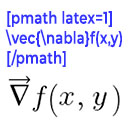
View plugin details ↗Render mathematical equations in WordPress as PNG images using pmath native syntax or LaTeX input with server-side rendering.
★ 4.2/5 (5)300+ active installations
- Version
- 3.0.5
- WordPress
- 5.0+
- PHP
- 7.2+
- Updated
- 9 May 2026
View plugin details ↗The easiest Back To Top button: 171 icons, SVG icons, text, scroll progress ring, animations, mobile settings, display rules and live preview.
★ 5.0/5 (3)60+ active installations
- Version
- 3.0.0
- WordPress
- 5.0+
- PHP
- 7.0+
- Updated
- 3 Nov 2026
View plugin details ↗Sticky Content allows website elements to remain fixed while scrolling. It is a simple and customizable Gutenberg block for creating sticky content .
★ 3.0/5 (1)500+ active installations
- Version
- 2.0.3
- WordPress
- 6.5+
- PHP
- 7.4+
- Updated
- 25 Nov 2026
View plugin details ↗Generate local PDF invoices, proforma invoices, delivery notes, order notes, and checkout fields for WooCommerce stores.
0+ active installations
- Version
- 1.1.5
- WordPress
- 6.0+
- PHP
- 7.4+
- Updated
- 26 Jun 2026
View plugin details ↗WooCommerce builder for Elementor & Gutenberg, offering product templates, product sliders, shopping cart, quick view, Woo Wishlist, product filter.
★ 4.6/5 (214)90,000+ active installations
- Version
- 4.9.10
- WordPress
- 6.0+
- PHP
- 7.4+
- Updated
- 17 Nov 2026
View plugin details ↗Make any element sticky with customizable positioning, responsive breakpoints, and z-index control.
★ 5.0/5 (4)100+ active installations
- Version
- 1.4.0
- WordPress
- 5.0+
- Updated
- 21 Sep 2025
View plugin details ↗Turn Google Sheets into live WordPress tables. Embed, sync, and customize data instantly with search, filters, and styling - no coding needed.
★ 4.6/5 (35)3,000+ active installations
- Version
- 3.27.0
- WordPress
- 6.9+
- PHP
- 7.2+
- Updated
- 17 Nov 2026
View plugin details ↗Style Ultimate Member login, register, directory, and profile pages in Elementor.
★ 5.0/5 (2)400+ active installations
- Version
- 3.0.1
- WordPress
- 6.0+
- PHP
- 8.0+
- Updated
- 1 Sep 2026
View plugin details ↗Sort WooCommerce cart and order items alphabetically (A-Z or Z-A) for better readability and faster order preparation.
60+ active installations
- Version
- 1.5
- WordPress
- 5.6+
- PHP
- 7.4+
- Updated
- 29 Oct 2026
View plugin details ↗Ready-made Elementor shop designs with their subpages, imported in one click, plus 12 Elementor widgets for WooCommerce.
★ 1.0/5 (1)9,000+ active installations
- Version
- 2.0.0
- WordPress
- 6.5+
- PHP
- 7.4+
- Updated
- 6 Nov 2026
View plugin details ↗
By CreativeMindsSolutions
Transform jargon into engaging content that boosts SEO, drives engagement, improves conversions, with automatic links and tooltips.
★ 4.3/5 (157)7,000+ active installations
- Version
- 4.5.7
- WordPress
- 5.4.0+
- PHP
- 5.2.4+
- Updated
- 13 Oct 2026
View plugin details ↗