
One Click Close Comments
By Scott Reilly
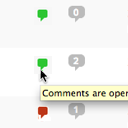
Conveniently close or open comments for a post or page with one click from the admin listing of posts.
★ 4.9/5 (10)5,000+ active installations
- Version
- 3.0
- WordPress
- 4.7+
- Updated
- 17 Apr 2025
WORDPRESS RESOURCES
Explore public plugin information from the official WordPress.org directory. Compare what a plugin does, its requirements and update history before adding it to your website.
Explore WordPress hosting →5,966 matching plugins reported by WordPress.org · Page 9 of 50
Source: WordPress.org
Data refreshed 24 Nov 2026 17:51 UTC
By Scott Reilly
Conveniently close or open comments for a post or page with one click from the admin listing of posts.
Reactive emoji. Allow visitors to add emoji reactions to your posts and comments. Disable comment for pages, posts.
This plugin allow admin to add extra fields in comment area. These fields are saved as comment meta and is displayed under comment text.

By Simply Static
Convert WordPress to static HTML. Boost performance 3-5x. Eliminate security vulnerabilities. Deploy anywhere.
Formerly "Custom Facebook Feed". Display completely customizable Facebook feeds of a Facebook page. Supports Facebook oEmbeds.

By Codepress
Take control of your WordPress admin list tables. Add, remove, and reorder columns for posts, users, media, and more - no coding needed.

By videowhisper
Add browser-based webcam, screen, audio and photo recording fields to WordPress comments and custom forms.
Create responsive photo, image and masonry galleries in WordPress with FooGallery, plus carousel, lightbox, albums, SEO and video gallery support.

By Morteza Geransayeh
Persian date support for WordPress and WooCommerce

By John James Jacoby
bbPress is forum software for WordPress.
Supercharge your WordPress email notifications using a WYSIWYG editor and shortcodes. Default and new notifications available. Add-ons available.

Get a fast contact form plugin. Create advanced forms using drag and drop form builder with all smart features.
CHOOSE WHAT YOUR WEBSITE NEEDS
Start with the task you need to solve. Compare features, WordPress and PHP requirements, update history and the author’s documentation. Test changes on a private copy and avoid adding several plugins for the same job.
This independent directory displays plugin information on WebFulHost and links to the official source. Packages are not mirrored or installed here. A plugin can include paid extensions or services with separate terms from its author.




