

Display posts in a responsive grid or slider. Category filter tabs, related posts, Gutenberg block and shortcode. No coding needed.
★ 4.3/5 (8)1,000+ active installations
- Version
- 1.0.23
- WordPress
- 5.0+
- PHP
- 7.0+
- Updated
- 2 Sep 2026
WORDPRESS RESOURCES
Explore public plugin information from the official WordPress.org directory. Compare what a plugin does, its requirements and update history before adding it to your website.
Explore WordPress hosting →10,000 matching plugins reported by WordPress.org · Page 9 of 50
Source: WordPress.org
Data refreshed 20 Nov 2026 21:18 UTC
Display posts in a responsive grid or slider. Category filter tabs, related posts, Gutenberg block and shortcode. No coding needed.
Track post views and page views, and display popular posts and trending content on your WordPress site.

By Atanas Yonkov
Reverse the post order for a specific category to be date ascending. This is a lightweight plugin that adds the option to reorder the posts from a spe …

By marynixie
Related Posts by WPBrigade is The Best Customizable plugin, that nicely displays related posts thumbnails under the post.

By solverwp
A beautiful, easy to use post slider widget for Elementor to display your recent posts.
Social media scheduler & auto post for WordPress. Schedule posts on a visual calendar, auto share to Facebook, X, LinkedIn, Bluesky, Threads & more.

By Kamlesh Parmar
Allows user to sync Posts, Pages and Custom Post Type with multiple websites.
By Felix W.
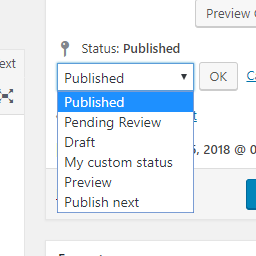
Add new statuses to all post types (posts, pages, products, ...).

Social media automation, social media scheduling and auto publish for WordPress posts to Facebook, X/Twitter, Threads, LinkedIn, Telegram and more.

By madalin.ungureanu
A must have tool for creating custom fields, custom post types and taxonomies, fast and without any programming knowledge.
Formerly "Custom Facebook Feed". Display completely customizable Facebook feeds of a Facebook page. Supports Facebook oEmbeds.

By hijiri
Intuitively reorder Posts, Pages, Custom Post Types, Taxonomies, and Sites with a simple drag-and-drop interface.
CHOOSE WHAT YOUR WEBSITE NEEDS
Start with the task you need to solve. Compare features, WordPress and PHP requirements, update history and the author’s documentation. Test changes on a private copy and avoid adding several plugins for the same job.
This independent directory displays plugin information on WebFulHost and links to the official source. Packages are not mirrored or installed here. A plugin can include paid extensions or services with separate terms from its author.


