

WP Ultimate Post Grid
By Brecht
Easily create filterable responsive grids for your posts, pages or custom post types
★ 4.4/5 (33)4,000+ active installations
- Version
- 4.1.1
- WordPress
- 3.5+
- Updated
- 19 Aug 2026
WORDPRESS RESOURCES
Explore public plugin information from the official WordPress.org directory. Compare what a plugin does, its requirements and update history before adding it to your website.
Explore WordPress hosting →10,000 matching plugins reported by WordPress.org · Page 9 of 50
Source: WordPress.org
Data refreshed 22 Nov 2026 22:16 UTC
By Brecht
Easily create filterable responsive grids for your posts, pages or custom post types
Auto-publish posts, pages & CPTs, plus manage Google Business Profile posts. All from your WordPress dashboard!

By Data443 Risk Mitigation, Inc.
Inline Related Posts AUTOMATICALLY inserts related posts INSIDE your content, capturing immediately the reader's attention.

Social media automation, social media scheduling and auto publish for WordPress posts to Facebook, X/Twitter, Threads, LinkedIn, Telegram and more.
Display posts in a responsive grid or slider. Category filter tabs, related posts, Gutenberg block and shortcode. No coding needed.

By Bastien Ho
The only WordPress plugin using native posts as full calendar events with begin and end date, geolocation, color and weather.

By Atanas Yonkov
Reverse the post order for a specific category to be date ascending. This is a lightweight plugin that adds the option to reorder the posts from a spe …

By ZephyrWest
Shows a list of recent posts from a category - with thumbnails, excerpt and a load more button. For posts, pages and the Site Editor.
By Felix W.
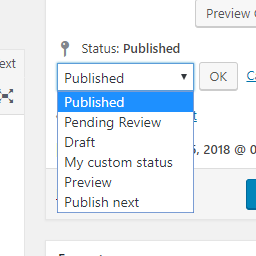
Add new statuses to all post types (posts, pages, products, ...).

By Nexcess
Turbo charge your posts admin for any custom post type with sortable filters and columns, and auto-registration of metaboxes.

By WPMU DEV - Your All-in-One WordPress Platform
Best WordPress form builder plugin. Create contact forms, payment forms & order forms with 1000+ integrations.

By MartinCV
Hide posts or WooCommerce products from the homepage, archives, search, RSS, REST API, sitemaps and SEO tools — per-post control in any editor.
CHOOSE WHAT YOUR WEBSITE NEEDS
Start with the task you need to solve. Compare features, WordPress and PHP requirements, update history and the author’s documentation. Test changes on a private copy and avoid adding several plugins for the same job.
This independent directory displays plugin information on WebFulHost and links to the official source. Packages are not mirrored or installed here. A plugin can include paid extensions or services with separate terms from its author.

