

Social Share Button
By PickPlugins
Awesome Share Button
★ 4.1/5 (17)1,000+ active installations
- Version
- 2.1.14
- WordPress
- 4.1+
- Updated
- 8 Jun 2026
WORDPRESS RESOURCES
Explore public plugin information from the official WordPress.org directory. Compare what a plugin does, its requirements and update history before adding it to your website.
Explore WordPress hosting →6,414 matching plugins reported by WordPress.org · Page 9 of 50
Source: WordPress.org
Data refreshed 21 Nov 2026 17:14 UTC
By PickPlugins
Awesome Share Button

AI ChatBot for Support, Leads and Sales, with AI SEO, AI Writer, Email Marketing, Social Media Scheduling and Heatmaps to GROW your Website & Business

By Nelio Software
WordPress editorial calendar and social media auto-posting plugin. Schedule posts, share to social networks, and streamline content workflows.

The best WordPress giveaway plugin. Grow your email list, website traffic, and social media followers with viral contests, giveaways, and sweepstakes.

By Taggbox
Display social media feeds, reviews, and user-generated content on your WordPress website with responsive, customizable widgets that require no coding

By wpoperations
Boost trust and conversions with beautiful sales notification popups. Show recent purchases as social proof, with or without WooCommerce.
By Jelle Roorda
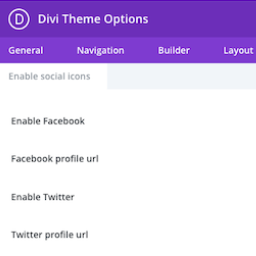
This plugin adds the ability to add more social icons to your website when using the Divi theme.
Skyboot Custom Icons for Elementor expands your Elementor icons library with custom icons, perfect for website owners who use the Elementor plugin.

By Nudgify
Increase your sign-ups and sales by up to 15% with real-time Social Proof and FOMO messages. Show customer reviews and recent activity in real-time.

By fifu.app
Use external image URLs for WordPress featured images and WooCommerce product images. No uploads required. FIFU PRO adds videos and galleries.

By maxfoundry
Maxbuttons is the best and easiest button plugin for WordPress. Within minutes you can create beautiful buttons, share buttons and social icons.

By Rank Math SEO
Grow your organic traffic and AI visibility with powerful SEO tools, XML sitemaps, Schema automation, and built-in AI SEO, all in one place.
CHOOSE WHAT YOUR WEBSITE NEEDS
Start with the task you need to solve. Compare features, WordPress and PHP requirements, update history and the author’s documentation. Test changes on a private copy and avoid adding several plugins for the same job.
This independent directory displays plugin information on WebFulHost and links to the official source. Packages are not mirrored or installed here. A plugin can include paid extensions or services with separate terms from its author.
