

Create eye-catching product badges and labels for your WooCommerce store in seconds. 100+ built-in product badges. Fully customizable.
★ 5.0/5 (9)600+ active installations
- Version
- 1.5.4
- WordPress
- 5.2+
- PHP
- 7.4+
- Updated
- 22 Nov 2026
WORDPRESS RESOURCES
Explore public plugin information from the official WordPress.org directory. Compare what a plugin does, its requirements and update history before adding it to your website.
Explore WordPress hosting →783 matching plugins reported by WordPress.org · Page 9 of 50
Source: WordPress.org
Data refreshed 29 Nov 2026 20:33 UTC
Create eye-catching product badges and labels for your WooCommerce store in seconds. 100+ built-in product badges. Fully customizable.

By RadiusTheme
WooCommerce builder for Elementor includes 80+ widgets, WooCommerce templates, quick view, compare, wishlist, shop & archive page builder and more.

By VillaTheme
Cart All In One For WooCommerce helps your customers view cart effortlessly.

By G Matta
Generate and print QR codes for WooCommerce simple/variable products and coupons.

By WebCodingPlace
Add expiry dates to WooCommerce products and variations, then auto set them out of stock, draft, or expired and email you when they expire.

By Digital Challenge
This plugin helps you create an XML feed for Skroutz and BestPrice marketplaces.
By Dmitry V. (CEO of "UKR Solution")
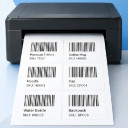
WooCommerce barcode generator for product and order labels & price tags. Easily print label with your printer (UPC, EAN, GS1, GTIN, QRcode).
Color, image and button swatches plus a per-variation image gallery and stock count, in one plugin. No second gallery plugin needed.
Create sales reports and order exports for WooCommerce with product analytics, order fulfillment data, filtering, charts, and 15+ templates.
YITH WooCommerce Product Gallery & Image Zoom add zoom effect to product images and a customizable image slider.
90+ Elementor widgets & addons, 600+ templates, Mega Menu, WooCommerce, Display Conditions. The only Elementor addon AI agents can fully build with.

By Saravana Kumar K
Sell your products with personalised options. Add custom fields to your products, variations, checkout, order and your admin screens.
CHOOSE WHAT YOUR WEBSITE NEEDS
Start with the task you need to solve. Compare features, WordPress and PHP requirements, update history and the author’s documentation. Test changes on a private copy and avoid adding several plugins for the same job.
This independent directory displays plugin information on WebFulHost and links to the official source. Packages are not mirrored or installed here. A plugin can include paid extensions or services with separate terms from its author.



