MyFatoorah – WooCommerce
By MyFatoorah
MyFatoorah Payment Gateway for WooCommerce. Integrated with MyFatoorah DHL/Aramex Shipping Methods.
★ 4.3/5 (3)2,000+ active installations
- Version
- 2.2.11
- WordPress
- 6.0+
- PHP
- 7.4+
- Updated
- 17 Feb 2026
WORDPRESS RESOURCES
Explore public plugin information from the official WordPress.org directory. Compare what a plugin does, its requirements and update history before adding it to your website.
Explore WordPress hosting →32 matching plugins reported by WordPress.org · Page 1 of 3
Source: WordPress.org
Data refreshed 19 Nov 2026 00:42 UTC
By MyFatoorah
MyFatoorah Payment Gateway for WooCommerce. Integrated with MyFatoorah DHL/Aramex Shipping Methods.
WooCommerce VAT & GST validation via EU VIES and 24 national registries. Automated B2B reverse charge and 50 free validations per month.
By ingenidev by Bright Vortex LLC & MetaNetSkills Lda
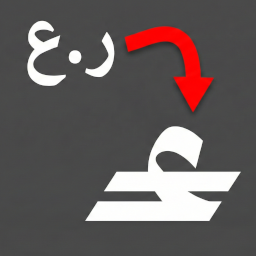
NEW Plugin! Change WooCommerce OMR currency symbol to the official OMR mark with a custom font for correct display. يغير رمز الريال العماني إلى الرمز …
Accept Visa and MasterCard payments on WooCommerce stores via Thawani Pay.

By Yaxii Dev
Create a focused WooCommerce cash-on-delivery order form with product variations, state shipping prices, stock checks, and mobile-friendly ordering.
Peppol e-invoicing for WooCommerce from a certified Access Point: Belgium, Germany, Netherlands, Australia, New Zealand, Oman. Credit notes included.

By sulimanalsalmi
Send delivery orders from any WordPress site to the Darb delivery marketplace. No WooCommerce required.

By OMPAY
Accept card payments in WooCommerce through OMPAY, using either the Bank Hosted redirect or the Merchant Hosted on-site card form.

By sulimanalsalmi
Send WooCommerce orders to the Darb delivery marketplace. Darb prices the delivery, charges your Darb credit and assigns a courier.

By MatrixInn Solutions
Stop fake and refused Cash on Delivery orders in WooCommerce with rules that run on your own site. No SMS, no API key, nothing sent away.

By BiruniHQ
Replace standard text currencies (SAR, AED, OMR) with modern official vector symbols and fonts in your WooCommerce store.
Add a properly taxed COD fee, or hide cash on delivery by city, postcode or order amount — and tell the customer why.
CHOOSE WHAT YOUR WEBSITE NEEDS
Start with the task you need to solve. Compare features, WordPress and PHP requirements, update history and the author’s documentation. Test changes on a private copy and avoid adding several plugins for the same job.
This independent directory displays plugin information on WebFulHost and links to the official source. Packages are not mirrored or installed here. A plugin can include paid extensions or services with separate terms from its author.