Count and display post views, track site-wide visits, and see what content works – inside WordPress. Fast, easy to use and privacy-first.
★ 4.9/5 (1,241)100,000+ active installations
- Version
- 1.8.2
- WordPress
- 6.4+
- PHP
- 7.4+
- Updated
- 2 Nov 2026
View plugin details ↗Lightweight and fast post view counter with smart tracking, built for high-traffic sites and large post databases.
★ 5.0/5 (1)3,000+ active installations
- Version
- 1.3.0
- WordPress
- 6.0+
- PHP
- 7.4+
- Updated
- 22 May 2026
View plugin details ↗WP Post Views is a lightweight and efficient plugin to track and display post views in WordPress.
★ 4.4/5 (7)4,000+ active installations
- Version
- 1.23.4
- WordPress
- 5.4+
- PHP
- 7.4+
- Updated
- 19 Sep 2026
View plugin details ↗Fast, lightweight post views counter. Display views in admin, blocks or shortcodes — no tracking scripts required.
★ 5.0/5 (5)2,000+ active installations
- Version
- 2.1.3
- WordPress
- 3.1+
- PHP
- 7.0+
- Updated
- 19 Dec 2025
View plugin details ↗Add a "Post View Count" plugin to get the count of views for your posts.
★ 4.6/5 (18)4,000+ active installations
- Version
- 3.3
- WordPress
- 6.8+
- PHP
- 7.1+
- Updated
- 16 Sep 2026
View plugin details ↗Display unique visitor or page-view counts anywhere on your site using widgets or shortcodes — Simple, very lightweight and no third-party code.
★ 4.2/5 (6)8,000+ active installations
- Version
- 2.2.3
- WordPress
- 3.4+
- Updated
- 31 May 2026
View plugin details ↗Simply counts the number of times your files are downloaded. Display download links and counts using shortcodes.
★ 4.9/5 (19)2,000+ active installations
- Version
- 2.4
- WordPress
- 5.0+
- PHP
- 5.6.20+
- Updated
- 5 Nov 2026
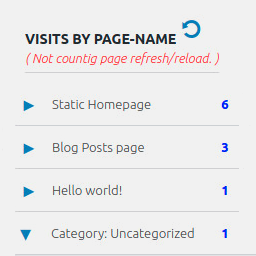
View plugin details ↗Display number of visits for each page in admin dashboard and browser developer-tool/console. Doesn't count page refresh as a new visit...
★ 4.0/5 (7)5,000+ active installations
- Version
- 2.0.5
- WordPress
- 6.5+
- PHP
- 5.6.40+
- Updated
- 14 Sep 2026
View plugin details ↗Display live visitor counts on WooCommerce product pages to add social proof and help customers make buying decisions.
★ 5.0/5 (5)4,000+ active installations
- Version
- 1.4.3
- WordPress
- 6.8+
- PHP
- 8.0+
- Updated
- 16 Nov 2026
View plugin details ↗Places an icon, all time views count and views today count at the bottom of posts, pages and custom post types on any WordPress website.
★ 4.0/5 (55)10,000+ active installations
- Version
- 2.9.2
- WordPress
- 6.0+
- Updated
- 9 Jul 2026
View plugin details ↗Easily handle authors' payments on a multi-author blog by computing posts' remuneration basing on admin defined rules.
★ 4.8/5 (46)1,000+ active installations
- Version
- 2.793
- WordPress
- 3.7+
- Updated
- 16 Aug 2026
View plugin details ↗Firewall, Malware Scanner, Two Factor Auth, and Comprehensive Security Features, powered by our 24-hour team. Make security a priority with Wordfence.
★ 4.7/5 (5,052)5,000,000+ active installations
- Version
- 9.1.1
- WordPress
- 4.7+
- PHP
- 7.0+
- Updated
- 10 Nov 2026
View plugin details ↗