

Smart Attachment Page Remove
By WP User Manager
Completely remove Attachment Pages from your Blog
★ 4.7/5 (13)900+ active installations
- Version
- 4.0.6
- WordPress
- 4.0+
- PHP
- 7.0+
- Updated
- 23 Oct 2026
WORDPRESS RESOURCES
Explore public plugin information from the official WordPress.org directory. Compare what a plugin does, its requirements and update history before adding it to your website.
Explore WordPress hosting →3,736 matching plugins reported by WordPress.org · Page 1 of 50
Source: WordPress.org
Data refreshed 18 Nov 2026 20:58 UTC
By WP User Manager
Completely remove Attachment Pages from your Blog

By Samuel Aguilera
Redirect attachment pages or return a 404 error for them based on the parent post status.

By greatestview
Redirects attachment pages to the post, where they are placed, and hides backend option to link images to attachment page (if not default).

By Dotstore
Plugin lets you easily upload any file type (images, documents, videos, etc.) to customer orders.

By dFactory
Download Attachments is a new approach to managing downloads in WordPress. It allows you to easily add and display download links in any post or page.

By Mark Jaquith
Lets you make a WordPress page (or port or other content type) link to a URL of your choosing (on your site, or on another site), instead of its norma …

By joppuyo
Completely remove "attachment" pages for WordPress media. Improve SEO and prevent conflicts between page and image permalinks.

By Jon Christopher
Attachments allows you to simply append any number of items from your WordPress Media Library to Posts, Pages, and Custom Post Types

By Polygon Themes
Remove child attachments when parent post, page or custom post type is deleted.

By boldthemes
Free Page Builder and Visual Composer - Build stunning responsive post and page layouts with easy to use drag and drop builder - no coding required.
By Denis Botić
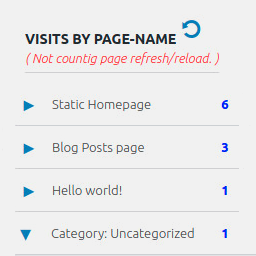
Display number of visits for each page in admin dashboard and browser developer-tool/console. Doesn't count page refresh as a new visit...

By Arno Welzel
Integration of PhotoSwipe (http://photoswipe.com) for WordPress.
CHOOSE WHAT YOUR WEBSITE NEEDS
Start with the task you need to solve. Compare features, WordPress and PHP requirements, update history and the author’s documentation. Test changes on a private copy and avoid adding several plugins for the same job.
This independent directory displays plugin information on WebFulHost and links to the official source. Packages are not mirrored or installed here. A plugin can include paid extensions or services with separate terms from its author.