Adds a user friendly and fully automatic way to create and display a table of contents generated from the page content.
★ 4.4/5 (221)600,000+ active installations
- Version
- 2.0.90
- WordPress
- 5.0+
- PHP
- 5.6.20+
- Updated
- 16 Nov 2026
View plugin details ↗Lightweight Elementor addons with 40+ widgets & templates. Conditional loading keeps your site fast. Built for marketers, not just coders.
★ 4.5/5 (35)7,000+ active installations
- Version
- 2.5.10
- WordPress
- 6.0+
- PHP
- 7.0+
- Updated
- 1 Sep 2026
View plugin details ↗Create newsletter signup forms for Mailster with the block editor.
★ 3.5/5 (2)60+ active installations
- Version
- 0.4.1
- WordPress
- 6.0+
- Updated
- 27 May 2024
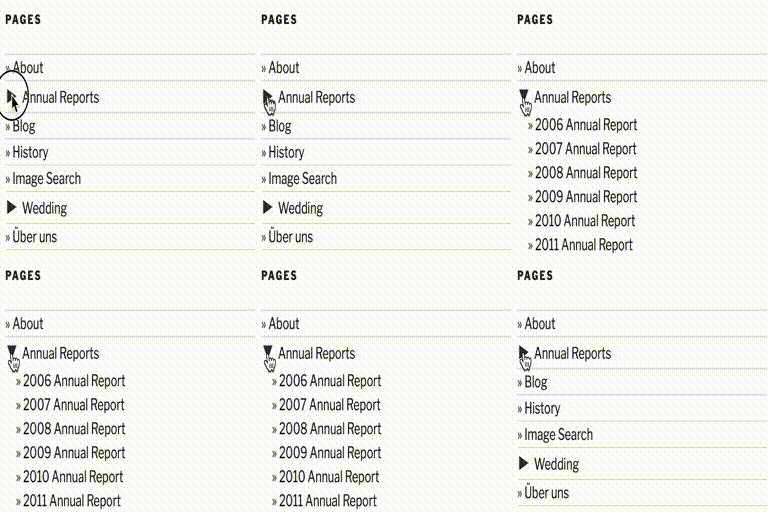
View plugin details ↗This plugin uses Javascript to dynamically expand or collapsable the set of pages for each parent page.
200+ active installations
- Version
- 2.0.3
- WordPress
- 5.0+
- Updated
- 1 Jan 2024
View plugin details ↗Display WordPress posts in beautiful grid, list, slider, and filter layouts. Works with Gutenberg, Elementor, Divi, and Shortcodes.
★ 4.8/5 (265)100,000+ active installations
- Version
- 7.9.11
- WordPress
- 4.5+
- PHP
- 7.4+
- Updated
- 11 Nov 2026
View plugin details ↗An easy to use mega menu plugin. Written the WordPress way.
★ 4.8/5 (883)300,000+ active installations
- Version
- 3.10.10
- WordPress
- 6.2+
- PHP
- 7.4+
- Updated
- 10 Nov 2026
View plugin details ↗Seamlessly integrates FancyBox lightbox into your WordPress blog: Upload, activate, and you're done. Additional configuration optional.
★ 4.6/5 (92)30,000+ active installations
- Version
- 3.4.3
- WordPress
- 5.6+
- PHP
- 7.4+
- Updated
- 9 Nov 2026
View plugin details ↗Dynamic AJAX Product Filters allow shoppers to quickly filter WooCommerce products by categories, attributes, prices, and more.
★ 5.0/5 (11)900+ active installations
- Version
- 1.6.9
- WordPress
- 5.9+
- PHP
- 7.0+
- Updated
- 10 Nov 2026
View plugin details ↗Use the Carta Online WordPress plugin to embed your offerings on your website.
30+ active installations
- Version
- 2.19.1
- WordPress
- 5.3+
- PHP
- 8.1+
- Updated
- 15 Oct 2026
View plugin details ↗Display a list of all registered post types and taxonomies including all properties. The list is expandable/collapsable. Use for debugging or educatio …
10+ active installations
- Version
- 1.0
- WordPress
- 4.0+
- PHP
- 5.3+
- Updated
- 27 Sep 2019
View plugin details ↗A simple, lightweight plugin for managing and displaying frequently asked questions using a custom post type.
10+ active installations
- Version
- 1.1.0
- WordPress
- 4.3+
- Updated
- 22 Jun 2017
View plugin details ↗This plugin is designed to strip all the hassle so you can insert contact forms where you want and how you want.
★ 5.0/5 (1)20+ active installations
- Version
- 1.6.4
- WordPress
- 3.8+
- Updated
- 3 Oct 2016
View plugin details ↗