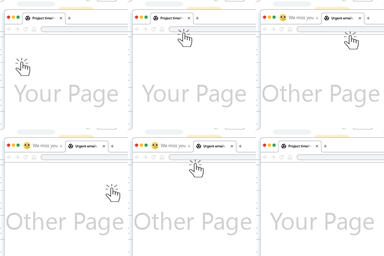
Beautiful Coming soon, Maintenance or Landing page on your website, packed with premium features for free.
★ 4.7/5 (326)200,000+ active installations
- Version
- 4.1.22
- WordPress
- 3.0+
- PHP
- 5.6+
- Updated
- 16 Oct 2026
View plugin details ↗Domain Mapping System is the most powerful way to manage alias domains and map them to any published resource - creating Microsites with ease!
★ 4.5/5 (56)2,000+ active installations
- Version
- 2.2.7
- WordPress
- 5.1+
- PHP
- 7.4+
- Updated
- 12 Jun 2026
View plugin details ↗A productivity desktop and custom dashboard for wp-admin: windows, dark mode, dashboard notes, an AI assistant, and a progressive web app (PWA).
★ 5.0/5 (24)1,000+ active installations
- Version
- 1.1.20
- WordPress
- 6.0+
- PHP
- 7.4+
- Updated
- 13 Nov 2026
View plugin details ↗Automatically switches your favicon (site icon) between production and development environments to prevent confusion.
0+ active installations
- Version
- 1.5.5
- WordPress
- 5.0+
- PHP
- 7.0+
- Updated
- 13 Jun 2026
View plugin details ↗40+ WooCommerce modules in one plugin: product labels, quick view, buy now, pre-orders, variation swatches, discount rules & more.
★ 4.2/5 (11)8,000+ active installations
- Version
- 2.3.2
- WordPress
- 6.4+
- PHP
- 7.4+
- Updated
- 17 Sep 2026
View plugin details ↗WooCommerce discount rules plugin to create automatic product and cart discounts, bulk pricing, BOGO deals, and dynamic pricing without coupon codes.
★ 4.2/5 (9)4,000+ active installations
- Version
- 1.4.31
- WordPress
- 5.9+
- PHP
- 7.4+
- Updated
- 19 Nov 2026
View plugin details ↗Changes the browser tab title and favicon when users leave the page, and restores them on return. Lightweight, fast, and attention-boosting.
10+ active installations
- Version
- 1.0.0
- WordPress
- 6.0+
- PHP
- 7.4+
- Updated
- 9 Dec 2025
View plugin details ↗White label WordPress admin, admin menu editor, login page customizer, admin dark mode, media library folders, admin columns.
★ 4.3/5 (109)6,000+ active installations
- Version
- 4.3.5
- WordPress
- 5.0+
- PHP
- 7.4+
- Updated
- 11 Nov 2026
View plugin details ↗Modern WordPress Maintenance Mode & Coming Soon suite with responsive templates, live countdown, lead capture, and advanced access controls.
★ 5.0/5 (5)10+ active installations
- Version
- 2.0.0
- WordPress
- 5.6+
- PHP
- 7.4+
- Updated
- 3 Oct 2026
View plugin details ↗A Coming Soon and Maintenance Mode plugin to manage your site's availability with responsive templates and SEO-friendly features.
★ 4.7/5 (3)6,000+ active installations
- Version
- 1.3.0
- WordPress
- 5.0+
- PHP
- 5.6+
- Updated
- 17 Sep 2026
View plugin details ↗A utility plugin to make the WordPress admin screen more comfortable and easier to use. You can hide unnecessary items and add useful features.
★ 5.0/5 (1)70+ active installations
- Version
- 3.8.4
- WordPress
- 5.9+
- PHP
- 7.4+
- Updated
- 7 Sep 2026
View plugin details ↗Re-engage visitors who switch browser tabs by changing the page title and favicon while the tab is inactive.
★ 5.0/5 (2)0+ active installations
- Version
- 2.0.0
- WordPress
- 6.0+
- PHP
- 7.4+
- Updated
- 28 May 2026
View plugin details ↗