

Build interactive family trees, create ancestor profiles, and display your genealogy data beautifully on any WordPress site.
★ 4.1/5 (16)600+ active installations
- Version
- 2.2.8
- WordPress
- 5.6+
- PHP
- 7.4+
- Updated
- 8 Sep 2026
WORDPRESS RESOURCES
Explore public plugin information from the official WordPress.org directory. Compare what a plugin does, its requirements and update history before adding it to your website.
Explore WordPress hosting →687 matching plugins reported by WordPress.org · Page 1 of 50
Source: WordPress.org
Data refreshed 20 Nov 2026 13:26 UTC
Build interactive family trees, create ancestor profiles, and display your genealogy data beautifully on any WordPress site.
Organize thousands of WordPress media files in folders / categories with ease.

By Hook & Filter
Nested Pages provides a drag and drop interface for managing pages & posts in the WordPress admin, while maintaining quick edit functionality.

By Vishit Shah
This plugin allows the end user to upload a header logo , footer logo, copy right text, design and development text & social media.

By webriti
The SEO Optimized Images plugin lets you dynamically add SEO-Friendly "alt" and "title" attributes to your images.

By ngocuct0912
Managing folders and files in the Media Library: left-hand folder tree, drag and drop, folder upload.

By Shahjada
This File Management & Digital Store plugin will help you to control file downloads & sell digital products from your WP site.
By hupe13
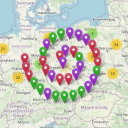
Extends the WordPress Plugin Leaflet Map with Leaflet Plugins and other functions.

By Ninja Team
Create WordPress document library using FileBird and Gutenberg or any WordPress page builder.
Create unlimited folders with the Folders WordPress plugin, organize & manage your Media Library files, Pages & Posts in folders 📁

By Trusty Plugins
AJAX filter & WooCommerce product filter. Filter posts, CPTs & products by category, taxonomy, attribute & price. Build with drag & drop or AI (MCP).

By dudaster
Seven free modules for Elementor: dark mode, container layouts, mobile menu, editorial text, style presets, JSON editor — all modular, all free.
CHOOSE WHAT YOUR WEBSITE NEEDS
Start with the task you need to solve. Compare features, WordPress and PHP requirements, update history and the author’s documentation. Test changes on a private copy and avoid adding several plugins for the same job.
This independent directory displays plugin information on WebFulHost and links to the official source. Packages are not mirrored or installed here. A plugin can include paid extensions or services with separate terms from its author.

