

Page-list
By webvitalii
[pagelist], [subpages], [siblings] and [pagelist_ext] shortcodes
★ 4.7/5 (89)30,000+ active installations
- Version
- 6.3
- WordPress
- 3.0+
- Updated
- 29 May 2026
WORDPRESS RESOURCES
Explore public plugin information from the official WordPress.org directory. Compare what a plugin does, its requirements and update history before adding it to your website.
Explore WordPress hosting →4,965 matching plugins reported by WordPress.org · Page 1 of 50
Source: WordPress.org
Data refreshed 20 Nov 2026 10:54 UTC
By webvitalii
[pagelist], [subpages], [siblings] and [pagelist_ext] shortcodes

By malihu
Create links that scroll the page smoothly to any id within the document.

By Mark Jaquith
Lets you make a WordPress page (or port or other content type) link to a URL of your choosing (on your site, or on another site), instead of its norma …
Easy Drag & Drop Page Builder that adds a splash page to your site that it's perfect for a coming soon page, maintenance or landing page.

By Arjun Thakur
Hide titles on individual pages, posts and public custom post types.
By Jeroen Sormani
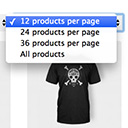
Products Per Page for WooCommerce is a easy-to-setup plugin that integrates a 'products per page' dropdown on your WooCommerce pages.

By Pär Thernström
Get a tree view of all your pages directly in the admin menu. Search, add, edit, view, re-order – all is just one click away!

By Steve Truman
Places an icon, all time views count and views today count at the bottom of posts, pages and custom post types on any WordPress website.

By Denis Botić
Display number of visits for each page in admin dashboard and browser developer-tool/console. Doesn't count page refresh as a new visit...

By Jb Audras
Build your HTML site map page easily and manually with WordPress native menus.

By themefusecom
A page builder that is fast & easy, Brizy is a next-gen website builder that anyone can use. No designer or developer skills required.

By Mongoose Marketplace
The most popular way to display the Facebook Page Plugin on your WordPress website. Easy implementation using a shortcode or widget.
CHOOSE WHAT YOUR WEBSITE NEEDS
Start with the task you need to solve. Compare features, WordPress and PHP requirements, update history and the author’s documentation. Test changes on a private copy and avoid adding several plugins for the same job.
This independent directory displays plugin information on WebFulHost and links to the official source. Packages are not mirrored or installed here. A plugin can include paid extensions or services with separate terms from its author.
