

Duplicate Post RB makes it easy to duplicate posts, pages and custom post types. Create duplicate posts, clone content, automate duplication
★ 4.7/5 (7)6,000+ active installations
- Version
- 2.5.1
- WordPress
- 5.0+
- Updated
- 6 Nov 2026
WORDPRESS RESOURCES
Explore public plugin information from the official WordPress.org directory. Compare what a plugin does, its requirements and update history before adding it to your website.
Explore WordPress hosting →837 matching plugins reported by WordPress.org · Page 1 of 50
Source: WordPress.org
Data refreshed 19 Nov 2026 17:31 UTC
Duplicate Post RB makes it easy to duplicate posts, pages and custom post types. Create duplicate posts, clone content, automate duplication

By robosoft
Robo Gallery is a powerful image gallery and photo gallery plugin with advanced features to create responsive galleries with a beautiful lightbox

By FAKTOR VIER
This plugin adds a neat and easy to use sidebar tree view to your posts and pages backend.
PublishPress Planner has all the tools you need to plan WordPress content including a Content Calendar, Content Overview, and Kanban Board.
Add icons to WordPress navigation menus easily — pick from Font Awesome, Dashicons, image icons & more. Style menu items with custom colors & sizes.

By JetixWP Plugins
Really Simple Featured Video lets you add product video & featured video to WooCommerce Products & Posts, Pages, CPTs (with featured images) a …
By Felix W.
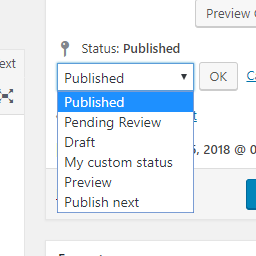
Add new statuses to all post types (posts, pages, products, ...).

By Franky
Manage and display (recurring) events, memberships, locations and maps, volunteers, widgets, RSVP, ICAL and RSS feeds, payment gateways. SEO ready.

By Michael Adams (mdawaffe)
Keeps WordPress from sending pings to your own site.

By Matt Pramschufer
Sell Pages/Posts through WooCommerce 2.6+ quickly and easily. Tested up to WooCommerce Version 11.2.x
Export WordPress pages, posts, and custom post types to clean static HTML or PDF files in one click. Create fast, secure static versions of your WordP …
Build a list or grid layout of any post type (posts, products, pages + more).
CHOOSE WHAT YOUR WEBSITE NEEDS
Start with the task you need to solve. Compare features, WordPress and PHP requirements, update history and the author’s documentation. Test changes on a private copy and avoid adding several plugins for the same job.
This independent directory displays plugin information on WebFulHost and links to the official source. Packages are not mirrored or installed here. A plugin can include paid extensions or services with separate terms from its author.



