PublishPress Future can make scheduled changes to your content. You can unpublish posts, move posts to a new status, update the categories, and more.
★ 4.5/5 (173)100,000+ active installations
- Version
- 4.11.2
- WordPress
- 6.8+
- PHP
- 7.4+
- Updated
- 22 Oct 2026
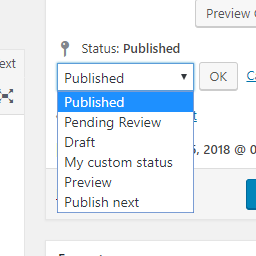
View plugin details ↗Add new statuses to all post types (posts, pages, products, ...).
★ 4.5/5 (11)1,000+ active installations
- Version
- 1.1.1
- WordPress
- 5.0+
- PHP
- 7.2+
- Updated
- 1 Sep 2026
View plugin details ↗Notify on every post change: Flexible rules, custom placeholders and support for all post types and taxonomies.
★ 3.9/5 (17)700+ active installations
- Version
- 1.13.1
- WordPress
- 5.5+
- PHP
- 8.1+
- Updated
- 29 May 2026
View plugin details ↗The Events Calendar: #1 calendar plugin for WordPress. Create/manage events (virtual too!) on your site with the free plugin.
★ 4.2/5 (2,467)600,000+ active installations
- Version
- 6.18.4.1
- WordPress
- 6.9+
- PHP
- 7.4+
- Updated
- 19 Nov 2026
View plugin details ↗Export html page from Tilda.cc for import to your WordPress site into post or page.
★ 3.4/5 (5)700+ active installations
- Version
- 0.3.29
- WordPress
- 3.0.1+
- PHP
- 5.6+
- Updated
- 13 Aug 2026
View plugin details ↗The best anti-spam protection to block spam comments and spam in a contact form. The most trusted antispam solution for WordPress and WooCommerce.
★ 4.7/5 (1,186)5,000,000+ active installations
- Version
- 5.7.2
- WordPress
- 5.8+
- PHP
- 7.2+
- Updated
- 18 Aug 2026
View plugin details ↗Enable users to submit posts and manage profiles from the front-end. Ideal for news, magazines, and creative platforms.
★ 4.6/5 (7)4,000+ active installations
- Version
- 2.8.0
- WordPress
- 6.3+
- PHP
- 7.4+
- Updated
- 9 Nov 2026
View plugin details ↗Publish and manage student exam results for schools, colleges, and universities with an easy-to-use WordPress result management system.
★ 5.0/5 (1)50+ active installations
- Version
- 1.2.3
- WordPress
- 5.0+
- PHP
- 7.4+
- Updated
- 11 Oct 2026
View plugin details ↗The PublishPress Statuses plugin allows you to create additional statuses for your posts. You can use each status to create publishing workflows.
★ 5.0/5 (4)1,000+ active installations
- Version
- 1.3.8
- WordPress
- 5.5+
- PHP
- 8.2+
- Updated
- 20 Nov 2026
View plugin details ↗The permissions plugin for posts, pages, categories, tags and more. You can control permissions for roles, individual users, and even custom groups.
★ 4.3/5 (66)10,000+ active installations
- Version
- 5.0.2
- WordPress
- 5.5+
- PHP
- 8.2+
- Updated
- 20 Nov 2026
View plugin details ↗PublishPress Planner has all the tools you need to plan WordPress content including a Content Calendar, Content Overview, and Kanban Board.
★ 4.9/5 (178)6,000+ active installations
- Version
- 4.9.0
- WordPress
- 5.5+
- PHP
- 8.2+
- Updated
- 16 Nov 2026
View plugin details ↗MCP server for WordPress. Connect Claude, ChatGPT, Cursor or any MCP client to manage content, themes and settings, with approvals.
★ 5.0/5 (221)100,000+ active installations
- Version
- 1.24.1
- WordPress
- 6.0+
- PHP
- 7.4+
- Updated
- 19 Nov 2026
View plugin details ↗