


Description
Init View Count is a fast, clean plugin to track post views without clutter. It:
- Uses REST API and JS to count real views
- Prevents duplicate counts with session/local storage
- Stores counts in meta keys like
_init_view_count,_init_view_day_count, etc. - Provides
[init_view_count]and[init_view_list]shortcodes - Includes
[init_view_ranking]shortcode with tabbed ranking by time range - Supports template overrides (like WooCommerce)
- Lightweight. No tracking, no admin bloat.
- Includes REST API to query most viewed posts
- Supports pagination in
[init_view_list]via thepageattribute - Batch view tracking support to reduce REST requests on busy sites
- Optional strict IP-based filtering to block fake view requests posted directly to the REST endpoint
- Includes a Dashboard widget to monitor top viewed posts directly in wp-admin
- Learns site-wide traffic shape (hourly & weekday) via AI-powered smoothing
- Shapes cached and updated efficiently with minimal overhead
- Safe reset action to rebuild patterns automatically
- Trending Engine v4: rolling 24-hour velocity, real hour-by-hour momentum and per-post uplift, measured in traffic-normalized hours so rankings stay accurate at any time of day
- Optional scroll area (CSS selector) so the scroll percent can be measured on the article itself instead of the whole page
- Native Block Editor (Gutenberg) support with 3 dedicated blocks, no build step required
- Abilities API support (WordPress 6.9+) — read-only abilities for AI agents and automation tools
- Optional “Reduce view count cache refreshes” mode for busy sites running a persistent object cache (Redis, Memcached)
- Optional “Buffer view writes in the object cache” mode for very busy sites: views are collected in Redis/Memcached and written to the database in batches, with zero database writes per view
This plugin is part of the Init Plugin Suite — a collection of minimalist, fast, and developer-focused tools for WordPress.
GitHub repository: https://github.com/brokensmile2103/init-view-count
Highlights
- REST-first design — no jQuery or legacy Ajax
- View tracking powered by time + scroll detection
- Realtime display with optional animated counters
- Fully theme-compatible with overrideable templates
- Developer-friendly with rich filter support
- Optional
[init_view_ranking]shortcode for tabbed view by day/week/month/total - Assets are only loaded when needed – perfect for performance-conscious themes
- Fully compatible with headless and SPA frameworks (REST-first + lazy)
- Supports batch mode: delay view requests and send in groups (configurable in settings)
- Includes optional Dashboard widget for quick admin overview of top viewed posts
- AI-powered Traffic Shape Learner – understands your site’s hourly & weekly rhythm
- Auto-integrated with Trending Engine v4 for seasonality-aware uplift detection
- Smart fallbacks (day → week → month → total) ensure rankings never run empty
- Ultra-light: only 1 write per increment + 1 rollup per day, cache-first design
Shortcodes
[init_view_count]
Shows the view count of the current post, or of any post via the id attribute.
Attributes:
– id: Post ID to display (default: the current post)
– field: total (default), day, week, month – which counter to display
– format: formatted (default), raw, or short – controls number formatting
– time: true to show time diff from post date (e.g. “3 days ago”)
– icon: true to display a small SVG icon before the count
– schema: true to output schema.org microdata (InteractionCounter)
– class: add a custom CSS class to the outer wrapper
[init_view_list]
Show list of most viewed posts.
Attributes:
– number: Number of posts to show (default: 10)
– page: Show a specific page of results (default: 1)
– post_type: Type of post (default: post)
– template: sidebar (default), full, grid, details (can be overridden)
– title: Title above list. Set to empty (title="") to hide
– class: Custom class added to wrapper
– orderby: Sort field (default: meta_value_num)
– order: ASC or DESC (default: DESC)
– range: total, day, week, month, trending
– category: Filter by category slug
– tag: Filter by tag slug
– empty: Message to show if no posts found
[init_view_ranking]
Show tabbed ranking of most viewed posts. Uses REST API and JavaScript for dynamic loading. Optimized for SPA/headless usage.
Attributes:
– tabs: Comma-separated list of ranges. Available: total, day, week, month, yesterday, last_week, last_month (default: total,day,week,month)
– number: Number of posts per tab (default: 5)
– post_type: Comma-separated post type(s) to rank (default: post and page)
– class: Custom class for outer wrapper
This shortcode automatically enqueues required JS and uses skeleton loaders while fetching data.
REST API
This plugin exposes two REST endpoints to interact with view counts: one for recording views and another for retrieving top posts.
POST /wp-json/initvico/v1/count
Record one or more views. Accepts a single post ID or an array of post IDs.
Parameters:
– post_id — (int|array) Required. One or more post IDs to increment view count for.
This endpoint checks if the post is published, belongs to a supported post type, and applies delay/scroll config (via JavaScript). It updates total and optionally day/week/month view counters.
Note: The number of post IDs processed per request is limited based on the batch setting in plugin options.
Optional: if “Require REST nonce verification?” is enabled in plugin settings, this endpoint also requires a valid X-WP-Nonce header (action wp_rest). This is off by default — see the FAQ below before turning it on.
GET /wp-json/initvico/v1/top
Retrieve the most viewed posts, ranked by view count.
Parameters:
– range — (string) total, day, week, month, yesterday, last_week, last_month, trending. Defaults to total.
– post_type — (string) Comma-separated post type(s) to query. Only existing, publicly viewable post types are accepted. Defaults to post and page.
– number — (int) Number of posts to return. Default: 5, maximum 100 (filterable via init_plugin_suite_view_count_api_top_max_number).
– page — (int) Page number. Default: 1.
– fields — (string) minimal (id, title, link) or full (includes excerpt, thumbnail, type, date, etc.)
– tax — (string) Optional. Taxonomy slug (e.g. category).
– terms — (string) Comma-separated term slugs or IDs.
– no_cache — (bool) If 1, disables transient caching.
This endpoint supports filtering and caching, and can be extended to support custom output formats.
Filters for Developers
This plugin provides multiple filters to help developers customize behavior and output in both REST API and shortcode use cases.
init_plugin_suite_view_count_should_count
Allow or prevent counting views for a specific post.
Applies to: REST /count
Params: bool $should_count, int $post_id, WP_REST_Request $request
init_plugin_suite_view_count_meta_key
Change the meta key used to read or write view counts.
Applies to: REST & Shortcodes
Params: string $meta_key, int|null $post_id
init_plugin_suite_view_count_after_counted
Run custom logic after view count has been incremented. Fires once per counted view in every mode. With Buffer view writes in the object cache on, the values in $updated (total, day, week, month) are “stored in the database + still buffered”, so they keep increasing by one per view exactly as before.
Applies to: REST /count
Params: int $post_id, array $updated, WP_REST_Request $request
init_plugin_suite_view_count_increment_keys
Change which counters are incremented for a post on each view, as a field => meta key map (default: total, plus day/week/month when enabled). Remove fields you don’t need for a post type, or add custom field => meta key pairs to have them incremented in the same write. total is always kept. Only total, day, week and month appear in the response and in $updated.
Applies to: REST /count
Params: array $fields, int $post_id, WP_REST_Request $request
init_plugin_suite_view_count_api_top_args
Customize WP_Query arguments used for /top endpoint.
Applies to: REST /top
Params: array $args, WP_REST_Request $request
init_plugin_suite_view_count_api_top_item
Modify each item before it’s returned in the /top response.
Applies to: REST /top
Params: array $item, WP_Post $post, WP_REST_Request $request
init_plugin_suite_view_count_api_top_cache_time
Adjust cache time (in seconds) for /top results.
Applies to: REST /top
Params: int $ttl, WP_REST_Request $request
init_plugin_suite_view_count_api_top_max_number
Maximum number of items /top returns per request (default 100).
Applies to: REST /top
Params: int $max, WP_REST_Request $request
init_plugin_suite_view_count_ip_headers
List of $_SERVER keys checked, in order, to detect the visitor IP for Strict IP check.
Applies to: REST /count (Strict IP check)
Params: array $headers
init_plugin_suite_view_count_meta_flush_interval
Minimum number of seconds between two refreshes of a post’s meta cache after counting views, when Reduce view count cache refreshes is enabled and a persistent object cache is active. Return 0 to refresh after every view.
Applies to: REST /count
Params: int $interval (already clamped to the 10–600 range of the setting)
init_plugin_suite_view_count_buffer_enabled
Turn off Buffer view writes in the object cache for the current request (return false). It cannot force buffering on when the setting is off or no working persistent object cache is available.
Applies to: View counting
Params: bool $enabled
init_plugin_suite_view_count_buffer_backend_status
Status of the object cache for buffering: ok, no_object_cache, unavailable (e.g. Redis is down), non_atomic (e.g. Redis Object Cache with igbinary) or non_persistent (the plugin’s cache group is ignored/non-persistent). Anything other than ok makes views go straight to the database. Useful if your drop-in has its own way of reporting a lost connection.
Applies to: View counting
Params: string $status
init_plugin_suite_view_count_buffer_flush_interval
Seconds between two writes of buffered views to the database.
Applies to: Buffer flush job
Params: int $interval (already clamped to the 30–600 range of the setting)
init_plugin_suite_view_count_buffer_flush_time_limit
Maximum seconds one buffer write may run (default 20, capped at 240). Anything left is written on the next run.
Applies to: Buffer flush job
Params: int $time_limit, string $context
init_plugin_suite_view_count_buffer_flushed (action)
Runs after each write of buffered views to the database.
Applies to: Buffer flush job
Params: array $summary (context, items, views, post_ids, increments as meta_key => [ post_id => views ], requeued, remaining, cleaned, duration)
init_plugin_suite_view_count_top_post_types
Customize the list of post types returned by the /top endpoint.
Applies to: REST /top
Params: array $post_types, WP_REST_Request $request
init_plugin_suite_view_count_query_args
Filter WP_Query args for [init_view_list] shortcode.
Applies to: [init_view_list]
Params: array $args, array $atts
init_plugin_suite_view_count_empty_output
Customize the HTML output when no posts are found.
Applies to: [init_view_list]
Params: string $output, array $atts
init_plugin_suite_view_count_view_list_atts
Modify shortcode attributes before WP_Query is run.
Applies to: [init_view_list]
Params: array $atts
init_plugin_suite_view_count_default_shortcode
Customize the default shortcode used when auto-inserting view count into post content.
Applies to: [init_view_count] auto-insert
Params: string $shortcode
init_plugin_suite_view_count_auto_insert_enabled
Control whether auto-insert is enabled for a given context.
Applies to: [init_view_count] auto-insert
Params: bool $enabled, string $position, string $post_type
init_plugin_suite_view_count_engagement_meta_keys
Change the meta keys used to retrieve like and share counts when calculating engagement quality.
Applies to: Engagement algorithm
Params: array $meta_keys (likes, shares), int $post_id
init_plugin_suite_view_count_trending_post_types
Override the list of post types used by the Trending cron calculation.
Applies to: Cron Trending
Params: array $post_types
init_plugin_suite_view_count_trending_component_weights
Adjust weights for Trending score components. Each weight is an exponent on its component (0 turns it off, 1 = default), except ewma (share of the hour-by-hour velocity versus the 24-hour velocity; 1 = 65%), explore (1 = 5% chance of inserting 1–2 promising posts; default 0 since 2.0.6) and mmr (topic diversity; 1 = lambda 0.75).
Applies to: Trending algorithm
Params: array $weights (velocity, engagement, freshness, momentum, uplift, ewma, fatigue, explore, mmr)
init_plugin_suite_view_count_trending_tuning
Fine-tune Trending Engine v4 (since 2.0.6). Keys and defaults: velocity_exponent (1.0; lower compresses the gap between busy and quiet posts, 0 = log like before 2.0.6), prior_hours (2), hot_half_life (3 hours), uplift_smoothing (10 views/day), uplift_min/uplift_max (0.75/2.0), freshness_boost (0.25), freshness_half_life (6 hours), engagement_max (0.5), age_grace (2 hours), age_half_life (72 hours), age_floor (0.5; 1 = no age penalty).
Applies to: Trending algorithm
Params: array $tuning
init_plugin_suite_view_count_trending_recent_comments_days
Number of days of approved comments counted as engagement (default 7, one grouped query per run). Return 0 to use the lifetime comment count without any query, like before 2.0.6.
Applies to: Trending algorithm
Params: int $days
init_plugin_suite_view_count_trending_yesterday_candidates
How many of yesterday’s most viewed posts are added to the Trending candidates (default: half of init_plugin_suite_view_count_trending_limit).
Applies to: Cron Trending
Params: int $number
init_plugin_suite_view_count_scroll_target
Change the CSS selector of the scroll area for the current page ('' = whole page). Runs when the front-end script is set up, so it can depend on the post or template.
Applies to: Front-end view counting
Params: string $selector
init_plugin_suite_view_count_shape_sample_rate
Sample rate N used when Sample Traffic Shape writes is enabled: traffic shape data is recorded from 1 in N view requests, each sample weighted N times. Return 1 to record every request.
Applies to: Traffic Shape Learner
Params: int $rate (already clamped to the 2–100 range of the setting)
Functions for Developers
init_plugin_suite_view_count_increment_meta( $post_id, $meta_keys )
Add one view to several counters of a post. Uses the object cache buffer when Buffer view writes in the object cache is active, otherwise one atomic database UPDATE (exactly like the built-in counter). Use it when your theme or plugin counts views for a related post (e.g. a chapter also counting toward its series), so that it benefits from buffering too. Returns array( 'buffered' => bool, 'pending' => array( meta_key => views still buffered ) ).
init_plugin_suite_view_count_get_pending_views( $post_id, $meta_key = '_init_view_count' )
Views of a post/counter still waiting in the buffer (0 when buffering is off). get_post_meta() + this value gives the live number.
init_plugin_suite_view_count_buffer_flush( $args = array() )
Write all buffered views to the database now. Safe to call at any time; returns a summary array, or false when there is nothing it can do (no persistent object cache, or another write is running).
Template Override
To customize output layout, copy any template file into your theme:
Example: your-theme/init-view-count/view-list-grid.php
License
This plugin is licensed under the GPLv2 or later.
You are free to use, modify, and distribute it under the same license.
Installation
- Upload plugin to
/wp-content/plugins/init-view-count/ - Activate via Plugins menu
- Use
[init_view_count]or[init_view_list]in your content - Customize settings in Settings → Init View Count
FAQ
Can I customize the layout of the list?
Yes. Use the template attribute in [init_view_list] (e.g. template="grid"), and override the corresponding file in your theme like WooCommerce templates.
Does it work with custom post types?
Yes. Just set post_type="your_custom_type" in the shortcode or REST query.
How does it avoid duplicate views?
Init View Count uses both time delay and scroll detection via JavaScript, and stores viewed post IDs in either sessionStorage or localStorage (your choice).
Why are very few (or no) views counted when “Scroll percent required” is high?
By default the percentage is measured on the whole page, comments and footer included. At 100%, a view only counts when the reader scrolls to the very last pixel of the page, which most readers never do. Before 2.0.6 it could even be impossible: on zoomed or high-density screens browsers often stop scrolling a fraction of a pixel before the end, so 100% was never reached. Since 2.0.6 the last 2 pixels count as the end, and you can set Scroll area (CSS selector), for example .entry-content, so the percentage is measured on the article itself: 100% then means the end of the article has appeared on screen. If the selector matches nothing on a page, that page falls back to the whole page. An area that already fits on screen only counts once the page has finished loading (since 2.0.7).
How is Trending calculated?
Every hour, Trending Engine v4 looks at today’s top posts, yesterday’s top posts and the current Trending list. For each post it estimates the views of the last 24 hours (today’s views plus the matching part of yesterday’s), how many views it really got in the last hour (from the change in its total views since the previous run, smoothed over a few hours), and its usual level from this and last week (or month). All rates are measured in “traffic-normalized hours”, using the hourly and weekday pattern learned from your site, so a post published at 3 AM is not penalized against one published at 8 PM. The score is views per day, multiplied by the uplift over the post’s own usual level, recent engagement (comments in the last 7 days, likes/shares), a small boost for new posts, a gentle age factor and topic momentum, followed by the existing anti-spike, fatigue and diversity steps. Everything can be tuned with the init_plugin_suite_view_count_trending_tuning and init_plugin_suite_view_count_trending_component_weights filters.
Is the view count updated immediately?
Yes, by default. When the scroll+delay conditions are met, the count is sent via REST API and saved with a single atomic database update. If you enable Reduce view count cache refreshes, views are still written to the database immediately, but the numbers displayed on your site may lag behind by up to the configured interval (see below). If you enable Buffer view writes in the object cache, views are written to the database in batches once per interval; the number returned right after a view is counted is always up to date.
What meta key is used to store views?
By default:
– _init_view_count (total)
– _init_view_day_count
– _init_view_week_count
– _init_view_month_count
These keys can be changed via the init_plugin_suite_view_count_meta_key filter.
Trending scores are calculated separately and stored in a transient.
Can I display view counts in my template manually?
Yes. Use get_post_meta($post_id, '_init_view_count', true) or similar keys. Or use [init_view_count] shortcode in post content.
Can I disable the built-in CSS?
Yes. There is an option in the plugin’s settings to disable the default stylesheet. You can style the output manually as needed.
Is it compatible with caching plugins?
Yes. Since it uses JavaScript + REST for counting, page caching doesn’t interfere. However, REST responses (/top) are cached using transients.
Can I use it in block editor / Gutenberg?
Yes — since version 2.0.0 there are 3 native blocks (search “View Count”, “Popular Posts List”, “View Ranking” in the block inserter, under the “Init View Count” category), each with its own settings panel and live preview. You can still use the classic Shortcode block with [init_view_count] / [init_view_list] / [init_view_ranking] if you prefer.
What is Abilities API support and do I need it?
Since version 2.0.0, on WordPress 6.9+ the plugin registers two read-only Abilities (init-view-count/get-post-views and init-view-count/get-top-posts) via the core Abilities API, so AI agents and automation tools can discover and query view-count data in a standardized way. This is entirely optional and has no effect on sites without the Abilities API (WordPress below 6.9) or on how the plugin otherwise works — no view/increment/reset ability is exposed.
Does it track bots?
No. Since counting only happens after scroll and delay via JavaScript, bots like Googlebot are naturally excluded.
Can I sort posts by views in WP_Query?
Yes. Use 'meta_key' => '_init_view_count' and 'orderby' => 'meta_value_num' in your WP_Query args.
Can I reduce the number of view requests sent to the server?
Yes. You can enable batch view tracking in the plugin settings. Instead of sending one request per view, views will be stored in the browser and sent in a group once the threshold is reached.
Should I enable “Reduce view count cache refreshes”?
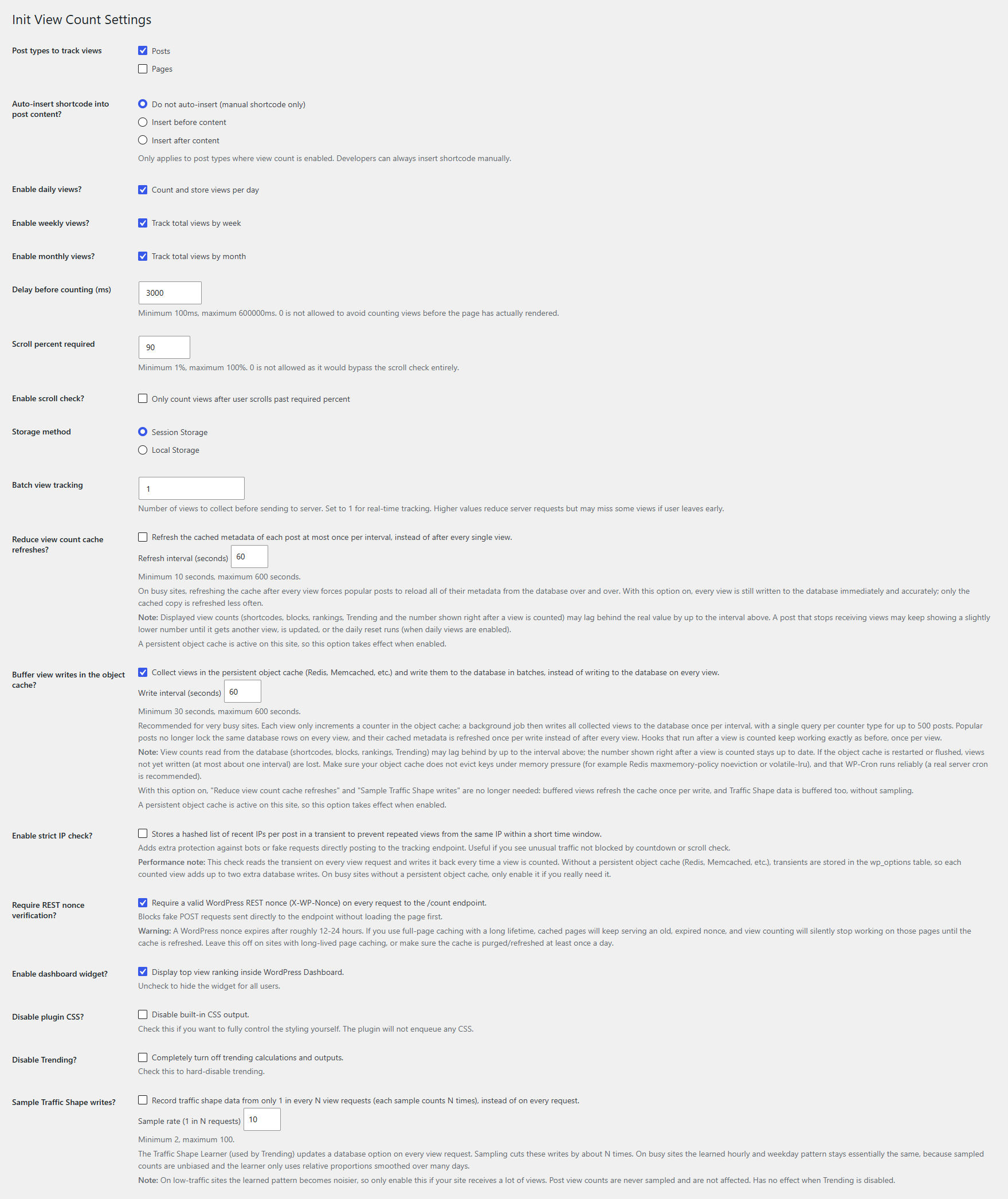
Only if your site uses a persistent object cache (Redis, Memcached, etc.) and gets a lot of traffic. By default, each counted view clears the cached metadata of that post, so a popular post has to reload all of its metadata from the database again and again. With this option on, each post’s cache is refreshed at most once per interval (60 seconds by default, 10–600 allowed). Every view is still written to the database right away and nothing is lost — only displayed numbers (shortcodes, blocks, rankings, Trending, the number shown after counting) may be slightly behind. A post that stops receiving views may keep showing a slightly lower number until it gets another view, is updated, or the daily reset runs (when daily views are enabled). Without a persistent object cache the option has no effect, and the settings page tells you so.
Should I enable “Buffer view writes in the object cache”?
Only if your site gets a lot of traffic and runs a working persistent object cache (Redis, Memcached, etc.). It is off by default. By default every counted view runs an UPDATE on wp_postmeta; on a very busy site, many visitors reading the same popular post update the same rows at the same time and queue up behind each other’s row locks. With this option on, each view only increments a counter in the object cache (an atomic in-memory operation), and a background WP-Cron job writes everything to the database once per interval (60 seconds by default, 30–600 allowed) using a single UPDATE per counter type for up to 500 posts, then refreshes each post’s meta cache once. Traffic Shape data is buffered too, exactly, without sampling.
Nothing changes for code that hooks into view counting: init_plugin_suite_view_count_after_counted still fires once per view with the same parameters, and its total/day/week/month values still increase by one per view. Numbers read from the database (shortcodes, blocks, rankings, Trending) may lag behind by up to the interval. Buffered views are always written before the daily reset, when the option is turned off, and when the plugin is deactivated, and you can write them at any time with Write buffered views now.
Memory use is small: about 200 bytes per post/counter pair that received views in the current hour. Counters of past hours are deleted from the object cache a few minutes after the hour ends, so the object cache only ever holds roughly one hour’s worth of counters.
Requirements and trade-offs: the object cache must increment counters atomically (Redis Object Cache, Object Cache Pro and the common Memcached drop-ins do; the plugin runs a self-test before the option can be turned on, and automatically falls back to direct database writes while Redis is unreachable, when Redis Object Cache uses igbinary, or when the plugin’s cache group is configured as non-persistent). If the object cache is restarted or flushed, views not yet written (at most about one interval) are lost. Configure Redis with maxmemory-policy noeviction or volatile-lru so buffered counters are never evicted, and make sure WP-Cron runs reliably. A real server cron is recommended; if WP-Cron stops running, the plugin writes overdue views itself during a view request.
Should I enable “Sample Traffic Shape writes”?
Only on busy sites with Trending enabled. The Traffic Shape Learner (which teaches Trending your site’s hourly and weekday rhythm) updates a database option on every view request. With sampling on, it records only 1 in every N requests (10 by default, 2–100 allowed) and counts each sample N times, so it writes about N times less often while the expected numbers stay the same. On low-traffic sites the learned pattern becomes noisier, so leave it off there. Post view counts are never sampled.
Does “Strict IP check” affect performance?
A little. It reads a transient on every view request and writes it back every time a view is counted. With a persistent object cache (Redis, Memcached) that happens in memory. Without one, transients live in the wp_options table, so each counted view adds up to two extra database writes. On busy sites without a persistent object cache, only enable it if you really need it.
Should I enable “Require REST nonce verification”?
It’s optional and off by default. Enabling it makes the /count endpoint reject requests that don’t carry a valid WordPress REST nonce, which helps block fake POST requests sent directly to the endpoint. However, WordPress nonces expire after roughly 12-24 hours. If your site uses full-page caching with a long TTL, cached pages will keep serving an old nonce and view counting will quietly stop working on those pages until the cache refreshes. Leave it off on sites with long-lived page caching, or make sure the cache is purged/refreshed regularly. The /top endpoint is unaffected either way, since it’s read-only and public by design.
Screenshots


Changelog
2.0.7 – November 14, 2026
- Fix: when the scroll area (or the whole page) fit on screen at first load – images not loaded yet, content still a loading placeholder or inserted later – the scroll check passed immediately, so a view counted after the delay without any scrolling. This case now only counts once the page has finished loading and the layout has been stable for 1 second, and it is checked again right before sending, so content that grows in the meantime requires real scrolling
- Improvement: the script re-checks the scroll condition when images load or the measured area changes size (
ResizeObserver)
2.0.6 – November 14, 2026
- New: Scroll area (CSS selector) setting to measure the scroll percent on an element (e.g.
.entry-content) instead of the whole page. Empty = whole page, as before - Fix: a 100% scroll requirement could never be reached on zoomed/high-density screens (sub-pixel scroll stop)
- New: Trending Engine v4 – rolling 24-hour views, real hour-by-hour momentum, uplift vs. the post’s own usual level, traffic-normalized hours, correct day/week/month time windows. More accurate rankings, especially after midnight and for old posts going viral again
- Fix: the weekday traffic pattern was never learned correctly
- Performance: the Trending transient read on each page view is ~65% smaller
- New filters:
init_plugin_suite_view_count_trending_tuning,init_plugin_suite_view_count_scroll_target - Change: “Tested up to” removed from the main plugin file (kept in readme only)
2.0.5 – October 18, 2026
- Improvement: buffered view writes keep object cache memory minimal; drained counters are deleted right after the hour ends
- Improvement: buffered key expiry lowered from 2 days to 1 day
2.0.4 – October 18, 2026
- New: Buffer view writes in the object cache option for very busy sites (Redis/Memcached), with zero database writes per view and batched flushes
- New: filter
init_plugin_suite_view_count_increment_keysand helpersinit_plugin_suite_view_count_increment_meta(),init_plugin_suite_view_count_buffer_flush() - Fix: duplicate counter rows (and lost views) when the first views of a period arrived at the same moment
- Fix: Traffic Shape data for a new day could be wiped by late writes
2.0.3 – October 4, 2026
- New: Reduce view count cache refreshes option for sites with a persistent object cache
- New: Sample Traffic Shape writes option to cut Traffic Shape database writes on busy sites
- Docs: corrected outdated readme information
2.0.2 – September 26, 2026
- Security: Traffic Shape reset now requires
manage_optionsand a nonce;GET /toponly exposes public post types and capsnumberat 100; ranking script no longer usesinnerHTML - Fix: timezone bugs in daily/weekly/monthly reset, DST drift and Trending post age
- Fix: several front-end and block issues (multiple ranking blocks, blocked storage, subdirectory installs, block attributes)
- Performance: one atomic
UPDATEper view, minimal writes in the daily rollover, Trending run from ~590 to ~30 queries - Improvement: full uninstall cleanup, including multisite
2.0.1 – August 29, 2026
- Fix: day/week/month counters were never reset on sites that had not saved Settings
- Fix: delay/scroll values of
0were ignored; both are now clamped (100ms–10min, 1–100%) - Fix: scroll check could never pass on pages shorter than the viewport
- Performance: daily reset uses batched SQL instead of per-post queries
2.0.0 – August 4, 2026
- Breaking: requires WordPress 6.9
- New: Abilities API support (two read-only abilities)
- New: 3 native blocks – View Count, Popular Posts List, View Ranking
View full changelog (all versions): Init View Count – Changelog