


Description
Logicoo Form is a form builder for WordPress, developed by Logicoo.dev. Build contact, registration, quote, order and booking forms with a visual builder, split them into several pages, show or hide fields with conditional logic, calculate totals automatically and keep every submission in a dedicated, easy-to-use entries screen.
Every form works with plain HTML first: JavaScript only adds enhancements (step navigation, live summary, drag and drop uploads), so a form can still be filled in and submitted when JavaScript is disabled (except forms that use reCAPTCHA or a digital signature, see the FAQ). The plugin makes no remote calls by default and contains no tracking or telemetry. When it is uninstalled it removes its tables, forms, settings and stored files, unless you choose to keep them.
Features
- Visual form builder (meta box in the form editor): multiple pages that can be reordered and shown or hidden with conditions, drag and drop field ordering, column widths, AND/OR conditional logic between fields, field descriptions with links and bold or italic text, and a warning before leaving the page with unsaved changes.
- Field types: text, email, textarea, select, checkbox, radio buttons, two-column text, phone number, website (URL), date (typed or with a calendar, a single day or a date range), time, quantity, rating (stars or slider), total, total quantity, file upload, digital signature, hidden, section, free HTML and repeatable group.
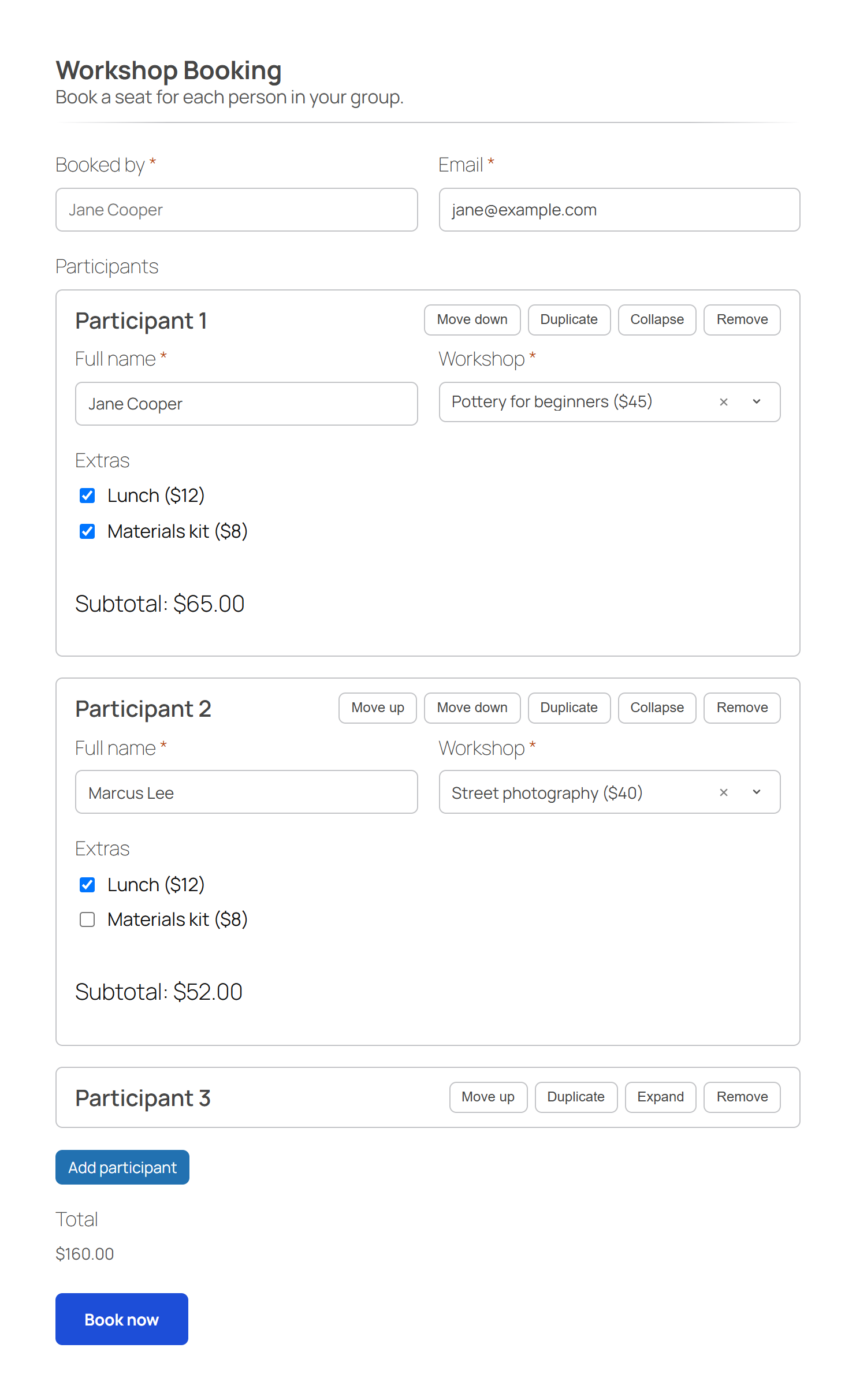
- Repeatable groups (enabled per form): visitors add the same group of fields as many times as they need, for example one block per participant, product or contact, within a minimum and maximum you choose. Each item can be moved, duplicated, collapsed or removed, and each of these buttons except Remove can be hidden per group; the Add button can span the full width. Totals, conditions, notifications, PDF, CSV export, summary and “Save and continue later” handle every item, with an optional subtotal per item. Adding and removing items also works without JavaScript.
- Works without JavaScript: a single server-side submission handler processes AJAX and classic POST submissions in exactly the same way; after an error the form comes back with the answers filled in and each error next to its field. JavaScript progressively adds step navigation, page-by-page validation, the attachment dropzone and the +/- quantity buttons. Forms with reCAPTCHA or a digital signature field require JavaScript.
- Email notifications: several independent notifications per form, with fixed addresses and addresses taken from form fields in the recipient, Cc and Bcc, Reply-To, placeholders (
{field_id},{ref},{all_fields},{summary},{entry_status}) and AND/OR sending conditions. Each notification is sent when the entry is saved, when it is confirmed or when it is cancelled. Uploaded files are attached by default only to notifications sent to fixed addresses; the generated PDF can be attached to any notification. - Calendar events (.ics): a notification can attach the event of the entry (date and time from the form, title, place and description you choose). Google Calendar, Outlook and Apple Calendar add it as an invitation, and the notification sent when the entry is cancelled removes it. After sending, an optional “Add to calendar” link lets the visitor download the event.
- Entries screen: paginated list with a search box (it finds words in the answers, the reference and the entry number, and updates the list while you type), filters by form, by category and by status, single and bulk deletion, details window, a direct link to each entry and CSV export. The details window downloads every attachment, signature and PDF of an entry in one ZIP file (requires the PHP zip extension, available on almost every hosting).
- Numeric values and “Total” field: assign a numeric value to each option of a select, checkbox or radio field, or a price to a Quantity field; a dedicated Total field sums the selected values (optionally multiplied by a linked Quantity field) with a live preview while the visitor fills in the form. The saved total is always recalculated on the server.
- Quantity-based pricing: price tiers per option or per Quantity field (per unit, progressive or package price), applied automatically in the Total field.
- Bookings with limited places: the Date field can show a calendar with only the days you allow (minimum notice, booking horizon, weekdays off, excluded dates), for a single day or a check-in and check-out range. The options of a select, radio or checkbox field can have a limited number of places, also per day when linked to a Date field, with an optional limit per day and a field for the number of people. Visitors see the places left, and two visitors can never take the last place together: the second one gets a clear message and keeps the answers already given. The entries screen shows the places taken and can rebuild the counters.
- Entry statuses (enabled per form): every entry is Pending, Confirmed or Cancelled. Change the status of one or more entries from the entries screen, with a history of every change; cancelling an entry frees its places. Entries still pending, for example while a payment add-on waits for the payment, can be cancelled automatically after the delay you choose.
- Form categories (off by default, enabled in the Settings): put each form in a category, create categories from the form editor, and filter the form list and the entries by category.
- Live summary and review step: a real-time summary of the values entered, and a review of all answers before the final submission.
- PDF generation: optionally generate a PDF when a form is completed, with logo, custom header and footer text and the form fields (including the signature). Admins can download it from the entries screen and attach it to notification emails.
- Digital signature field: an interactive drawing area (mouse or touch); the image is stored in a dedicated protected folder, never in the public media library. See the FAQ about its legal value.
- Submission limits per form: a maximum number of submissions per IP address, anonymous session, registered user or overall, or a maximum cumulative value of a field, with a customizable message.
- Save and continue later: visitors can save an unfinished form and receive an email with a link to resume it before a configurable expiry date.
- Automatic cleanup (Autoclean): scheduled removal of entries older than a configurable number of days, including their uploaded files, signatures and PDFs. Off by default.
- Statistics page: views, submissions and conversion rate per form. Off by default; views are counted only while it is on.
- Import / export: export and import the configuration of a form as JSON (structure, notifications, settings and submission limits) and export entries as CSV. An imported form is created as a draft.
- reCAPTCHA v2 / v3 by Google, enabled per form (see “External services” below).
- Rate limiting of successful submissions per IP address and form, with configurable threshold and window, and optional trusted proxies.
- Privacy tools integration: personal data export and erasure through the native WordPress privacy tools, plus an option not to store the sender’s IP address and browser user agent.
- Clean uninstall: removes the plugin tables, all forms (also in the trash), all settings and temporary data, and the protected folder with uploaded files, signatures and PDFs, on every site of a multisite network, with an explicit option to keep the data.
- Translation ready: every visible string uses the
logicoo-formtext domain; the source strings are in English, and translations are delivered by translate.wordpress.org.
External services
This plugin can make the following calls to external services. They are never enabled by default.
- Google reCAPTCHA (v2 or v3): if an administrator enables reCAPTCHA for a form, the visitor’s browser loads Google’s script from
https://www.google.com/recaptcha/...and the server sends a verification request tohttps://www.google.com/recaptcha/api/siteverify(the token generated by the widget and, unless IP anonymization is enabled in the plugin settings, the sender’s IP address). This only happens when the administrator has entered their own reCAPTCHA keys and enabled the feature on at least one form. Google’s Terms of Service and Privacy Policy apply.
The “Check protection” button in the “Status and Support” tab, when an administrator clicks it, requests one of the protection files of the private upload folder from the site’s own address, to tell whether the folder can be read from the web; nothing is sent to any other address.
No other remote calls, tracking or telemetry are present in the plugin. In particular, the plugin does not include any self-hosted update checker: updates are delivered exclusively through WordPress.org.
Privacy
Logicoo Form stores the submissions sent through the forms published on your site: the submitted values, the submission date, and the sender’s IP address and browser user agent (both can be disabled with one option in the plugin settings). If a form has a submission limit per registered user or per anonymous session, the user ID or a random browser identifier (stored in a first-party cookie) is saved with the entry. This data stays in the plugin’s table until an administrator deletes it manually, until it is removed by Autoclean if enabled, by a personal data erasure request, together with its form when the form is deleted permanently, or until the plugin is uninstalled (unless the administrator has explicitly chosen to keep the data).
The plugin integrates with the native WordPress privacy tools: a personal data export request for an email address finds every entry that contains it or that was sent by that registered user. An erasure request deletes the entries that belong to that person (the address is in the form’s identifying email field, by default the first Email field, or the entry was sent by that registered user) and, in entries of other people that mention the address, anonymizes only the address. WordPress keeps a whole personal data export in a single database value: for a person with thousands of entries (roughly 1,500 for every MB of the MySQL max_allowed_packet setting) WordPress may leave the later entries out of the export file without showing an error. Raising max_allowed_packet avoids it.
Uploaded files, signature images and generated PDFs are stored in a dedicated subfolder (logicoo-form-private/) that is never given a public URL: they can only be downloaded from the entries screen by an authenticated administrator with the required capability, or through a download link that an active add-on creates for one file, which works without signing in and expires after the time the add-on sets (at most 30 days). Logicoo Form itself never creates such links. The plugin writes deny-all protection files for Apache (.htaccess) and IIS (web.config) in that folder and restores them before every write; Nginx ignores those files, and Apache ignores .htaccess when the server configuration does not allow it (AllowOverride None): in those cases the matching rule shown in the “Status and Support” tab (Nginx or Apache) must be added to the server configuration. The “Check protection” button in that tab tells whether the folder can be read from the web. These files are deleted together with their entry and when the plugin is uninstalled, unless the administrator has chosen to keep the data.
If a form uses limited places, the plugin counts the places taken for each option and day and records which entry took them; the record is deleted with the entry, and the counters and records are removed when the plugin is uninstalled, unless the administrator has chosen to keep the data. If a form uses entry statuses, the status of each entry and a history of its changes (date, previous and new status and, for a change made in the entries screen, the ID of the user who made it) are stored with the entry and deleted with it.
A calendar invitation attached to a notification names the site’s sender address as organizer and the visible recipients of that notification (To and Cc, never Bcc) as attendees, and contains only the title, place and description chosen by the administrator. The file is written for a moment in the server’s temporary folder and deleted right after sending. The optional “Add to calendar” link shown after sending works for one hour and only for that entry; the file it downloads names no organizer or attendees.
To make entries searchable, the plugin keeps a plain text copy of the values of each entry in a dedicated table. The copy is updated when the entry changes or is anonymized, deleted together with the entry, and removed when the plugin is uninstalled, unless the administrator has chosen to keep the data.
After a submission without JavaScript, the outcome (and, after an error, the submitted values, to fill the form in again) is kept for at most 15 minutes and deleted as soon as the page shows it.
If a form has “Save and continue later” enabled, an unfinished submission can be temporarily stored together with the email address supplied by the visitor for sending the resume link. The draft is deleted when the form is submitted from its resume link, and otherwise by a daily cleanup when it expires.
Installation
- Upload the
logicoo-formfolder to the/wp-content/plugins/directory, or install the plugin from the Plugins screen in WordPress. - Activate the plugin through the Plugins screen.
- Go to Logicoo Form → Add New, build your form and publish it.
- Insert the form in any page or post with its shortcode (shown in the form list and in the form editor):
[logicoo_form id="123"].
FAQ
Does Logicoo Form send data to external services?
Only if an administrator explicitly enables reCAPTCHA for a form (see “External services” above). The “Check protection” button contacts only your own site. No tracking or telemetry is present.
What happens to the collected data when I uninstall the plugin?
The plugin tables, all forms, all plugin settings and the protected folder with uploaded files, signatures and PDFs are removed, on every site of a multisite network, unless the administrator of a site has enabled the option to keep the plugin data on uninstall in the Settings screen.
Does the form work when the visitor has JavaScript disabled?
Yes, for every form that has neither reCAPTCHA nor a “Digital signature” field enabled: the submission is processed in exactly the same way by the same server-side component used for JavaScript submissions. A form with reCAPTCHA enabled requires JavaScript, because of a limitation of the reCAPTCHA product itself; the same is true for a form with a “Digital signature” field, since the drawing area is an interactive <canvas> with no native HTML equivalent. “Save and continue later” is a progressive enhancement: the save button only appears when JavaScript is enabled, but its absence never prevents the form from being filled in and submitted normally. After a submission without JavaScript the visitor comes back to the same page: on success they see the confirmation message, otherwise the form is shown again with the answers already filled in and each error next to its field. Files must be selected again after an error, because browsers never keep them. Payment fields added by other plugins may require JavaScript.
Does the “Digital signature” field have legal value?
No, it is not a qualified electronic signature. Despite its name (chosen to be immediately understandable to the end user), this field captures a simple graphic stroke drawn with a mouse or touch. It is a simple electronic signature, not based on digital certificates or PKI infrastructure, and it does not meet the requirements of a qualified electronic signature (for example under the eIDAS regulation in the European Union). Its evidential value is limited to the graphic stroke itself plus the context metadata collected automatically with each submission (IP address, browser/user agent, date and time). Before using this field for documents that require legal evidential value (binding contracts, consents with specific regulatory requirements, and so on), check with a legal advisor whether this level of electronic signature is adequate for your use case.
Does PDF generation require anything special on the server?
The built-in PDF generator (the dompdf/dompdf library, bundled with the plugin: no additional download, no network calls) needs the PHP DOM and mbstring extensions, present on almost every hosting; without them no PDF is generated, and the submission is never blocked. If the server also has the PHP GD extension (available on almost all modern shared hosting), the generated PDFs embed the form logo and the digital signature as real images. If GD is not available, the document is still generated in full, with a short placeholder text instead of the image: a PDF is never missing and a submission is never blocked for this reason.
Can I accept payments or sell products with my forms?
Yes, with the free add-on Logicoo Form Payments & Shop, also published in the WordPress.org directory. It adds Stripe and PayPal payments (one-off and subscriptions) and an optional WooCommerce integration that creates orders from form submissions. Logicoo Form works fully on its own: the add-on is only needed if you want to collect payments.
Can visitors fill in the same fields several times, for example one block per participant?
Yes. Turn on “Repeatable fields” in the form’s Features settings, add a “Repeatable group” field and put the fields to repeat inside it. You choose the minimum and maximum number of items (the highest maximum is set in the plugin settings: 20, 50 or 100). Items added but left untouched beyond the minimum are not saved. Notifications can list every item ({all_fields}) or a single value with {group_id:N:field_id} (the form builder shows it ready to copy in the properties of each field of the group); the Reply-To can be an Email field of the group, from the first item or from all items. The entries screen, PDF and CSV export show one section or set of columns per item.
Can I take bookings for events with limited places?
Yes. Choose the calendar for a Date field and set the days visitors can pick, give the options of a select, radio or checkbox field a number of places (per day if you link the Date field) and turn on entry statuses in the form settings. Visitors see the places left and get a clear message if the last place is taken while they fill in the form. In the entries screen you confirm or cancel bookings, and a cancelled booking frees its places. Notifications can attach the event to add to the calendar, and send a second email when a booking is cancelled. With the free add-on Logicoo Form Payments & Shop, a booking waiting for its payment keeps its place and is confirmed when the payment succeeds.
Where can I get support?
Please use the support form on our website: https://logicoo.dev/wordpress-solutions/logicoo-form-support/ — it is the fastest way to reach the development team, and you can attach screenshots and your system report. Short questions are also welcome in the WordPress.org support forum, where we answer publicly.
Screenshots




Changelog
1.8.0
- New: calendar for the Date field. Choose which days visitors can pick (minimum notice, booking horizon, weekdays off, excluded dates, also every year) and whether they pick one day or a check-in and check-out range, with a minimum and maximum number of nights or days. The rules are checked again when the form is sent, also without JavaScript.
- New: limited places for the options of select, radio and checkbox fields, also per day of a linked Date field, with an optional limit per day and a field for the number of people. The form shows the places left; when two visitors want the last place at the same moment, only one gets it and the other sees a clear message with the answers kept. The entries screen shows the places taken and a Recount button rebuilds the counters.
- New: entry statuses (Pending, Confirmed, Cancelled), enabled per form. Change them from the entries screen, one entry or many at a time, filter the list by status and read the history of every change. Cancelling frees the places, restoring takes them again if they are still free, and pending entries can be cancelled automatically after a delay.
- New: notifications can be sent when the entry is saved, confirmed or cancelled, and use the
{entry_status}placeholder. The status is also in the CSV export, the PDF and the privacy tools. - New: calendar event (.ics) attached to a notification, added as an invitation by Google Calendar, Outlook and Apple Calendar and removed by the notification sent when the entry is cancelled. After sending, an optional “Add to calendar” link lets the visitor download the event for one hour.
- New: extension points for add-ons: notices in the form builder, hiding the price tiers in the forms of an add-on, a link from the form settings to the add-on panel, and changes to the calendar event before it is written.
- New: two database tables for the places, created automatically when the plugin is updated. Existing forms do not change until you turn on a calendar, places or statuses.
1.7.0
- New: search in Entries. Type words from the answers, the reference or the entry number: the list updates while you type, and with JavaScript disabled the Filter button gives the same result. All words must match, without regard to upper case, lower case or accents. The search works together with the form and category filters; the CSV export keeps following the form and category filters only.
- New: a direct address for each entry. It opens Entries with only that entry, its details window already open, and a link back to all entries; if the entry has been deleted, a notice says so. Add-ons use it to link their own records or alert emails to the entry they concern.
- New: form categories, off by default (Settings > General > “Enable form categories”). Choose or create a category in the form editor, manage categories from the Logicoo Form menu, and filter the form list and the entries by category. Categories travel with the form when it is exported and imported. Turning the option off hides categories without deleting them.
- New: “Hidden” field type, also inside repeatable groups. It is not shown to visitors, and its value is saved with the entry and shown in Entries, CSV export, notifications and privacy tools like any other field.
- New: extension points for add-ons that fill in forms with data from other systems or send entries to them: initial values of fields and repeatable groups, the options of select, radio and checkbox fields (checked again when the form is sent), time-limited download links for uploaded files, creating and updating entries, and reading the entries of a form one page at a time. Without such an add-on, forms and entries do not change.
- New: add-ons can make the values they store with an entry searchable in Entries.
- New: a database table for the search. It is created automatically when the plugin is updated and filled in the background for existing entries; until it is complete, the first search fills in the missing entries.
- Fixed: the tabs of the Settings screen stay on one line in every language, and their panel is no longer covered by the background that some other plugins add to admin pages.
1.6.2
- Fixed: a background task of an add-on (for example sending a contact to an email marketing service) could wait until the next form submission when another plugin was running its own scheduled tasks at the same moment, as WooCommerce does every minute. The waiting task now starts on the next page view.
- Fixed: the “Remove condition” button in the conditions of a notification had too little contrast with its background. It now looks like the other remove links of WordPress.
1.6.1
- Fixed: in a required Checkbox field with several options, the form could only be sent when the first option was checked. Any option is now enough, and a clear message asks to select at least one option when none is checked.
- Improved: screen readers announce a required Checkbox field as required on the whole group of options, not only on the first one.
1.6.0
- New: extension points for add-ons that send entries to other services, such as email marketing tools: a shared background queue that runs tasks a few seconds after a form is sent and retries them when the service does not answer (with WP-Cron, or with the
wp logicoo-form jobs runcommand when WP-Cron is disabled), encrypted storage for API keys, safe HTTPS requests, conditions on a saved entry and the same conditions editor as notifications in add-on panels. - New: an add-on can mark an entry as waiting, for example for a payment, so that other add-ons act only once it is confirmed.
- New: add-ons can add their own lines to the data of an entry in the personal data export (Tools > Export Personal Data).
- New: two database tables for the background queue. They are created automatically when the plugin is updated and removed with the plugin data.
- Note: API keys saved by add-ons are encrypted with a key taken from wp-config.php:
LOGICOO_FORM_SECRET_KEY(at least 32 characters) or, if it is not defined,SECURE_AUTH_KEYandSECURE_AUTH_SALT. Changing these keys makes saved API keys unreadable, and they must be entered again.
1.5.0
- New: extension points for add-ons such as quizzes and scoring: results calculated when a form is sent (shown in the entry details, CSV export and notification conditions), checks before an entry is saved, a custom message or address after sending, extra placeholders, PDF sections and attachments, changes to the form markup, columns, filters and bulk actions in Entries, form templates, and settings saved with a form.
- New: add-ons can show shared content in place of a form field, for example a question kept in a question bank, with the same validation, saving, notifications, PDF and Entries as any other field.
- New: add-ons can read a saved entry again, read the fields of a form on the server and the visitor IP address resolved with the “Trusted proxies” setting, and are told when a form is reopened from a “Save and continue later” link, for example to resume a quiz timer where it was.
- New: a form can require an add-on feature: when that add-on is not active, visitors see the “temporarily unavailable” notice and form managers see which add-on is missing.
- New: JavaScript events when a visitor starts filling in a form, sends it, saves it for later or resumes it.
- New: a database table for the values that add-ons store with each entry. It is created automatically when the plugin is updated and removed with the plugin data.
- New: conditions for a whole page. In the form builder, the “Conditions” button of a page (from the second page on) shows the page only when answers on earlier pages match, with the same rules as field conditions. Next and Back skip a hidden page, Submit appears on the last visible page and the progress bar counts only visible pages. The fields of a hidden page are not required, not saved and not included in notifications, PDF and totals. The builder warns when a page condition uses a field that is not on an earlier page, for example after the pages are reordered.
- New: in the form builder, pages can be reordered by dragging their handle or with the “Move page up” and “Move page down” buttons, which also work with the keyboard; screen readers announce the new position.
- New: field descriptions accept links, bold, italic and line breaks. In the form builder, the Bold, Italic and Link buttons above the description wrap the selected text; any other HTML is removed. Links that open in a new tab tell screen reader users so. Line breaks in existing descriptions now show on the form, and HTML tags typed in an existing description are now applied instead of being shown as text.
- New: when you edit a form and try to leave the page without saving, the browser asks you to confirm. This covers the builder, the form settings, notifications, submission limits and add-on panels; before, only a changed title was noticed.
- New: in the form builder, the properties of a field inside a repeatable group show its ID for one item,
{group_id:1:field_id}, ready to copy into notification recipients, subject and message. The hint under To, Cc and Bcc and the notice about group recipients now use an example with real IDs. - New: the Reply-To of a notification can be an Email field inside a repeatable group, from the first item or from all items (up to 10 addresses). The Reply-To menu no longer lists choices that can never give an address, such as the number of items of a group.
- New: the Support page mentions the AI assistant available on logicoo.dev.
- Fix: the progress bar of a multi-page form has the name “Form progress”, and screen readers read the same text as the visible progress line.
- Fix: the entry details window in Entries works with the keyboard: its content can be scrolled with the arrow keys, Tab stays inside the window and, when it closes, the focus goes back to the “Details” button that opened it.
- Fix: in the entry details window, screen readers read each page and group title in its place instead of repeating all titles as column headers on every cell.
- Fix: forms with long chains of conditions (a field or page that depends on fields that depend on others, and so on) no longer slow down the form page or the submission.
- Fix: in the form builder, a collapsed page stays collapsed when another page is moved or deleted (before, the collapsed state stayed with the position, not with the page).
1.3.1
- Fix: screen readers no longer read the whole live summary again after every change in a field. The summary box is now a named region with a level 2 heading (it was an
asidewith a level 3 heading); themes that style it through theasideorh3element selectors may need to use the.logicoo-form-summaryclasses. - Fix: the Total, Total quantity and item subtotals are announced by screen readers only when their value changes, not after every key press.
- Fix: in the form builder, clicking the icon of the “Copy field ID” button now copies the ID (before, only a click on the button border worked).
- Fix: in the form builder, two quick changes to the options of a field (for example a label typed and then a price or a tier) no longer lose the first change.
- New: the form builder shows the ID of each sub-field of a two-column text field, with its own copy button, to use in notifications.
- New: the recipient of an email notification accepts several form fields, also together with fixed addresses (for example
admin@example.com, {field_id}, {other_field_id}). - New: Cc and Bcc for email notifications, with the same format as the recipient. Uploaded files are attached by default only when all the recipients, Cc and Bcc included, are fixed addresses.
- New: a field of a repeatable group can be a recipient, Cc or Bcc for one item, with
{group_id:item:field_id}(for example{f111:1:f222}, wheref111is the group ID andf222the field ID). A notice after saving explains this when a group or one of its fields is used alone, which gives no recipient.
1.3.0
- New: repeatable groups, enabled per form: visitors add the same group of fields several times (one item per participant, product or contact), with minimum and maximum, move, duplicate, collapse and remove actions, and an optional subtotal per item. Totals, conditions, submission limits, notifications and placeholders, PDF, CSV export, summary, “Save and continue later”, privacy tools, form import and export, and file and signature fields all work with the items.
- New: options to hide the Duplicate, Collapse and Move buttons of a repeatable group and to make its Add button full width.
- New: “Download attachments” in the entry details window, one ZIP file with all the files, signatures and PDF of the entry. Status and Support reports when the PHP zip extension is missing.
- New: a “Features” section in the form settings, where add-ons can also offer options that are switched on per form.
- New: extension points for add-on field types inside repeatable groups.
1.2.0
- Changed: a form with a visible field of an add-on that is not active is no longer sent without that field. Visitors see a “temporarily unavailable” notice (instead of the whole form when the field is always shown), and form managers also see which field needs the add-on.
- New: a notice on the Logicoo Form admin screens lists the published forms affected by an inactive add-on.
1.1.0
- New: public extension points for add-ons: extra inputs and an extra information line saved with a field, values kept after an error without JavaScript, a “field” setting row in the builder, an admin menu hook, and JavaScript functions to start a form added after page load and to save and restore its answers.
- New: a notice in the builder for fields of an add-on that is not active.
- Fix: a star rating saved with “Save and continue later” is shown again when the visitor resumes the form.
- Changed: links to logicoo.dev point to the new /wordpress-solutions/ pages (old links are redirected).
1.0.0
- Initial release.