


Description
MRN Forms lets you build and style WordPress forms without a page builder. It includes a visual editor, an entry inbox, configurable email notifications, and Persian/English interfaces with automatic RTL/LTR layouts.
Product website | MRNWP | Source and issue tracker
Features
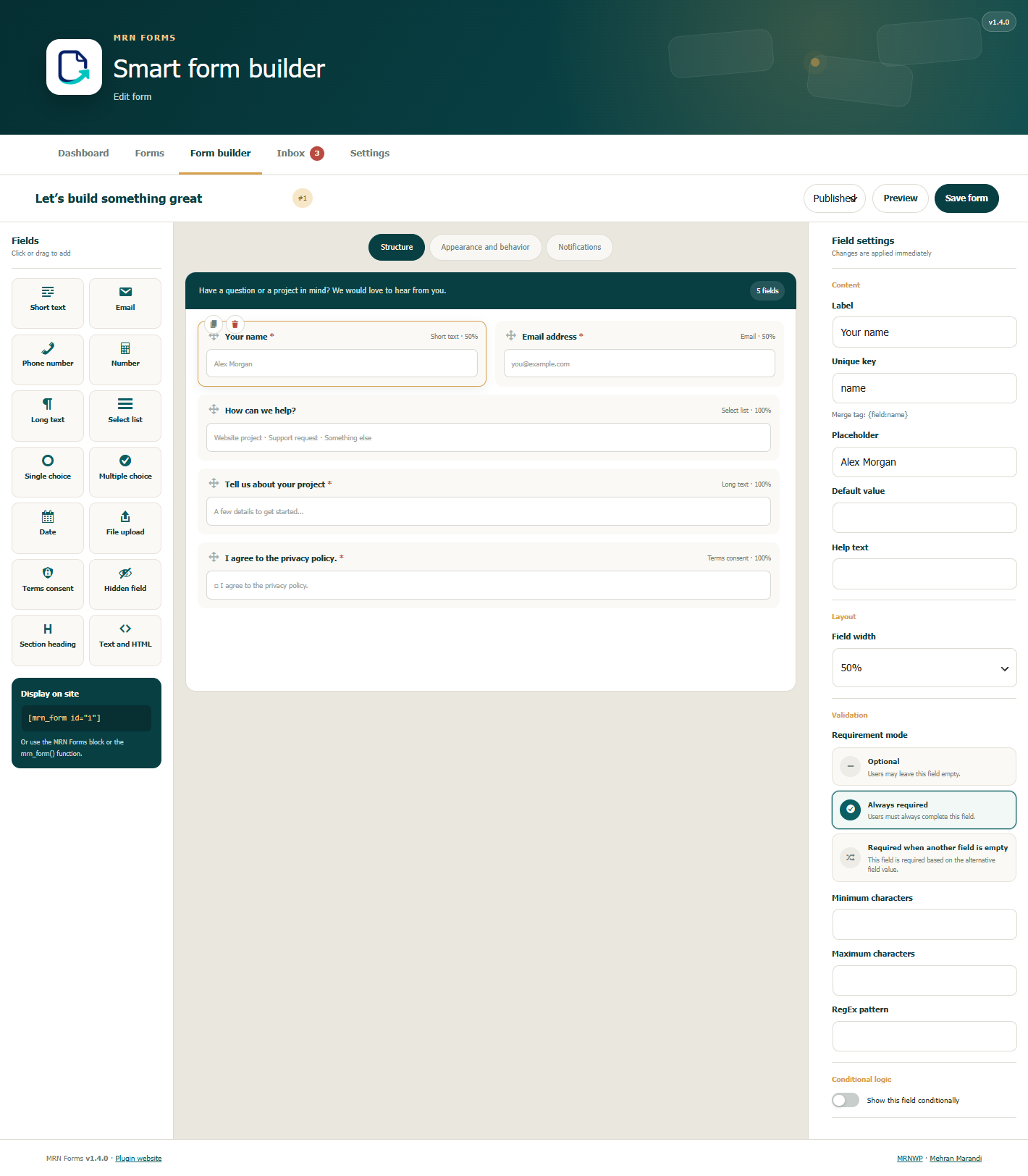
- Drag-and-drop form builder with live preview and fourteen field types.
- Field types include short text, email, phone, number, long text, select, radio, checkbox, date, file, consent, hidden, heading, and HTML.
- Conditional visibility and fields required when another field is empty.
- Client and server validation, honeypot protection, form nonces, and rate limits.
- Configurable field widths, labels, colors, spacing, and custom CSS classes.
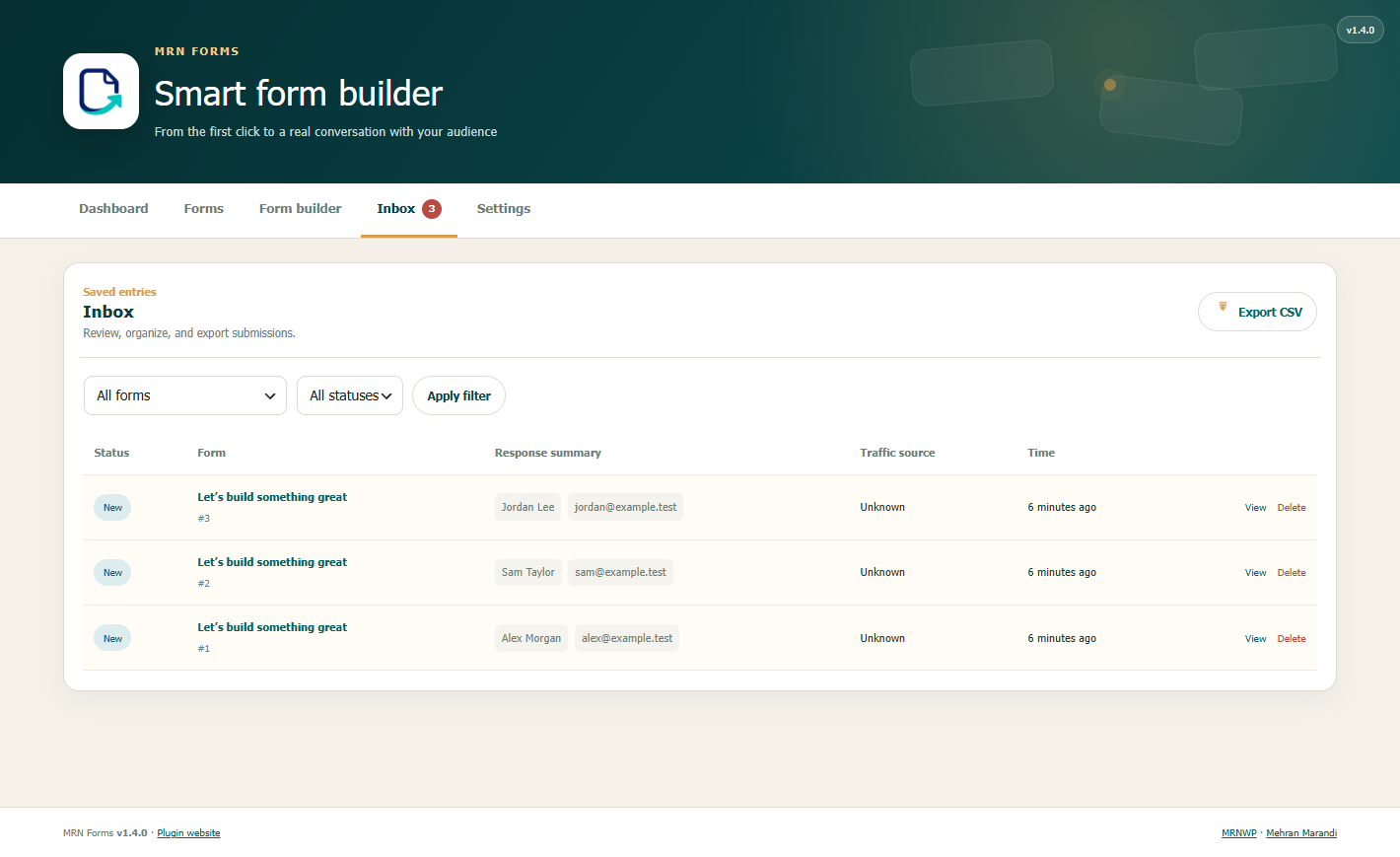
- Entry inbox, read/spam statuses, and CSV exports.
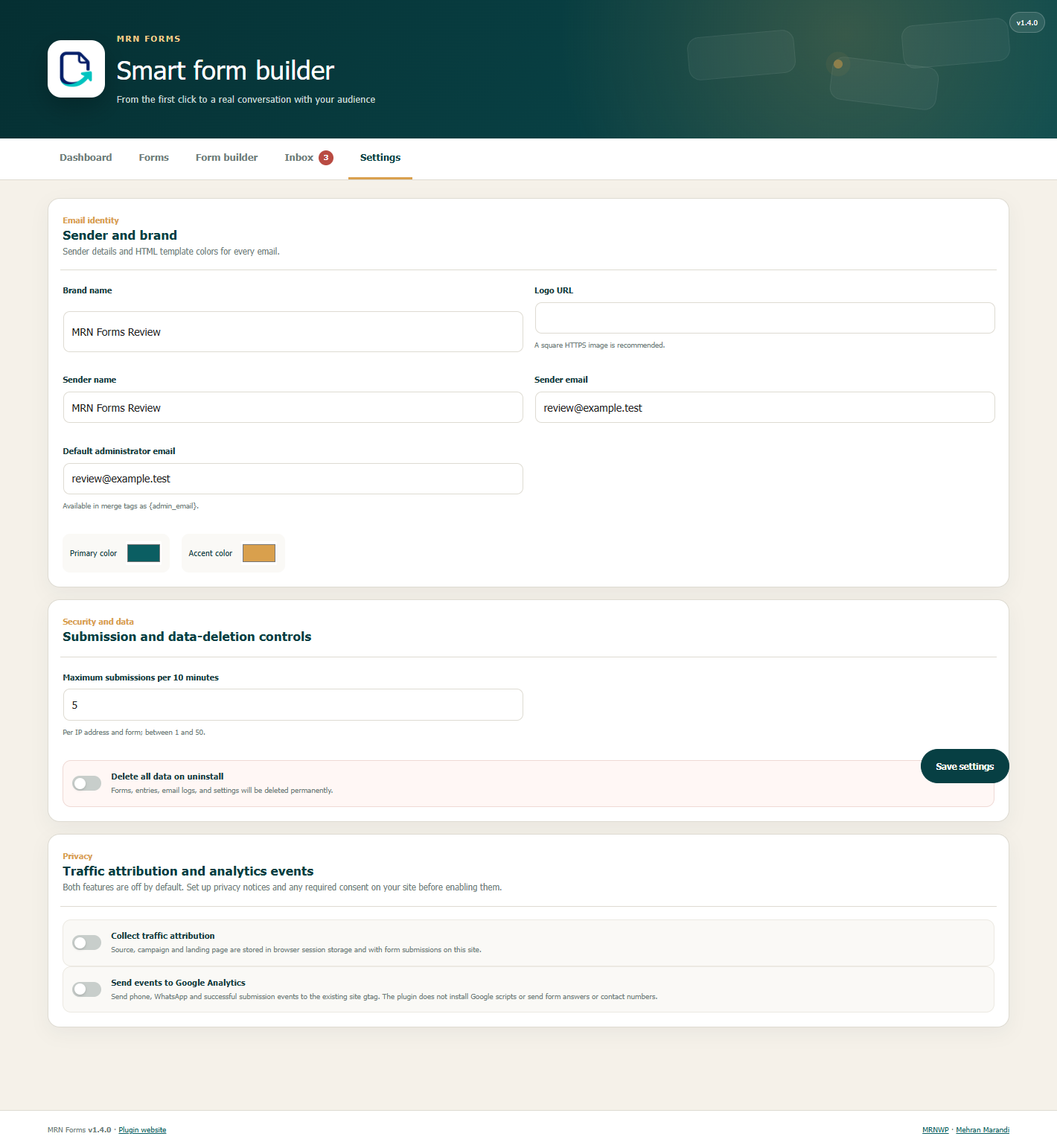
- Administrator notifications and respondent receipts with responsive HTML templates, brand colors, logos, and merge tags.
- Conditional notification recipients.
- Shortcodes, a dynamic Gutenberg block, and a theme function.
- JavaScript submission with a standard POST fallback for regular forms.
- Optional custom registration and SMS verification with Anar Toolkit 1.5.0 or later.
- Optional traffic attribution and events for an existing Google Analytics installation. Both are off by default.
- Automatic RTL/LTR layouts and basic accessibility support.
- Uploads with configurable file type and size limits.
- No paid license, external account, or external runtime library is required for the form builder.
MRN Forms is developed by Mehran Marandi as a product of MRNWP.
Registration and SMS verification with Anar
In Appearance and behavior > Anar and MRN Forms, select a required phone field with no visibility condition. Choose SMS verification before submission for regular forms. For registration, select Anar registration, publish the form, and select it under Anar > Settings > General. Both modes use Anar’s verification service and require JavaScript.
Display without a page builder
Shortcode
[mrn_form id="1"]
Or use a form slug
[mrn_form slug="contact-us"]
Theme template
<?php mrn_form( 1 ); ?>
Or pass display options
<?php mrn_form( 'contact-us', array( 'showTitle' => false ) ); ?>
Gutenberg
Add the MRN Forms block and select a published form.
Merge Tags
{form_title}— Form title{form_id}— Form ID{entry_id}— Entry ID{site_name}— Site name{site_url}— Site URL{admin_email}— Default administrator email address{all_fields}— Table of all responses{field:email}— Value of the field with the keyemail
Separate multiple email recipients with a comma or a ;.
Theme customization
Each form has its own appearance settings. You can override these CSS variables on .mrnf-shell for finer control.
--mrnf-primary, `--mrnf-accent`, `--mrnf-bg`, `--mrnf-text`, `--mrnf-gap`, `--mrnf-radius`
For example
.my-form { --mrnf-primary: #222; --mrnf-radius: 4px; }
Add the my-form class under Appearance and behavior > Custom CSS class.
Developer API
The main filters and actions are listed below.
mrnf_submission_values— Filter validated values before savingmrnf_after_entry_created— Runs after an entry is savedmrnf_after_submission— Runs after notification delivery is attemptedmrnf_after_notification— Runs after each notification is sentmrnf_notification_results— Filter the results from notification channelsmrnf_rendered_form— Filter the final form HTML
Privacy
When Anar verification is enabled for a form, Anar sends the mobile number and verification message to the SMS provider configured by the site administrator. Custom field answers are stored according to the form settings and registration answers are saved in the form inbox.
Form definitions, submitted values, and delivery logs are stored in this site’s database. Entry metadata includes submission time, the logged-in user ID when present, browser user agent, referring URL, and a keyed one-way IP hash. Raw IP addresses are not saved with entries; the hash is used for abuse control. Notifications use WordPress wp_mail() and the site’s configured mail transport, and are sent to configured recipients. The plugin does not send entries or usage statistics to MRNWP or the developer.
Traffic attribution and analytics events are separate opt-in settings under Forms > Settings, and are off by default. Configure privacy notices and any required visitor consent before enabling them.
When attribution is enabled, source, medium, campaign, term, content, landing page, referrer, and capture time are saved in browser session storage and with submissions on this site. Attribution page URLs omit query strings and fragments. These are browser-supplied reporting values, not trusted identity information.
When analytics events are enabled and the site already provides a gtag function, phone-click, WhatsApp-click, and successful-submission events are passed to that function. Events include the interaction type, page URL without query parameters, form ID for a submission, and traffic source/medium when attribution is enabled. Form answers, phone numbers, email addresses, and clicked-link text are not included. MRN Forms does not install Google scripts. The site’s existing analytics configuration controls delivery and consent, and Google may collect additional information under that configuration.
Optional service: Google Analytics, Terms, Privacy policy.
Installation
- Upload the plugin ZIP through Plugins > Add New > Upload Plugin, or copy the
mrn-formsfolder into/wp-content/plugins/. - Activate MRN Forms.
- Open Forms > New Form, add fields, and publish the form.
- Add the MRN Forms block to a page, or use
[mrn_form id="1"]with your form ID.
FAQ
Does it support Persian and English?
Yes. The plugin includes both interfaces and follows the WordPress locale for RTL/LTR layouts. Other languages can use WordPress translations.
Will the rename change my existing forms?
Database tables, settings keys, shortcodes, REST routes, and the block name are retained. If you previously installed the development plugin in a mrn-form folder, deactivate that copy before activating the new mrn-forms package. Do not uninstall the old copy with its delete-data option enabled when you want to keep your forms.
How are uploads stored?
Allowed files are stored through the WordPress upload system and registered as private attachments. A private attachment does not make its underlying file URL private: anyone who knows that URL may be able to access it. Avoid collecting confidential documents unless your site also protects uploaded files.
What happens when I uninstall the plugin?
Data is retained by default. Enable the delete-data setting before uninstalling only when you want to permanently remove forms, entries, email logs, and settings. Media attachments and uploaded files are not removed by that setting.
Where is the source code?
PHP, JavaScript, and CSS sources are included in the plugin. No build step is required. The development repository is linked above. Code and artwork are distributed under GPLv2 or later.
Screenshots
Changelog
1.5.1
- Use English source strings and bundle the Persian translation for the WordPress locale.
1.5.0
- Build custom registration forms for Anar with a required mobile field and save the answers in the form inbox.
- Verify mobile numbers by SMS before submission using Anar’s configured verification service.
- Add a bilingual integration card and a mobile-friendly verification step.
1.4.3
- Correct the WordPress.org contributor username to mrnwp.
- Use WordPress’s default bottom placement for the top-level Forms menu.
1.4.2
- Prevent spreadsheet formula injection in CSV exports, including submitted answers and attribution fields.
- Keep database error details out of public submission responses.
- Include the complete GPL version 2 license text with the installation package.
1.4.1
- Add the
mrnf_submission_responsefilter so an integration can send one submission to its own next step, such as payment. - Add the
mrnf_entry_detail_asideaction for integration panels on the entry screen.
1.4.0
- Update the plugin name to MRN Forms and add the product logo.
- Add product, MRNWP, and developer links.
- Match the translation domain and release folder to mrn-forms while retaining stored forms and public APIs.
- Make attribution and existing-GA analytics events opt-in and off by default.
- Exclude contact numbers and link text from analytics events.
- Improve directory documentation and prepare a clean installation package.
- Fix fresh submission nonces when WordPress uses plain permalinks.
1.3.0
- Capture first-touch source, medium, campaign, landing page, and external referrer with each new entry.
- Show attribution in the inbox, entry details, and CSV exports.
- Send GA4 events for phone clicks, WhatsApp clicks, and successful MRN Forms submissions.
1.2.0
- Add a requirement-mode control to the form builder: optional, always required, or required when another field is empty.
- Add an alternative-field selector with safe reference cleanup when fields are renamed or deleted.
- Show conditional required indicators dynamically on frontend forms.
1.1.2
- Add cross-field required-without validation for text and upload alternatives.
- Display successful frontend submissions as accessible, dismissible toast notifications.
1.1.1
- Preserve a form’s stable slug when editing fields, appearance, or notification settings.
- Keep all plugin administration screens inside the standard WordPress content area.
1.1.0
- Add the English interface for administration, the form builder, public forms, validation, and emails.
- Add automatic LTR layouts alongside RTL support.
- Credit Mehran Marandi and mehranmarandi.ir as the plugin developer.
1.0.2
- Fetch a fresh, uncached nonce before submission to prevent session errors on cached pages.
1.0.1
- Fix sidebar spacing and horizontal scrolling in the admin area for RTL and LTR layouts.
1.0.0
- Initial release with form building, entry management, email notifications, conditional logic, and developer tools.