


Description
Smart COD for WooCommerce extends the WooCommerce Cash on Delivery (COD) Gateway with an optional extra fee and restrictions based on customer conditions such as location and selected shipping method.
Supports both Classic Checkout and WooCommerce Cart & Checkout Blocks (WooCommerce 9.9+ for Blocks). The same COD restrictions and extra fees apply to both checkout types.
Take full control of COD with Smart COD PRO
Make COD work for your store: choose when to offer it, what to charge and when to collect a deposit before dispatch.
- Different COD fees for different orders: combine cart value, products, customer details and shipping conditions to build the pricing that fits your store.
- Partial COD with an upfront deposit: collect a fixed amount or percentage online and leave the balance payable on delivery.
- More control before accepting COD: hide COD or request email verification when your checkout conditions match.
- Delivery history beyond your own store: use history from participating stores in your country alongside your own, with clear reasons for each decision.
Already using Free? Keep your setup. PRO automatically detects your saved Free settings for review and import, so you do not have to rebuild your rules. Premium ticket support is there when you need help.
Black Friday: Save 30% on Smart COD PRO through November 30, 2026. View pricing and offer terms.
This Free plugin remains free and works independently.
Restrictions
Each restriction can be easily toggled between Enable and Disable. When set to Enable, the restriction will allow the Cash on Delivery (COD) payment option only for the specified selections. On the other hand, when set to Disable, the restriction will disable the COD option for the specified selections, making it unavailable for them.
- Shipping Zone
- Shipping Method inside Shipping Zone
- Country
- State
- Postal Code (Supports Ranges)
- City
- User Role
- Products in cart (Supports Variations)
- Categories of the products in cart
- Shipping Class
You can define an informational message to display before the payment methods, when the COD method is not available for a customer.
You can define different messages per restrict reason.
Extra Fees
You can configure a standard extra fee and a separate fee for local pickup.
You can use a fixed price or a percentage of the customer’s cart amount.
You also have a nice rounding option.
You can enable tax for this fee. Set a custom label for the fee in COD settings. The label appears in both Classic Checkout and Checkout Blocks.
Settings Backup
Export your Free settings as a JSON file and restore them on the same store from WooCommerce > Smart COD: Settings backup. Review the current and saved values before confirming. No paid account is required.
Backups include COD availability, fees, restriction selections and messages. Sharing consent, credentials and order/customer data are excluded and remain unchanged during restoration. Files from another store are not accepted because product, shipping and category identifiers are store-specific. A preview expires after ten minutes; changing settings after preview requires a new preview.
Developer-Friendly
The plugin integrates seamlessly with WooCommerce and uses a clean, object-oriented codebase. It also provides the following filters for easy customization:
wc_smart_cod_fee: Alter the extra fee.wc_smart_cod_available: Alter the current COD restriction.wc_smart_cod_fee_title: Change the COD fee title.
Since the plugin extends the existing WooCommerce Cash on Delivery Gateway, there’s no need to enable or disable gateways manually.
External services
COD Protection and data sharing are optional and off by default. If enabled in the Cash on Delivery settings, the plugin registers with api.woosmartcod.com using an installation ID, shop domain, country and public signing key. The existing choice carries forward after updates without a separate activation or upgrade notice. Switching it off stops future collection, transmission and checkout lookups.
The plugin sends new physical COD orders and their outcomes in signed batches. It sends eligible past cancellations and a capped prior-completion count for the shopper at the same store. Events include pseudonymized contact and postcode tokens, an order reference, timestamps, totals and currency, shipping method, item count, guest status and tracking details where available. The plugin never sends raw customer names, email addresses or phone numbers. The service uses these data for same-store COD Protection and may use eligible events to train cross-store models. Free checkout uses only same-store history.
Checkout sends hashed contact tokens, the installation ID and country. The service returns an allow or disable decision with a reference and policy details, not customer-history counts. It keeps aggregate decision statistics and pseudonymized evidence for denials. If the service is unavailable, COD stays available.
Service information: cancelled COD service privacy details, Terms and Conditions and Privacy Policy.
Promotional links
The PRO settings card and Black Friday notice link directly to woosmartcod.com without campaign tags, store identifiers or customer identifiers. The plugin does not send promotional requests or track notice impressions or clicks.
COD Protection, successful history and order lifecycle
Classic shortcode checkout remains supported. Cart and Checkout Blocks are also supported on WooCommerce 9.9 or newer through the native Store API and Blocks extension APIs. The same COD rules, fees and optional order-lifecycle collection apply to both checkouts. Third-party gateways and checkout fields require their own Blocks support.
With sharing enabled, new physical COD orders and their outcomes can be recorded immediately. For a cancellation to affect COD availability, it must meet fulfilment checks. An untracked fallback applies after at least 24 hours where there is no recognized tracking integration and any supplied source status indicates fulfilment.
The successful-history allowance uses matching email or phone history from the same store. The minimum success rate is configurable from 50% to 100% and defaults to 100%. For example, nine completed orders and one qualifying cancellation meet a 90% threshold. Pending orders are excluded.
Installation
- Upload plugin to your website and activate it
- Go as always to WooCommerce / Settings / Checkout / Cash On Delivery
- Setup your desired settings, click ‘Save Changes’, and you are ready to go!
FAQ
Does this plugin support WooCommerce Cart and Checkout Blocks?
Yes. Cart and Checkout Blocks are supported on WooCommerce 9.9 or newer, using the native Store API and Blocks extension APIs. The same COD restrictions and extra fees apply to both Blocks and Classic Checkout. Optional COD Protection also works with both checkout types.
Payment gateways and checkout fields provided by other plugins need their own Blocks compatibility.
Can I keep using Classic Checkout?
Yes. Classic shortcode checkout remains supported. You do not need to switch to Blocks, and your existing COD settings apply to either checkout type.
Screenshots
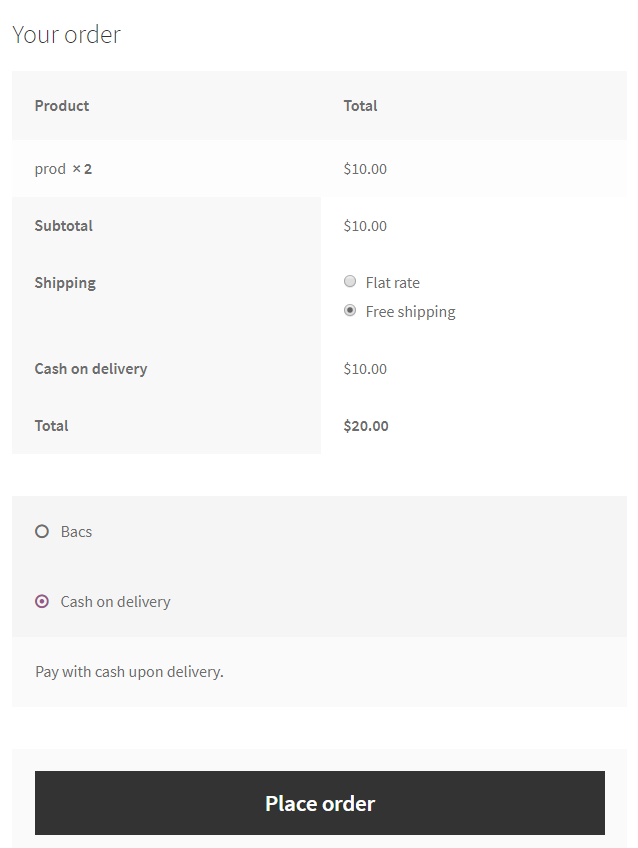
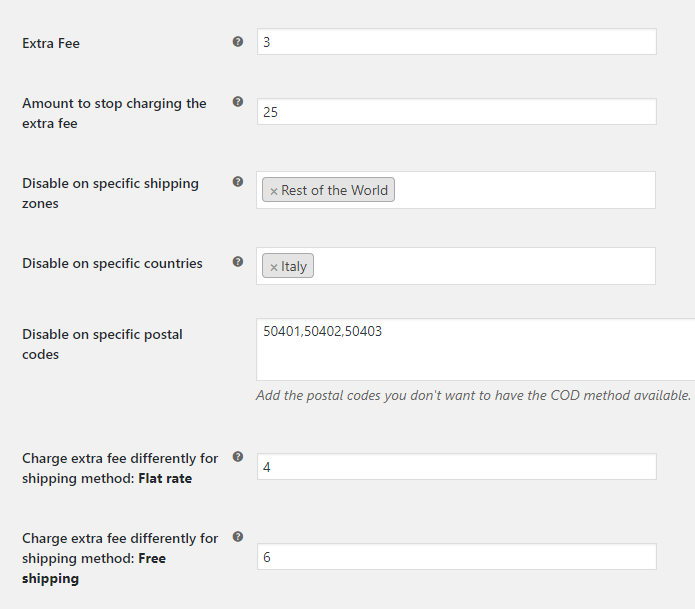
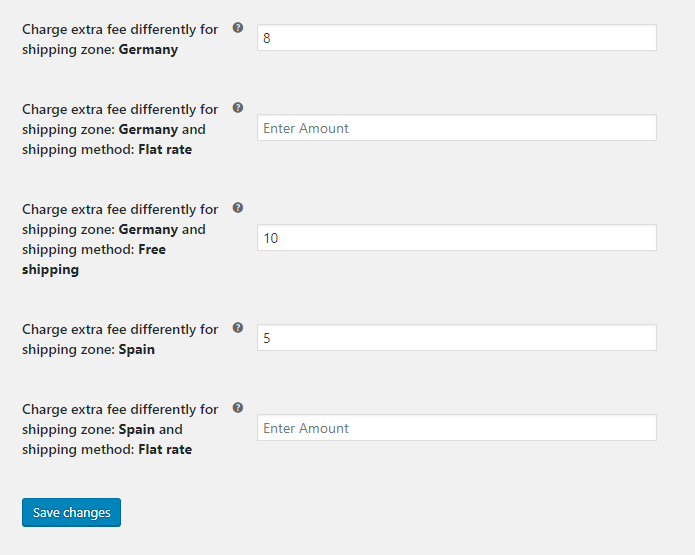
Changelog
1.9.11
- Updated – Show the standard Smart COD PRO benefits notice after the Black Friday offer ends. Each notice can be dismissed separately.
1.9.10
- Added – Set the name customers see for the COD fee in Classic Checkout and Checkout Blocks. The setting is included in Free settings backups.
- Updated – Show a dismissible Black Friday offer in WordPress admin through November 30, 2026.
- Compatibility – Tested with WordPress 7.1.4 and WooCommerce 11.3.0.
1.9.9
- Improvement: Settings restore preview now separates changed and unchanged fields, counts changes and avoids offering a restore when nothing has changed.
- Improvement: Refreshed PRO notices and the settings card with a more compact, responsive layout and clearer feature explanations.
- Update: Replaces Smart COD AI upgrade links with the new Smart COD PRO on woosmartcod.com, preserving country-specific destinations.
- Update: Adds the launch offer deadline and automatically removes discount messaging when the offer expires.
- Localization: Updates Greek, Italian, Czech, Slovak and Spanish translations.
1.9.8
- Fix – Refresh COD restrictions and fees when country, region, city, postcode or registered address fields change in Checkout Blocks.
- Fix – Preserve typed address values while checkout updates are pending and apply the latest changes without duplicate manual cart updates.
- Reliability – Preserve the original order-creation metadata when delivering lifecycle updates and retries.
- Compatibility – Tested with WordPress 7.1.3 and WooCommerce 11.2.1.
- Added – Make the dismissible Smart COD AI announcement and detailed settings card available for the public launch.
1.9.7
- Reliability – Synchronize plugin version and the explicitly enabled or disabled sharing preference in signed background updates, with revision acknowledgments and retries. Existing sharing choices remain unchanged.
-
Fix – Preserve empty checkout payment fragments when the WooCommerce session expires, avoiding a fatal HTML parsing error.
-
Added – Free settings export and same-store restore with preview, explicit confirmation and protection against expired previews or intervening changes.
- Security – Exclude sharing consent, credentials, PRO-only options and order/customer data from settings backups.
- Tests – Add backup validation and restore safety contracts to the mandatory release checks. Classic and Blocks checkout behavior is unchanged.
1.9.6
- Maintenance – Remove inactive PRO advance-payment integration code from the Free Blocks adapter and frontend. COD restrictions, fees and Classic checkout behavior remain unchanged.
- Tests – Add regression checks for Free/PRO separation and crafted advance-payment inputs; verify Classic and Blocks parity with and without HPOS.
1.9.5
- Fix – Remove the COD fee in the same shipping update when WooCommerce or another plugin makes COD unavailable, in Classic and Checkout Blocks.
- Localization – Include complete Greek and Italian catalogs for plugin settings, notices and frontend messages; keep WooCommerce-native text in its own translation domain.
- Compatibility – Add native Cart/Checkout Blocks support on WooCommerce 9.9+, including COD restrictions, fees and lifecycle capture, while preserving Classic checkout.
- Feature – Add a configurable successful-COD history allowance: 100% by default, 50-100%, same-store only and never overriding other COD rules.
- Compatibility – Tested with WordPress 7.1.3 and WooCommerce 11.2.1.
- Collection – Record prospective physical COD creation snapshots and later outcomes, even without tracking or a 24-hour wait, whenever the existing sharing setting is enabled.
- Transparency – Explain collection versus qualifying negative evidence, excluded order types, historical limitations, transmitted data and cross-store ML training in the settings and service disclosure.
- Settings – Keep both editions opt-in and off by default, with one sharing setting for new and existing installations; no additional activation or expansion notice.
- Reliability – Use signed, durable background revisions with exact acknowledgments, bounded batches, retries and deduplication; exclude changed or late snapshots from the prospective training cohort.
- Release – ML collection is not live ML scoring. Backend compatibility, disclosure publication and release verification must precede plugin distribution.
1.9.4
- Feature – Add optional COD Protection that can hide Cash on Delivery when checkout identity matches an eligible dispatched-then-cancelled COD order from the same store.
- Privacy – Send only locally generated SHA-256 identity tokens during checkout lookups; raw email and telephone values are never sent and lookup requests are not persisted by the service.
- Reliability – Keep checkout fail-open with a one-second timeout, strict response validation and short session caching.
- Admin – Place the opt-in directly below the main COD switch and show a one-time dismissible admin reminder.
- Localization – Add Greek translations for COD Protection and its data-sharing disclosure.
1.9.3
- Compatibility – Replace deprecated product-category queries with the current WordPress API; minimum WordPress version is now 4.5.
- Security – Prevent direct access to the admin display template.
- Transparency – Ship the checkout JavaScript in readable, uncompressed form and clarify optional country-level data pooling.
- Compatibility – Declare WooCommerce as a required plugin.
- Security – Harden the category search endpoint and escape merchant-facing admin values.
- Reliability – Safely handle malformed saved settings and sanitize checkout selections used by COD rules.
1.9.2
- Privacy – Make cancelled COD data sharing an explicit, default-off merchant opt-in; existing opt-out values do not count as consent.
- Admin – Remove remote promotional notifications and prominent PRO promotions from the Free plugin.
- Admin – Remove the remote settings-manager request and PRO-only locked fields; retain the existing local-pickup fee option.
- Admin – Use the Select2 script supplied by WooCommerce instead of bundling a second copy.
- Performance – Collect and transmit eligible order evidence only through small, rate-limited background batches; checkout and ordinary storefront requests remain unaffected.
- Enhancement – Recognise shipment data from supported tracking integrations and preserve custom fulfilment-status evidence without storing customer data in scheduled jobs.
- Enhancement – Add a conservative fallback for physical COD orders only on shops without a recognised tracking integration, after a minimum one-day order lifetime.
- Reliability – Re-scan historical eligible orders gradually after this upgrade and enrich the existing central event row without creating duplicate orders.
- Reliability – Include a bounded snapshot of earlier completed, tracked COD orders for the same shopper at the same shop.
- Privacy – Stop pending collection and delivery work when the merchant turns sharing off.
1.9.1
- Privacy – Tokenise email, telephone, postcode, city and region locally before relay; raw customer identity and location values never leave the store.
- Privacy – Introduce identity token scheme 1 for deterministic, checkout-compatible matching.
1.9.0
- Performance – Remote settings and promotional notices are cached and refreshed only in wp-admin; storefront, AJAX and REST requests no longer make external HTTP requests.
- Feature – Collect cancelled COD shipment metadata in rate-limited batches.
- Feature – Queue privacy-minimised Smart COD AI shipment events for secure delivery.
- Enhancement – Prepare operating-country-scoped customer matching tokens and remove local transport data after central acknowledgement.
- Reliability – Exclude cancelled COD orders unless a valid courier tracking code provides dispatch evidence.
- Compatibility – Updated WordPress and WooCommerce compatibility metadata.
1.7.3
- Fix – Deprecated creation of dynamic properties
1.6
- Fix – Bad require on admin partial
- Fix – Add method_exists before restriction check
1.5
- Fix – Don’t show extra fee, if it is 0
- Fix – Fix deprecated ternary operation
- Fix – Admin ui fixes
1.4.9.6
- Fix – Fix issue with states on admin.
1.4.9.5
- Tweak – Improved the way the DOMDocument parses the payment div to attach the custom message.
- Fix – Add support for the newly introduced WooCommerce settings, “shipping method enable”
- Fix – Fix the way the plugin calculates the total cart amount. Until now it would add the extra fee cost if any.
- Feature – You can select what defines the total cart amount by checking / unchecking taxes and shipping costs.
- Fix – Restore broken tiptip descriptions on admin page.
1.4.9.4
- Feature – Added a new filter to change the cod fee title ( wc_smart_cod_fee_title ).
1.4.9.3
- Fix – Fix extra fee outside of cod.
1.4.9.2
- Fix – Fix warnings on checkout, WC issue when payment method is one, translatable fee.
1.4.9.1
- Fix – Minor fixes on order pay page
1.4.9
- Fix – Fix issues with wrong shipping zone – method calculation.
1.4.8
- Fix – Minor fixes, custom select2 version missing, remove version check notice, fix some public code running outside checkout page.
1.4.7
- Feature – Add restriction based on shipping method inside shipping zone
- Feature – Optimize extra fee – shipping method inside shipping zone
- Tweak – Rewrite shipping method getter function.
1.4.6
- Fix – Optimize shipping method calculation
1.4.5
- Feature – Shipping Class Restriction
- Feature – City Restriction
- Feature – Product Restriction now supports variable products
- Feature – Extra Fee now can be taxable
- Feature – Postal Codes now supports ranges
- Fix – Warnings on custom messages
1.4.4
- Fix – Fix issue with wrong calculation on amount restriction.
- Feature – Now you can have different messages per restrict reason.
1.4.3
- Fix – Fix issue with notice on empty extra fee.
1.4.2
- Fix – Fix issue with cod getting disabled, when ‘enable for shipping methods’ is empty.
1.4.1
- Fix – Fix issue with extra fee appears in restricted shipping method.
1.4.0
- Tweak – Select2 compatibility for older woocommerce versions
- Feature – Restriction mode is now independent per field ( enable / disable )
- Feature – Price now can be percentage for every price field with rounding option
- Feature – Added restriction for states / counties
- Feature – Added restriction for user roles
1.3.6
- Tweak – Product and product categories are now fetched asynchronously to resolve timeout issues.
1.3.5
- Feature – Restrict cod gateway based on customer’s cart product’s categories.
- Feature – Restrict cod gateway based on customer’s cart products.
1.3.4
- Tweak – Tweak the way the plugin calculates the availability based on postal codes.
- Feature – Restrict cod gateway based on customer’s cart amount.
- Feature – Added filter for developers: wc_smart_cod_fee
1.3.3
- Fix – Fix warning on empty foreach.
1.3.2
- Fix – Fix issue with cod check method running outside checkout, creating problem with wp menus.
1.3.1
- Feature – Added custom information message when the cod is not available.
1.3
- Feature – Added restriction mode option – exclude or include –
- Feature – Added different price per country
- Fix – Fix issue when delimiter was a “,”
1.2
- Feature – Different amount charge, based on shipping method.
- Feature – Different amount charge, based on shipping zone and shipping method.
- Feature – Added a quick link to WooCommerce Cod Settings as a notice, when the plugin get’s activated.
- Fix – When you select a country or postal code which doesn’t have cod available, while you previous where on country or postal code which have the cod available, the extra fees will be applied on ajax request.
- Tweak – Clean up settings on database when a shipping zone get’s deleted
- Tweak – Don’t store settings on database when they are not required.
1.1.2
- Add support for older PHP versions ( < 5.4 ).
1.1.1
- Add support for older WooCommerce versions ( < 2.6 ).
1.0
- Deploy of the first version of the plugin.