CodeKit – Custom Codes Editor
By Bilal TAS
Your custom SASS, CSS, JS, PHP and HTML customizations in same directory.
★ 4.8/5 (16)7,000+ active installations
- Version
- 2.5.3
- WordPress
- 4.9.8+
- PHP
- 7.0+
- Updated
- 12 Oct 2026
WORDPRESS RESOURCES
Explore public plugin information from the official WordPress.org directory. Compare what a plugin does, its requirements and update history before adding it to your website.
Explore WordPress hosting →1,969 matching plugins reported by WordPress.org · Page 1 of 50
Source: WordPress.org
Data refreshed 20 Nov 2026 09:18 UTC
By Bilal TAS
Your custom SASS, CSS, JS, PHP and HTML customizations in same directory.

By Automattic
Everything you need to launch an online store in days and keep it growing for years. From your first sale to millions in revenue, Woo is with you.

By mndpsingh287
file manager provides you ability to edit, delete, upload, download, copy and paste files and folders.

By Paul Glover
Zip Code Redirect Will Check A Users Zip Code Or Post Code And Redirect The User To A Pre-determined URL Or Display A Useful Message.

By Elementor
The Elementor Website Builder has it all: drag and drop page builder, Atomic Editor, pixel perfect design, global and reusable style systems, mobile r …
The most popular gallery plugin that lets you create galleries and albums in seconds.
Firewall, Malware Scanner, Two Factor Auth, and Comprehensive Security Features, powered by our 24-hour team. Make security a priority with Wordfence.
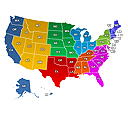
Create engaging Interactive United States Maps in WordPress for free. It's easy to install, simple, and highly customizable.

By Melapress
Get better WordPress login security; add two-factor authentication (2FA) for all your users with this easy-to-use plugin.

By David Anderson / Team Updraft
Protect your WordPress site with All-In-One Security (AIOS): easy-to-use login security, a powerful firewall, and much more.

By Inisev
Backup, migrate, and create staging sites with free cloud storage and support.

By Complianz
Publish your cookie banner or notice in minutes. Automatically scan cookies, and create policies to align with GDPR, CCPA, and Google Consent Mode.
CHOOSE WHAT YOUR WEBSITE NEEDS
Start with the task you need to solve. Compare features, WordPress and PHP requirements, update history and the author’s documentation. Test changes on a private copy and avoid adding several plugins for the same job.
This independent directory displays plugin information on WebFulHost and links to the official source. Packages are not mirrored or installed here. A plugin can include paid extensions or services with separate terms from its author.