

Share buttons and pop up share icons for social media sharing
★ 4.8/5 (5,333)100,000+ active installations
- Version
- 3.0.2
- WordPress
- 3.5+
- Updated
- 18 Sep 2026
WORDPRESS RESOURCES
Explore public plugin information from the official WordPress.org directory. Compare what a plugin does, its requirements and update history before adding it to your website.
Explore WordPress hosting →3,732 matching plugins reported by WordPress.org · Page 11 of 50
Source: WordPress.org
Data refreshed 23 Nov 2026 05:34 UTC
Share buttons and pop up share icons for social media sharing
Let customers download a PDF catalog or price list from your WooCommerce shop, a category, or a single product. Print-ready, one click.

By ELEXtensions
The plugin will help you to Automate USPS shipping by displaying LIVE shipping rates on the Cart and Checkout page.
Easily build floating, social share, and print buttons in WordPress. Engage visitors, increase clicks, and let users share or print pages instantly.

By Waseem Senjer
Show live Australia Post Parcel Post and Express Post rates and delivery times at WooCommerce checkout. Pro adds labels, MyPost and eParcel.

By Fahad Mahmood
This plugin will help you to manage WooCommerce Products stocks through locations.
The original WooCommerce multi-vendor plugin. Easily create a WooCommerce marketplace with multi-seller, product vendor stores & vendor commissions.

By pimwick
Sell WooCommerce gift cards in minutes. Customers choose an amount, email it to a recipient, and redeem the balance at checkout.
Social sharing plugin adding social buttons.
By G Matta
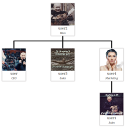
Drag-and-drop organization chart for WordPress. Display your team hierarchy with a shortcode.

By Brainstorm Force
Variation Swatches for WooCommerce replaces dropdowns with color, image & size swatches, helping shoppers decide faster and buy with confidence.
PublishPress Planner has all the tools you need to plan WordPress content including a Content Calendar, Content Overview, and Kanban Board.
CHOOSE WHAT YOUR WEBSITE NEEDS
Start with the task you need to solve. Compare features, WordPress and PHP requirements, update history and the author’s documentation. Test changes on a private copy and avoid adding several plugins for the same job.
This independent directory displays plugin information on WebFulHost and links to the official source. Packages are not mirrored or installed here. A plugin can include paid extensions or services with separate terms from its author.



