Video player block for Gutenberg – embed and play YouTube, Vimeo, and self-hosted HTML5 videos in a responsive, customizable player.
★ 5.0/5 (8)2,000+ active installations
- Version
- 2.3.0
- WordPress
- 6.5+
- PHP
- 7.4+
- Updated
- 24 Nov 2026
WORDPRESS RESOURCES
Explore public plugin information from the official WordPress.org directory. Compare what a plugin does, its requirements and update history before adding it to your website.
Explore WordPress hosting →436 matching plugins reported by WordPress.org · Page 13 of 37
Source: WordPress.org
Data refreshed 26 Nov 2026 18:38 UTC
Video player block for Gutenberg – embed and play YouTube, Vimeo, and self-hosted HTML5 videos in a responsive, customizable player.
Build responsive hero sliders and carousels visually, with ready templates, a layout for every device, and full RTL support.

By Guram Zhgamadze
Score every page for AI answer engines, see which assistant read which page, then publish llms.txt, Markdown and structured data.

By Kestrel
Shortcode to display a linked list of terms from a product attribute, such as all brand links from a brands attribute.
Add one-click AI summary buttons (ChatGPT, Claude, Perplexity, Gemini, Grok, DeepSeek, Copilot, Meta AI) to your WordPress posts and pages.
By Ron Fredericks
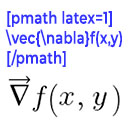
Render mathematical equations in WordPress as PNG images using pmath native syntax or LaTeX input with server-side rendering.

Answer engine optimization for posts you already published. Restructures them for GEO and AEO so ChatGPT, Perplexity and AI Overviews cite you.

By smelterstudio
Accessible table of contents with auto-insert, a Gutenberg block, shortcode and widget. Style it with a live preview, in light or dark mode.

By Themeum
Readymade gutenberg blocks and sections with rich customization options. Enhance Gutenberg editor with easy UI and functional blocks.

By ConicPlex
Create beautiful, screen-reader-friendly accordions and FAQ sections. Features layout customization, modern design presets, and one-click SEO FAQ Sche …

By Sakhawat Hossain
Show your blog posts as a carousel, slider, grid, minimal list, timeline or masonry layout, with live filters, sorting and pagination.

By creedle
Display creedle rockc answers directly on your page.
CHOOSE WHAT YOUR WEBSITE NEEDS
Start with the task you need to solve. Compare features, WordPress and PHP requirements, update history and the author’s documentation. Test changes on a private copy and avoid adding several plugins for the same job.
This independent directory displays plugin information on WebFulHost and links to the official source. Packages are not mirrored or installed here. A plugin can include paid extensions or services with separate terms from its author.