The AI Language Translator plugin instantly translates any theme or plugin and enables multilingual website functionality.
0+ active installations
- Version
- 2.0.0
- WordPress
- 6.4+
- PHP
- 7.4+
- Updated
- 20 Oct 2026
View plugin details ↗Allows you to easily display a random number, a random or variable content on your website.
★ 5.0/5 (3)100+ active installations
- Version
- 5.0.1
- WordPress
- 3.5+
- PHP
- 5.3+
- Updated
- 9 Sep 2025
View plugin details ↗Fast, file-based code snippets plugin. Insert header & footer scripts and add PHP, CSS, JS & HTML snippets with conditional logic. Zero DB queries.
★ 4.7/5 (79)50,000+ active installations
- Version
- 10.58
- WordPress
- 6.0+
- PHP
- 7.3+
- Updated
- 23 Oct 2026
View plugin details ↗Simple and free language switcher based on Google Translate. Shortcodes, widgets, customizable styles.
0+ active installations
- Version
- 1.0.3
- WordPress
- 5.8+
- PHP
- 7.4+
- Updated
- 19 Nov 2026
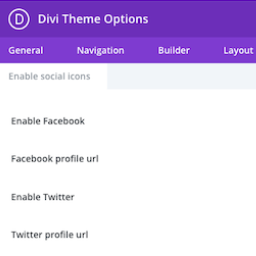
View plugin details ↗This plugin adds the ability to add more social icons to your website when using the Divi theme.
★ 5.0/5 (4)1,000+ active installations
- Version
- 1.8.1
- WordPress
- 5.1+
- PHP
- 5.4+
- Updated
- 7 May 2026
View plugin details ↗Omnichannel Live Chat and Help Desk plugin, optimized for WordPress. Free, fast, easy to install and to use. Turn your visitors into happy customers!
★ 4.9/5 (710)10,000+ active installations
- Version
- 1.3.6.2
- WordPress
- 3.0.1+
- Updated
- 23 Nov 2026
View plugin details ↗Automatically convert JPG and PNG images to WebP, reduce file sizes and speed up your WordPress website.
★ 5.0/5 (3)500+ active installations
- Version
- 2.1.4
- WordPress
- 6.0+
- PHP
- 8.0+
- Updated
- 17 Oct 2026
View plugin details ↗Log and view all outgoing emails from WordPress. Very useful if you have to debug email related problems or have to store sent emails for auditing.
★ 4.2/5 (43)80,000+ active installations
- Version
- 2.64
- WordPress
- 4.0+
- PHP
- 5.6+
- Updated
- 21 Sep 2026
View plugin details ↗Add Bing Website Translator to your website, and make it instantly available in 40+ languages. Adding the translator is quick and easy.
★ 3.7/5 (3)10+ active installations
- Version
- 1.0.4
- WordPress
- 3.3+
- PHP
- 5.6+
- Updated
- 16 May 2025
View plugin details ↗
By iworks (Marcin Pietrzak)
Your easy way to Progressive Web Application.
★ 4.8/5 (26)1,000+ active installations
- Version
- 1.9.0
- WordPress
- 6.0+
- PHP
- 8.0+
- Updated
- 17 Nov 2026
View plugin details ↗WP Custom CSS JS plugin allows you to add any HTML, CSS, Javascript, jQuery or Tracking Pixel easily on your wordpress site right from your dashboard.
★ 5.0/5 (1)700+ active installations
- Version
- 1.4.2
- WordPress
- 4.5+
- PHP
- 5.6+
- Updated
- 16 Mar 2025
View plugin details ↗Notifies Odoo about a new order on WooCommerce.
80+ active installations
- Version
- 1.0.2
- WordPress
- 4.7+
- Updated
- 20 Nov 2026
View plugin details ↗