Add a Facebook Messenger chat button to WordPress — floating chat bubble, pre-filled messages, availability hours, and built-in analytics.
★ 5.0/5 (5)1,000+ active installations
- Version
- 2.6.3
- WordPress
- 5.7+
- PHP
- 7.0+
- Updated
- 7 Nov 2026
View plugin details ↗Extends existing Elementor and Elementor Pro Widgets, adds more useful new Widgets, features that saves your valuable time.
★ 4.4/5 (18)200+ active installations
- Version
- 1.0.8.10
- WordPress
- 4.0.1+
- Updated
- 26 Nov 2026
View plugin details ↗Web Accessibility (formally known as Ally) is a free, powerful, and user-friendly plugin that helps WordPress creators build more accessible websites …
★ 2.9/5 (163)500,000+ active installations
- Version
- 4.1.4
- WordPress
- 6.7+
- PHP
- 7.4+
- Updated
- 24 Aug 2026
View plugin details ↗Display WooCommerce product categories in responsive sliders and grids to boost navigation, engagement, and product discovery.
★ 4.1/5 (9)700+ active installations
- Version
- 1.7.2
- WordPress
- 5.0+
- Updated
- 13 Aug 2026
View plugin details ↗Lightweight, self-hosted captcha field for Fluent Forms — image, math and question/answer challenges. No external services, no tracking.
★ 3.0/5 (2)100+ active installations
- Version
- 2.0.0
- WordPress
- 5.0+
- PHP
- 7.4+
- Updated
- 9 Jul 2026
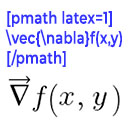
View plugin details ↗Render mathematical equations in WordPress as PNG images using pmath native syntax or LaTeX input with server-side rendering.
★ 4.2/5 (5)300+ active installations
- Version
- 3.0.5
- WordPress
- 5.0+
- PHP
- 7.2+
- Updated
- 9 May 2026
View plugin details ↗Make your WordPress website header fixed or sticky while scrolling. Choose your header, scroll position, colors, height, and spacing.
★ 3.3/5 (7)1,000+ active installations
- Version
- 1.5.3
- WordPress
- 4.1+
- PHP
- 5.6+
- Updated
- 6 Sep 2026
View plugin details ↗Optimize your WordPress database by efficiently managing the Action Scheduler tables used by popular plugins like WooCommerce.
★ 5.0/5 (5)3,000+ active installations
- Version
- 1.3.2
- WordPress
- 6.3+
- PHP
- 7.4+
- Updated
- 12 Nov 2026
View plugin details ↗Easily hide or reveal long content with Read More buttons, accordions, and popups. Streamline your WordPress site's layout while enhancing user e …
★ 5.0/5 (159)10,000+ active installations
- Version
- 3.5.9
- WordPress
- 3.8+
- Updated
- 18 Nov 2026
View plugin details ↗Front-end file upload forms for WordPress. Build them visually, add your own fields, and capture photos from a webcam.
★ 4.4/5 (117)10,000+ active installations
- Version
- 5.3.2
- WordPress
- 3.0+
- Updated
- 23 Nov 2026
View plugin details ↗Visually build any type of table in WordPress data tables, WooCommerce product tables, and post tables from scratch or use table templates.
★ 5.0/5 (4)3,000+ active installations
- Version
- 2.4.2
- WordPress
- 6.1+
- PHP
- 7.4+
- Updated
- 17 Nov 2026
View plugin details ↗Newsletter optins, discount coupon popups, sticky bars and lightbox modals that capture leads and recover abandoned WooCommerce carts.
★ 4.8/5 (76)6,000+ active installations
- Version
- 3.1.17
- WordPress
- 6.3+
- PHP
- 7.0+
- Updated
- 16 Nov 2026
View plugin details ↗