Enhance store inclusivity with Easy Web Accessibility Widget for EAA, ADA, WCAG & AODA compliance
★ 4.3/5 (9)100+ active installations
- Version
- 6.0.7
- WordPress
- 4.0+
- PHP
- 5.0+
- Updated
- 11 Aug 2026
View plugin details ↗Provides Instagram embedding functionality exclusively for WP Block Editor. Your feeds, other Pro accounts' feeds and posts related to hashtags.
★ 5.0/5 (2)700+ active installations
- Version
- 0.21.0
- WordPress
- 6.7+
- PHP
- 8.0+
- Updated
- 26 Jul 2026
View plugin details ↗Accessible FAQ accordions with FAQ schema for Google rich results, a Gutenberg block, shortcodes, live search, and category filters.
★ 3.3/5 (4)100+ active installations
- Version
- 4.1.0
- WordPress
- 6.2+
- PHP
- 7.4+
- Updated
- 5 Jul 2026
View plugin details ↗AI support chatbot that answers questions using your documents (PDF, DOCX, TXT) or URLs. Powered by Gemini, OpenAI, or WordPress AI.
30+ active installations
- Version
- 1.0.2
- WordPress
- 6.2+
- PHP
- 7.4+
- Updated
- 8 Nov 2026
View plugin details ↗Advanced chat plugin for WordPress with AI ChatGPT bots. Requires no server, supports multiple channels, appearance settings, moderation, bans.
★ 4.4/5 (105)4,000+ active installations
- Version
- 3.4.6
- WordPress
- 6.2+
- PHP
- 7.4+
- Updated
- 13 Nov 2026
View plugin details ↗Build professional websites faster with ready-made pages and sections, plus flexible layout, typography, color, and spacing controls.
★ 4.6/5 (5)1,000+ active installations
- Version
- 2.0.17
- WordPress
- 5.6+
- Updated
- 9 Nov 2026
View plugin details ↗AI Powered LINK DIRECTORY Plugin for WordPress to Curate Links for Web Directory. Link Management, Directory Listings, Link Archive, Vendor Directory
★ 4.8/5 (121)2,000+ active installations
- Version
- 9.2.2
- WordPress
- 5.2+
- PHP
- 7.4+
- Updated
- 7 Oct 2026
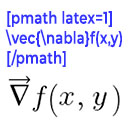
View plugin details ↗Render mathematical equations in WordPress as PNG images using pmath native syntax or LaTeX input with server-side rendering.
★ 4.2/5 (5)300+ active installations
- Version
- 3.0.5
- WordPress
- 5.0+
- PHP
- 7.2+
- Updated
- 9 May 2026
View plugin details ↗Build news, magazine & blog sites with BlogNews for Elementor. 50+ widgets, 20+ templates, header/footer builder. No coding required!
400+ active installations
- Version
- 2.0.3
- WordPress
- 6.6+
- PHP
- 7.4+
- Updated
- 21 May 2026
View plugin details ↗Secure, control and customize WordPress with modular admin tools, access controls, 2FA, Firewall protection, activity monitoring, and more.
★ 5.0/5 (2)70+ active installations
- Version
- 1.6.4
- WordPress
- 5.7+
- PHP
- 7.0+
- Updated
- 21 Oct 2026
View plugin details ↗Optimize, secure, and speed up WordPress: trim front-end bloat, clean the database, block attacks and spam, and purge every cache in one click.
300+ active installations
- Version
- 5.3.4
- WordPress
- 5.6+
- PHP
- 7.4+
- Updated
- 19 Nov 2026
View plugin details ↗Social login & passwordless login with Passkeys, Magic Link and Email OTP, plus Guardrails to control spam registrations.
★ 5.0/5 (3)100+ active installations
- Version
- 1.4.8
- WordPress
- 6.2+
- PHP
- 7.4+
- Updated
- 18 Nov 2026
View plugin details ↗