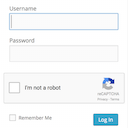
Adds a Google No Captcha ReCaptcha checkbox to your Wordpress and Woocommerce login, forgot password, and user registration pages.
★ 4.5/5 (63)50,000+ active installations
- Version
- 1.8.1
- WordPress
- 4.6+
- PHP
- 7.4+
- Updated
- 26 May 2026
View plugin details ↗90+ Gutenberg Blocks & AI Website Builder with 1000+ Templates. Complete Page Builder, Popup Builder, Mega Menu, Form Builder & More. No Code.
★ 4.8/5 (90)9,000+ active installations
- Version
- 5.0.11
- WordPress
- 5.6+
- PHP
- 7.4+
- Updated
- 17 Nov 2026
View plugin details ↗Easily improve site security with WordPress Hardening, Two-Factor Authentication (2FA), Login Protection, Vulnerability Detection and SSL certificate.
★ 4.9/5 (8,873)3,000,000+ active installations
- Version
- 9.8.4
- WordPress
- 6.6+
- PHP
- 7.4+
- Updated
- 26 Oct 2026
View plugin details ↗Two-factor authentication, passkeys, social login, magic login, limit login attempts, file change scanning and audit logs for WordPress.
★ 4.2/5 (35)10,000+ active installations
- Version
- 3.1.1
- WordPress
- 5.0+
- PHP
- 7.3+
- Updated
- 3 Nov 2026
View plugin details ↗Enforce WordPress login and password security policies to protect user accounts and prevent unauthorized logins.
★ 4.8/5 (20)4,000+ active installations
- Version
- 2.4.3
- WordPress
- 5.5+
- PHP
- 8.0+
- Updated
- 11 Nov 2026
View plugin details ↗Secure your access to the admin page with this plugin !
★ 4.7/5 (12)20,000+ active installations
- Version
- 2.2.5
- WordPress
- 5.0+
- PHP
- 7.0+
- Updated
- 14 Oct 2026
View plugin details ↗Passwordless login for WordPress. Streamline the login process by sending magic links to your users.
★ 4.8/5 (26)3,000+ active installations
- Version
- 2.8.1
- WordPress
- 5.0+
- PHP
- 7.4+
- Updated
- 11 Aug 2026
View plugin details ↗Duplicate post, post order, image resize, email via SMTP, admin menu editor, custom css / code, disable gutenberg and much more in a single plugin.
★ 5.0/5 (423)200,000+ active installations
- Version
- 9.3.3
- WordPress
- 4.6+
- PHP
- 5.6+
- Updated
- 16 Nov 2026
View plugin details ↗Make WordPress private in one click, block registration spam, and safely clean up existing spam accounts.
★ 4.5/5 (82)10,000+ active installations
- Version
- 4.2.3
- WordPress
- 5.8+
- PHP
- 7.4+
- Updated
- 1 Sep 2026
View plugin details ↗Customize the WordPress login screen with your own colors, logo, backgrounds, and form styles.
★ 4.8/5 (14)10,000+ active installations
- Version
- 3.4.0
- WordPress
- 6.8+
- PHP
- 7.4+
- Updated
- 30 Oct 2026
View plugin details ↗Real-time SEO guidance, schema, and AI built in. Help search engines and AI systems understand your content. All AI tools included, no hidden fees.
★ 4.8/5 (27,821)10,000,000+ active installations
- Version
- 28.9
- WordPress
- 7.0+
- PHP
- 7.4+
- Updated
- 18 Nov 2026
View plugin details ↗Get multi-functional buttons
★ 5.0/5 (7)5,000+ active installations
- Version
- 1.2.9
- WordPress
- 6.5+
- PHP
- 7.4+
- Updated
- 17 Nov 2026
View plugin details ↗